

Frontman vs Niwa AI: Which WordPress AI Agent Fits Your Workflow?
Compare Frontman and Niwa AI for visual WordPress editing, WooCommerce operations, messaging administration, reporting, leads, and conversions.
The phrase WordPress AI agent now covers several very different products. Some tools generate copy. Some expose WordPress to external AI clients. Others can take real actions inside a site.
Frontman and Niwa AI both belong in that last group, but they approach the job from different angles. Frontman is a visual AI website editor built around a live preview. Niwa AI is a broader WordPress and WooCommerce operator designed to work with the owner through conversational channels and connect site administration with business and conversion workflows.
This comparison uses Frontman’s official website, documentation, and current WordPress.org plugin listing as the basis for its capabilities. Public feature sets change quickly, so claims below reflect information available on July 16, 2026.
Quick Verdict
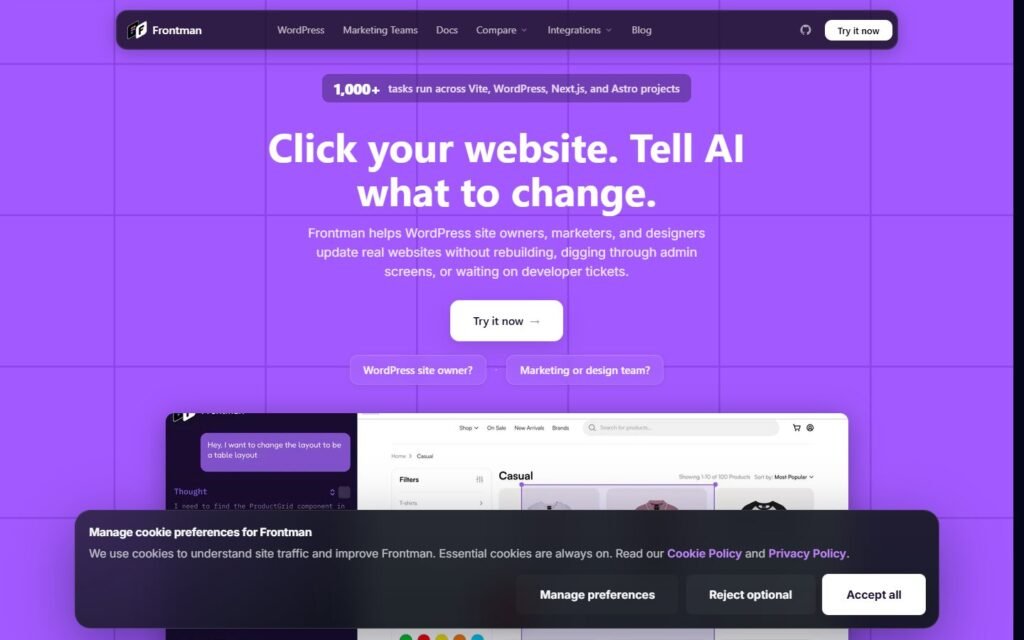
Choose Frontman if your priority is visually editing an existing WordPress site while keeping the affected page in view. Its live-preview workspace, element selection, Gutenberg support, Elementor-aware tools, and broad WooCommerce administration make it especially relevant to marketers, content teams, agencies, and store managers who want faster website changes without navigating multiple admin screens.
Choose Niwa AI if you want the AI relationship to extend beyond a visual editing session. Niwa is positioned as a WordPress business operator that can receive instructions through Telegram or WhatsApp, publish content, work with WooCommerce, prepare business reports, research competitors, and support customer-facing conversion workflows.
The simplest distinction is:
Frontman is strongest as an AI editor beside the website. Niwa AI is designed as an operator beside the business owner.
Neither model is universally better. The right choice depends on whether your bottleneck is making precise on-page changes or coordinating broader website, store, reporting, and customer workflows.
What Is Frontman for WordPress?
Frontman describes itself as an AI website editor for existing sites. In WordPress, an administrator opens the /frontman workspace, describes a requested change, and reviews the work beside a live preview.
Its strongest differentiator is visual context. Instead of asking an agent to find a vaguely described section, the user can navigate to the page, select an element, and explain what should change. That can reduce ambiguity when editing a headline, button, product card, menu item, section, or Elementor element.
Frontman’s official WordPress.org listing documents support for:
- Posts and pages
- Gutenberg blocks
- Elementor pages
- Navigation menus and menu items
- Templates and template parts
- Widgets and theme settings
- Additional CSS
- Safe WordPress options
- WooCommerce products, orders, customers, coupons, shipping, taxes, reports, settings, system status, and store data
Frontman also documents administrator-only access, WordPress nonces, sanitized inputs, allowlisted option changes, review requirements for destructive actions, and a recommendation to use staging, backups, and careful review because the plugin remains early-access software.
That is a meaningful combination. Frontman is not merely generating text for a human to paste later; it is designed to perform real edits while giving the user a visual verification loop.
What Is Niwa AI?
Niwa AI starts with a different interface assumption: the owner should be able to talk to the website from the messaging app already on their phone.
Through Telegram or WhatsApp, the owner can request practical work such as changing prices, updating stock, publishing products, creating coupons, editing Elementor content, preparing current SEO articles, reviewing sales trends, researching competitors, or contacting suppliers.
Niwa also extends toward the visitor side of the website. She is designed to answer buying questions, guide product selection, capture customer intent, recommend relevant products or upgrades, address objections, and support follow-up when a visitor leaves without completing a purchase.
That broader conversion direction connects naturally with workflows described in our guides to AI sales agents for WooCommerce and AI-assisted abandoned-cart recovery. The goal is not only to update WordPress faster, but to use the website’s operational and conversational context to help the business make better decisions and win more orders.
Frontman vs Niwa AI Comparison Table
| Capability | Frontman | Niwa AI |
|—|—|—|
| Natural-language WordPress actions | Yes | Yes |
| Side-by-side live website preview | Core product strength | Not currently the primary positioning |
| Click or select a page element for editing | Yes | Not currently the primary positioning |
| Gutenberg editing | Yes | Content publishing and WordPress editing supported |
| Elementor-aware editing | Yes | Yes |
| WordPress menus, templates, widgets, and safe settings | Officially documented | Broader WordPress operator workflows; exact coverage depends on the available site tools |
| WooCommerce product management | Yes | Yes |
| WooCommerce orders, customers, coupons, shipping, taxes, and reports | Officially documented | WooCommerce operations, coupons, stock, pricing, and reporting are supported; exact actions depend on connected tools |
| Publishing blog posts and SEO content | Yes, through WordPress content tools | Yes, including research-led SEO publishing workflows |
| Owner administration through Telegram or WhatsApp | Not documented in the official sources reviewed | Yes |
| Business reporting delivered conversationally | WooCommerce reports can be accessed | Yes, positioned around owner-ready reports and sales trends |
| Competitor research and monitoring | Not documented in the official sources reviewed | Yes |
| Storefront buyer assistance | Not the product’s documented primary purpose | Yes |
| Lead and buyer-intent capture | Not documented in the official sources reviewed | Yes |
| Conversion guidance and objection handling | Not documented as a core Frontman workflow | Yes |
| Open-source WordPress plugin | Yes | Niwa offers a WordPress plugin; review current licensing and deployment details for your plan |
The wording matters. “Not documented” does not prove that Frontman could never support a workflow through future tools or custom integrations. It means those capabilities were not presented as current product features in the official Frontman pages and plugin listing reviewed for this article.
Where Frontman Does Especially Well
1. Visual editing with immediate context
Frontman’s clearest advantage is the shared preview. The user and agent work beside the same live view, which makes the interaction concrete. For a visual change, pointing at the target is often faster and safer than explaining where it lives in WordPress.
This is valuable for teams that receive requests such as “make this CTA clearer,” “change the product heading,” or “update this section without touching the rest of the page.”
2. Elementor and Gutenberg workflows
Frontman officially documents both block-editor and Elementor-aware editing. That makes it relevant to a wide range of existing WordPress sites rather than only sites built with one content system.
3. Broad documented WooCommerce administration
Frontman deserves credit for going beyond product descriptions. Its listing explicitly includes products, orders, customers, coupons, shipping, taxes, reports, settings, system status, and store data. For an administrator working inside a browser, that is a substantial operating surface.
4. Review-oriented safety
Administrator-only access, nonces, sanitized input, restricted option changes, confirmation around destructive operations, and explicit staging and backup guidance are sensible safeguards for an agent that can change a live site.
5. Open-source availability
Frontman’s WordPress plugin is published as open source. That can be attractive to technical teams that want to inspect the plugin, understand its integrations, or contribute to development.
Where Niwa AI Is the Better Fit
1. The owner can work from Telegram or WhatsApp
Frontman’s documented experience is browser-centered: open its workspace, keep the website visible, and review the change. That is excellent for visual editing.
Niwa is designed for moments when the owner is not sitting in front of WordPress. A stock update, price change, product publication, report request, supplier email, or content instruction can begin as a message from a phone.
2. Operations can connect to business context
Accessing a WooCommerce report and explaining what the owner should do next are different jobs. Niwa’s positioning emphasizes sales trends, summaries, competitor analysis, and practical follow-up rather than only exposing site data.
A useful business operator should be able to connect signals: a product is selling quickly, stock is running low, a competitor changed an offer, and a campaign needs updated copy. The value comes from coordinating the next action, not merely displaying each fact separately.
3. Customer conversations are part of the system
Frontman is presented as a site editor for administrators and teams. Niwa is also designed to participate on the storefront by answering questions, understanding intent, recommending suitable products, and handling hesitation.
That distinction matters near checkout. Our guide to an AI checkout assistant explains why shipping, returns, trust, payment, and product-fit questions often decide whether a shopper completes an order.
4. Lead capture and conversion workflows
Niwa can turn an unanswered product request, out-of-stock enquiry, or unfinished buying conversation into a follow-up opportunity. This gives the business context that a basic email form usually misses: what the person wanted, what stopped the purchase, and what next action may help.
5. Competitor and content monitoring
Niwa can research competitors and use current industry information when preparing content. Frontman can edit and publish WordPress content, but competitor monitoring is not documented as a core capability in the official Frontman sources reviewed.
Which Agent Is Better for WooCommerce?
For browser-based WooCommerce administration with strong visual context, Frontman is a serious option. Its official feature set is broader than a simple product-copy generator and includes operational areas such as orders, customers, shipping, taxes, reports, and settings.
For an owner who wants WooCommerce work connected to messaging, reporting, customer conversations, lead capture, and conversion follow-up, Niwa AI is the more natural fit.
A store manager could reasonably prefer Frontman for editing a product page while seeing it. The same business could prefer Niwa for receiving a sales summary in Telegram, changing stock, publishing an SEO article, investigating a competitor, answering buyer objections, and following up on missed revenue.
The products overlap, but their centers of gravity differ.
Which WordPress AI Agent Should You Choose?
Choose Frontman when:
- Visual page editing is your primary need.
- Your team works mainly in a browser.
- You want to point at an element and request a change.
- Gutenberg, Elementor, or WooCommerce administration is the main workflow.
- An open-source, review-oriented editing plugin appeals to your technical team.
Choose Niwa AI when:
- You want to administer WordPress from Telegram or WhatsApp.
- You need WooCommerce operations connected to business reporting.
- You want research-led content publishing and competitor monitoring.
- Customer-facing guidance, lead capture, and conversion workflows matter.
- You want one conversational operator spanning owner tasks and storefront opportunities.
For some businesses, Frontman’s visual workflow may be the fastest route to accurate page changes. For others, the bigger bottleneck is not editing the page, it is coordinating everything around the page.
FAQs
Is Frontman a WordPress AI agent or only an AI writer?
Frontman is more than an AI writer. Its official plugin listing describes an AI website editor that can take actions across posts, pages, Gutenberg, Elementor, menus, templates, widgets, settings, Additional CSS, and WooCommerce data.
Can Frontman manage WooCommerce?
Yes. Frontman officially documents tools for products, orders, customers, coupons, shipping, taxes, reports, settings, system status, and other store data when WooCommerce is active.
Does Frontman support Telegram or WhatsApp administration?
Telegram and WhatsApp administration were not documented in the official Frontman website, documentation, or WordPress.org listing reviewed on July 16, 2026. Frontman’s documented workflow centers on its browser-based workspace and live preview.
What is the biggest difference between Frontman and Niwa AI?
Frontman focuses on visually editing and managing the site beside a live preview. Niwa AI focuses on operating WordPress and WooCommerce through conversation while also connecting reporting, research, customer assistance, lead capture, and conversion workflows.
Is Frontman better than Niwa AI for Elementor?
Frontman has a particularly clear advantage for visual Elementor work because element selection and live preview are core parts of its product experience. Niwa supports Elementor content operations, but it is not currently positioned primarily as a side-by-side visual editor.
Is Niwa AI better for ecommerce conversions?
Niwa is the stronger fit when the desired workflow includes buyer guidance, objection handling, intent capture, product recommendations, lead follow-up, or abandoned-cart communication. Frontman’s official positioning is centered on editing and administration rather than acting as a customer-facing conversion layer.
Final Verdict
Frontman is one of the more relevant direct results for people searching for a real WordPress AI agent, because it performs site changes rather than stopping at generated suggestions. Its live preview, visual selection, Elementor support, WooCommerce tools, and safety controls deserve a fair evaluation.
Niwa AI addresses a broader operating problem. She is designed for owners who want to message their website, manage WordPress and WooCommerce, publish researched content, receive business insight, monitor competitors, and connect site activity with customer and conversion workflows.
If your main question is, “How can AI help me change this page while I look at it?” Frontman may be the better fit.
If your question is, “How can I run more of my WordPress business through one conversational operator?” Niwa AI is built for that wider role.

