
Make the changes you’ve been putting off.
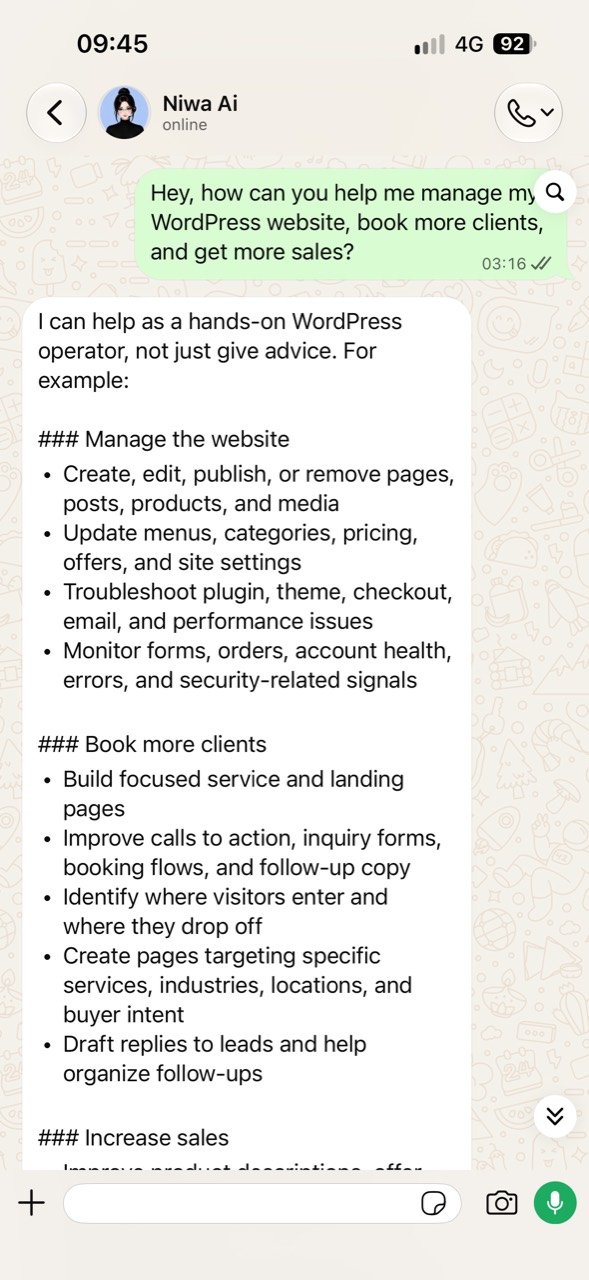
Add a landing page, rework a section or fix a layout that breaks on mobile. Tell Niwa what you want, and she makes the changes in WordPress.


At home in your WordPress business stack
 WordPress
 Elementor
 WooCommerce
 OpenAI
 Bricks
 Gutenberg
 Yoast SEO
 WhatsApp
 Telegram
 Facebook
 Gmail
Gmail Google Calendar
 Instagram
 Meta Ads
 Google Analytics 4
 Email
EmailYour pricing page needs updating, but a customer is waiting for an answer. And somewhere in your inbox is yesterday's inquiry that you meant to follow up on.
None of it looks like a big job. Together, it takes over your day.
You can see what needs doing. Finding the time to do it, or waiting for someone else to make the change, is the problem.
Niwa gives you an AI partner inside your business who can take real work off your hands. Send a task from your sofa and watch it get done for you in a few minutes.
Add a landing page, rework a section or fix a layout that breaks on mobile. Tell Niwa what you want, and she makes the changes in WordPress.

Update a price. Publish a page. Follow up on an inquiry. Give the task to your agent and keep your attention on the rest of your day. And take back your time.

Connect the services your business uses. With MCP, Niwa can work through connected tools and carry a task beyond your website.
Niwa clears the noise, answers your customers and keeps the useful conversations in order.
She organises the mess, supports your customers and keeps you protected from spam.







theolive.edit Your next everyday favourite. 20% off till the end of the week.
I’ve prepared your next ad. Should I publish the campaign on Instagram and Facebook for you, boss?
You: Yes, go ahead. Publish it on both.
Done. The campaign is published and running on Instagram and Facebook.
I’ll keep an eye on performance and conversions, and send you an update every morning. You can check it over your morning coffee.
On the way out. Between meetings. From your sofa. Send Niwa a WhatsApp or Telegram message when something needs changing. Your agent can get to work while you get on with your day.
 Connected through MCP
 Codex
Codex Claude Code
 Cursor
 Windsurf
 GitHub Copilot
 Gemini CLI
 Cline
Cline Roo Code
 OpenCode
 n8n
n8n Make
Make Zapier
Niwa connects to AI through OpenAI API, OpenAI Codex OAuth or OpenRouter. MCP connects your agent to the tools and services you use to get work done.
Model Context Protocol connects agents to tools. Add supported MCP connections so Niwa can use the services you choose as part of a task.
Create and edit pages, update products and work on code in the site you already own. Keep your theme, your content and your way of working.
Ask Niwa to check the result and explain the changes. Continue the conversation when you want to refine the work.
Sudopere Toković
“A price, stock, or product description change can start with one message instead of another admin session.”
Dečji Bazar
“With a catalog this large, having help with product updates, promotions, and the same repeated customer questions saves real time every week.”
Grubin Showroom
“We can finally see what shoppers ask before buying and where they hesitate between two models.”
Start with seven days to explore. Your paid licence depends on the websites, features and support you need.
Free for 7 days
See what Niwa can do with your content, your store and your everyday tasks.
$60 / month
Tell us what you want Niwa to take care of. We’ll help you choose a licence for your business.
AI provider charges may apply separately, including during the trial.
Niwa brings website management, customer conversations, store operations and recurring work into one WordPress agent.
| Feature | Niwa AI | Tidio / Lyro | Novamira |
|---|---|---|---|
| Website & content | |||
| Page & blog editing | Available | Not listed as built-in | Available |
| Products & variants | Available | Not listed as built-in | Available |
| Prices & stock | Available | Not listed as built-in | Available |
| Elementor layouts | Available | Not listed as built-in | Available |
| Theme & plugin code | Available | Not listed as built-in | Available |
| WP-CLI & database tools | Available | Not listed as built-in | Available |
| SEO metadata & links | Available | Not listed as built-in | Available |
| AI image generation | Available | Not listed as built-in | Not listed as built-in |
| Customer support & sales | |||
| Customer AI chat | Available | Available | Not listed as built-in |
| Product suggestions | Available | Available | Not listed as built-in |
| Add to cart in chat | Available | Available | Not listed as built-in |
| Built-in booking system | Available | Not listed as built-in | Not listed as built-in |
| Lead qualification | Available | Available | Not listed as built-in |
| Abandoned-cart recovery | Available | Available | Not listed as built-in |
| Email inbox & replies | Available | Available | Not listed as built-in |
| Visitor & sales analytics | Available | Available | Not listed as built-in |
| Automation & memory | |||
| Scheduled agent tasks | Available | Not listed as built-in | Not listed as built-in |
| Recurring site reports | Available | Not listed as built-in | Not listed as built-in |
| Proactive site monitoring | Available | Not listed as built-in | Not listed as built-in |
| Persistent project memory | Available | Not listed as built-in | Available |
| Reusable agent skills | Available | Not listed as built-in | Available |
| Delegated subagents | Available | Not listed as built-in | Not listed as built-in |
| Connections & remote work | |||
| MCP for external AI clients | Available | Not listed as built-in | Available |
| Connect external MCP tools | Available | Available | Not listed as built-in |
| Admin chat in WordPress | Available | Not listed as built-in | Available |
| Built-in WhatsApp control | Available | Not listed as built-in | Not listed as built-in |
| Built-in Telegram control | Available | Not listed as built-in | Not listed as built-in |
| Admin voice messages | Available | Not listed as built-in | Not listed as built-in |
| Google Calendar connector | Available | Not listed as built-in | Not listed as built-in |
| Your AI setup | |||
| Choose your AI provider | Available | Not listed as built-in | Available |
| Bring your own API key | Available | Not listed as built-in | Available |
| Self-hosted WordPress tools | Available | Not listed as built-in | Available |
+ Documented product feature. − Not listed as built-in. Paid plans, setup and supported integrations may be required. External agents can add capabilities beyond this table. Novamira messaging uses an external agent; its tools target development and staging. Tidio’s in-chat cart action is documented for Shopify. Sources checked September 19, 2026. Niwa AI · Tidio / Lyro · Novamira
A few things to know before Niwa becomes part of your working day.
Something else on your mind? Write to us.
Niwa AI is an AI agent built specifically for WordPress websites. She can talk to visitors, recommend products or services, generate sales and bookings, manage your website, create content, analyze performance, and complete everyday WordPress tasks. Connect Niwa to WhatsApp or Telegram and simply ask her to update a service, publish a blog post, change a headline, or report which campaign generated the most results.
Niwa can work as a customer-facing chatbot, but she is much more than that. A regular chatbot only answers questions. Niwa is an AI agent that can take action inside your WordPress website: update content, manage products, change prices and stock, create promotions, answer emails, analyze visitor behavior, and complete tasks on your behalf.
Connect Niwa with your favorite messaging app, WhatsApp or Telegram, and tell it what should happen next: email suppliers when stock is low, send daily sales trends, update prices, analyze competitors, or prepare a blog post.
Niwa uses the information available on your website and in connected services to answer questions. The quality of an answer depends on those sources and the configured AI model, so important details should be checked. Supported WordPress changes can use previews, backups and rollback. Actions such as sending an email cannot be undone.
Yes. Niwa uses WooCommerce products, prices, categories, variations, stock, images, and descriptions so every selling flow stays grounded in the store.
Niwa’s Attention Capture System recognizes when a visitor needs help and starts a useful conversation before they leave. She can resolve buying questions, recommend and compare products, handle objections, use strategic coupons, add products to the cart, qualify leads, recover abandoned conversations, and show which campaigns and channels generate sales.
Niwa can automate price and stock changes, product management, discounts, content publishing, website copy, product images, support emails, lead qualification, bookings, activity monitoring, campaign attribution, reporting, routine maintenance, and WordPress troubleshooting. Give her instructions through WordPress, WhatsApp, or Telegram.
Yes. Niwa has a built-in booking system that lets visitors book treatments, consultations, services, or appointments directly through chat. She can answer questions, recommend the right service, collect the necessary information, check availability, and confirm the booking immediately. If you already use another booking system, Niwa can guide visitors through that process instead.
Install Niwa like a standard WordPress plugin. Enter your licence details, connect your preferred AI provider, configure Niwa’s behavior, and index your website. Niwa can then learn from your pages, products, services, settings, menus, and other relevant content. You can connect an OpenAI API key or use Codex OAuth where supported.
You can download Niwa for free and test her on your WordPress website for seven days. This gives you time to explore customer support, sales, content creation, website management, automation, and analytics before choosing a plan. Paid licensing depends on the number of websites, features, and support level, while AI usage is not marked up by Niwa.
Yes. Niwa supports MCP, allowing compatible AI tools and agents to connect to your WordPress website and use Niwa’s capabilities. This lets you work through supported external AI clients while Niwa securely performs the requested actions inside WordPress.
Niwa can research topics, discover content opportunities, write SEO-focused articles, create product and service pages, update existing content, and publish directly to WordPress. Because she understands your website, products, services, and audience, the content supports real business goals. She can also turn visitor searches and unanswered questions into useful new pages and articles.
Yes. Niwa can improve page structure, research topics, write and publish search-focused articles, optimize titles, headings, descriptions, and internal links, and create clear answers that search engines and AI answer engines can understand. She can also discover content gaps from visitor activity and keep older pages accurate and relevant.
Yes. You can customize Niwa’s personality, tone of voice, language, instructions, sales approach, recommendations, and the actions she is allowed to perform. She can sound like your brand, follow your business rules, remember important instructions, and behave differently when helping visitors or managing the website for your team.
Niwa grew out of agency work and conversations with clients about how they used their websites. For owners without technical experience, even changing a price, stock level or photograph often meant contacting a developer and waiting. They did not want another dashboard to learn.
Being able to send a message as they would to a colleague was more useful: ‘Change this product’s price’ or ‘Add this photograph’. The initial idea was to manage a website through WhatsApp. It then expanded: an assistant with access to the site’s data and functions could also help customers find a product, resolve a question or book a service. That brought together a personal assistant for the owner and an assistant for visitors.
Niwa grew out of work with businesses using WordPress. Their products, pages and business information were already in that system. A plugin lets Niwa work in that environment without requiring a new website or a store migration.
Installation provides a foundation for helping customers and managing the site through conversation. Stores can use product information, recommendations and supported cart actions; owners can edit content and catalogues. Service businesses can enable bookings.
Setup starts like any other WordPress plugin: installation, licence activation, connecting an AI provider and indexing content. The business then configures rules, chat appearance and the functions it needs. A basic chat and a multi-channel setup require different amounts of work. A business deployment should include testing the complete flow on the actual site.
The main difference is whether a conversation can lead to completed work. A chatbot can explain where to change a price. A business assistant with the appropriate access can find the product, save the requested price and check the result.
The same applies to customers. An answer is useful, but the next step can be comparing two models, choosing a size and adding a product to the cart. For services, it can be booking a specific appointment.
The product label alone guarantees nothing, and other chatbots can have connected tools too. The difference is visible in a concrete task: what the assistant knows, which actions it can use and what it actually completed.
Niwa uses website content and data accessible through connected tools. In a WooCommerce store, this includes products, descriptions, categories, images, prices, variations and stock information. It also receives business rules supplied by the owner, such as delivery, returns and communication policies.
An answer about a size or price should refer to the specific product and variation. General product descriptions differ from changing information such as stock levels. For those details, the available store data needs to be checked.
Understanding the site means connecting a question with this context. If material or care information is missing from the catalogue, AI cannot reliably replace it with an assumption.
Consider a customer looking for work clogs who asks about the difference between two models. Niwa can show products with photographs and prices, compare their documented features and help the customer choose an available size or colour. Once a suitable variation is selected, it can be added to the cart through the supported product display.
The conversation can continue with a question about caring for the footwear. If the store has care instructions and a suitable care product, the answer can connect that guidance with the product. Customers can also discover related items alongside their chosen footwear.
The Dent Elevate demo store is used to illustrate the question, recommendation, selection and cart update. A separate demonstration can show what happens when the owner changes information on the website.
The owner gives a specific instruction in an administrator conversation or through a connected channel such as Telegram: for example, ‘Change the homepage headline to…’. Niwa finds the relevant content, performs a supported edit and checks what was saved. A price change needs an unambiguous product and, where applicable, variation.
Administrator access is separate from visitor conversations. Telegram access is tied to an approved owner identity, with more limited roles available for product management. WhatsApp also assigns roles to authorised senders. Simply contacting the assistant does not give a visitor permission to edit the site.
Supported changes have saved previous states and recovery mechanisms. Code changes have additional checks, but these do not replace backups and testing. Security also depends on correctly configured access and connected services.
Relevance starts with what the customer says: what the product is for, which features matter and which options they are considering. Niwa connects that request with catalogue data. If information is missing, asking a follow-up question is more useful than immediately listing many products.
Related recommendations also use relationships configured in WooCommerce, including complementary products and higher-priced alternatives. An owner can connect footwear with suitable care products or other items that make sense alongside it.
A recommendation should have an explainable connection to the customer’s needs. Socks with clogs or a suitable care product have that connection. Adding random items simply to increase the cart value offers little value to the customer.
Additional product recommendations and the Conversion module work differently. Related items can appear beside a product, so customers notice them themselves or discover them through a question. This provides an unobtrusive way to find something useful alongside the main purchase.
AOV means average order value: the value of orders divided by their number over the same period. A relevant addition can help increase it, but a recommendation alone does not prove that an improvement occurred.
Conversion checks configured cart conditions, such as item count and value, and can offer a discount when they are met. Usefulness and freedom of choice set the boundary: recommendations should fit the purchase, offers should be clear, and customers should be able to continue without accepting. Invented scarcity or pressure to spend more should not be part of the conversation.
Attention Capture displays a short message at a configured point during a visit. Triggers can include time on the page, scroll depth or a period of inactivity. Settings can also take account of the current page and cart state.
The owner chooses when the system activates and which messages suit the store. On a product page, a message might offer help comparing models or choosing a variation.
These signals do not reveal what someone is thinking. A longer visit may mean they are reading, deciding or simply leaving a tab open. The purpose is a carefully configured invitation to talk, whose usefulness should be checked against actual visitor behaviour.
Objection Slayers are part of Attention Capture and address possible concerns before a purchase. One mode uses a product’s description, attributes and available options to prepare a relevant message. Preset messages and a mode for discussing the offer are also available.
For example, someone may spend time on a footwear page whose description contains information that helps distinguish two models. The system can highlight that feature and invite further questions.
Niwa cannot know what actually concerns a customer until they express it. It starts from the product context and signals on the page. Accurate descriptions and an appropriate tone therefore matter more than the feature’s name.
Leave Stoper reacts to a signal that a visitor may leave and creates an opportunity for one more question. Depending on the settings, it displays a message or starts a conversation inviting them to ask for help.
Someone leaving a product page might be offered help with sizing or delivery. Resolving a question can help them continue their purchase.
An exit signal does not prove that someone has abandoned the purchase and does not automatically justify a discount. The owner should adapt the content and frequency of messages to their customers. Visitors must be able to dismiss the message and leave the site.
The owner defines the offer’s conditions in advance: when it activates, the required cart value and item count, the discount and the coupon’s validity period. Conversion checks those conditions. When the customer accepts the offer, it creates a time-limited WooCommerce coupon.
The owner sets the commercial terms. If a discount does not make sense for the margin on a particular cart, there is no reason to enable it just because the option exists.
Before use, check the amount, duration and coupon behaviour with a test cart. The stated time limit should match the coupon’s actual validity, and customers should understand exactly what they receive and under which conditions.
Autonomy depends on the task and the permissions granted. During a conversation, Niwa can decide which follow-up question to ask, which data to read and in which order to use available tools. Every answer does not need to be written in advance.
The owner sets the business boundaries: who can edit the site, which services exist, when the team works and which offers are allowed. AI should not invent working hours or an approved discount.
Permissions can expand gradually. Start with clear, limited tasks and review the results. Once a flow works reliably, the business can authorise more routine work. Tasks with greater consequences for money, data or customer relationships need clearer controls.
First, the business enters its services, their duration and the team members who provide them. Working hours, breaks and exceptions are configured so that available appointments reflect the way the business operates.
In conversation, the client explains what they need, chooses a service and receives suitable available times. They select a time and provide the required contact information. The result is a recorded appointment with the service, time and staff member.
Niwa has its own booking system and can work without Google Calendar. Connecting Google Calendar allows access to authorised calendars, with separate authorisation and synchronisation checks. This is useful for teams already managing their schedules there. Setup should finish with a complete booking test, including the appointment record and the chosen confirmation method.
The client starts with an ordinary WhatsApp message to the business, such as ‘Do you have an appointment for this service on Friday?’. Niwa uses service and schedule data, clarifies the request and offers available times. The client chooses a slot and supplies the information needed for the reservation.
When WhatsApp and bookings are connected and enabled, the conversation can end with a recorded appointment. A connected Google Calendar can be part of the process, but the booking depends on actual availability and configured rules.
The client can continue in an app they already use. For the business, what matters is that the appointment reaches the schedule and the responsible person has the necessary details.
For an abandoned cart, the system can retain a link to the unfinished purchase and send a reminder when an appropriate contact and permission for that channel are available. The owner sets the delay, channel and any additional reminder or offer. Frequency limits and a list of contacts excluded from messaging are also available.
A phone number provided for an order should not automatically be treated as permission for every marketing message. Before enabling the flow, the business should establish consent, the purpose of contact and a way to stop messages, in accordance with channel rules and applicable obligations.
The data flow matters too. Niwa stores local records on the site’s hosting, but relevant response data is sent to the chosen AI provider and message data to the appropriate service. Privacy therefore also involves those connections, access permissions and retention periods.
The Meta integration includes work with comments and private messages on Instagram and Facebook, plus tools for creating ads, configuring targeting and managing campaigns in Ads Manager. Communication and advertising can use the business context already available on the website.
Niwa can work with available ad and website metrics to support the owner’s review and subsequent changes. This part is in beta testing and awaiting final Meta approval.
Fully automated advertising management is not yet available to every user. Budget, offer, creative material and permitted changes must be clearly defined. When money is being spent, the owner needs to know what was authorised and be able to review the result.
The main requirements are completion of Meta’s approval process and the results of beta testing. Availability also depends on the permissions and functions the connected account can use.
Before a wider release, connection, access assignment and the intended flows need to work reliably in supported configurations. Users should also be able to see what is active, what needs further setup and when they need to take control.
The availability date depends on approval and those conditions being met. Features shown in a beta environment may not all be available in a particular installation.
The first limitation is information quality: an assistant cannot answer reliably from an incorrect price, an empty description or an outdated schedule. The technical environment is another limit. Hosting, themes, other plugins and external integrations affect which actions can be completed. The chosen AI provider also has costs, response times and usage limits.
Human control is needed for significant spending, bulk price changes, deletion of important data and decisions with serious consequences for customers. In legal or healthcare settings, the assistant can explain published services and help with appointments; professional assessment and advice belong to the responsible practitioner.
AI can make mistakes. Checks and recovery for supported changes are useful, but do not make every action risk-free. A sent message, for example, cannot be recalled by restoring an earlier website version.
Data quality is essential. A useful catalogue has clear names, accurate prices and stock, organised variations and descriptions that answer real customer questions. Footwear stores benefit from information about materials, sizing and care. Clear delivery, returns and human contact information are also needed.
A service business should define its services, appointment lengths, working hours and responsibilities. The owner then decides how Niwa communicates, which actions are permitted and when the team takes over a conversation.
A few common questions and one specific process, such as product selection or booking, are enough to start. Once that works well, the scope can expand. This also reveals where the website needs more information.
One question can connect several steps in a purchase. For footwear, a customer asks which clogs to choose, compares models, selects a variation and then asks about care. That last question creates a natural opportunity to show a suitable care product.
Conversations also reveal which information is missing from product descriptions. Those questions can guide improvements to the website and make the offer clearer. Connecting the customer experience with subsequent store updates illustrates a useful direction for Niwa’s development.
Niwa currently fits WordPress and WooCommerce businesses with a clear offering and recurring tasks. These include stores with several models and variations where customers need help choosing, or salons, studios and other service businesses that want enquiries to lead to appointments.
Examples include Grubin Showroom, Sudopere Toković, Dečji Bazar and SEO Expert. There are applications in other fields too, but the industry alone is not enough to determine suitability. It matters more that the business knows what it wants to solve and that the website data supports the task.
If the offering is not organised or every decision needs individual professional assessment, a narrower scope is useful: information, collecting a relevant enquiry and connecting the customer with the responsible person.
The metric should match Niwa’s job. For stores, relevant measures include completed purchases, conversion rate, average order value and returning customers. For services, they include booked and attended appointments. Owners using Niwa to manage a site should also consider task time, accuracy and how often corrections are needed.
The number of conversations alone says little. A short exchange that resolves a question and leads to a suitable product may be more valuable than a long conversation without an outcome.
Comparisons need to account for the period, traffic, campaigns and discounts. Sales growth after installation does not by itself prove that Niwa caused it. The same improvement percentage cannot be promised to every business. Define the goal and measurement method first.
A useful starting point is work that repeats often and whose quality is easy to check. For a store, that means questions about products, selection and delivery, supported by an organised catalogue. For service businesses, common questions and bookings may be the priority.
Next comes help with daily operations: content and product updates, preparing responses and reviewing important enquiries. The owner can then see where AI saves time and where it still needs too much supervision.
Choose tools according to how well they work with the existing site and channels. Start with one flow, clear permissions and a verifiable result, then add marketing and more complex automation.
Niwa’s development connects customer communication with the owner’s everyday work. The goal is for an owner to state what needs doing, receive a completed task and easily verify the result, whether it concerns the website, products, an enquiry or an appointment.
Customer communication remains important because it shows what people need and where they get stuck. Those insights can inform practical business improvements.
The emphasis is on reliability, simpler setup and clear permission controls. An operational layer is useful when it makes work easier for a small business while the owner still understands what is happening and makes the important decisions.