

WPBot vs Niwa AI: WordPress Chatbot or Business Operator?
Compare WPBot and Niwa AI for WordPress chatbots, WooCommerce, lead capture, messaging, publishing, reporting, and business operations.
WPBot and Niwa AI both bring conversational AI to WordPress, but they are designed around different centers of gravity.
WPBot is primarily a customer-facing chatbot platform. Its current public feature set emphasizes automated support, lead generation, conversational forms, WooCommerce product discovery, cart actions, behavioral retargeting, live-agent escalation, and multichannel customer engagement.
Niwa AI is positioned as a WordPress business operator. It combines visitor-facing conversion assistance with owner-side WordPress and WooCommerce operations through Telegram or WhatsApp, including publishing, catalog changes, reporting, competitor research, and connected business workflows.
This comparison is based on publicly documented product information available on July 16, 2026. It avoids treating a feature as available when it is not clearly supported by the relevant product’s current documentation.
Quick Verdict
Choose WPBot if your main requirement is a mature, configurable WordPress chatbot for customer support, lead capture, appointment booking, WooCommerce product interactions, live-chat handoff, and behavioral retargeting.
Choose Niwa AI if you want a broader WordPress AI agent that can help customers on the storefront while also letting the owner operate WordPress and WooCommerce from Telegram or WhatsApp, publish content, request business reports, research competitors, and coordinate conversion work.
The simplest distinction is:
WPBot concentrates on conversations with website visitors. Niwa AI combines visitor conversations with owner-side website and business operations.
That does not make one universally better. It makes them better suited to different jobs.
What Is WPBot?
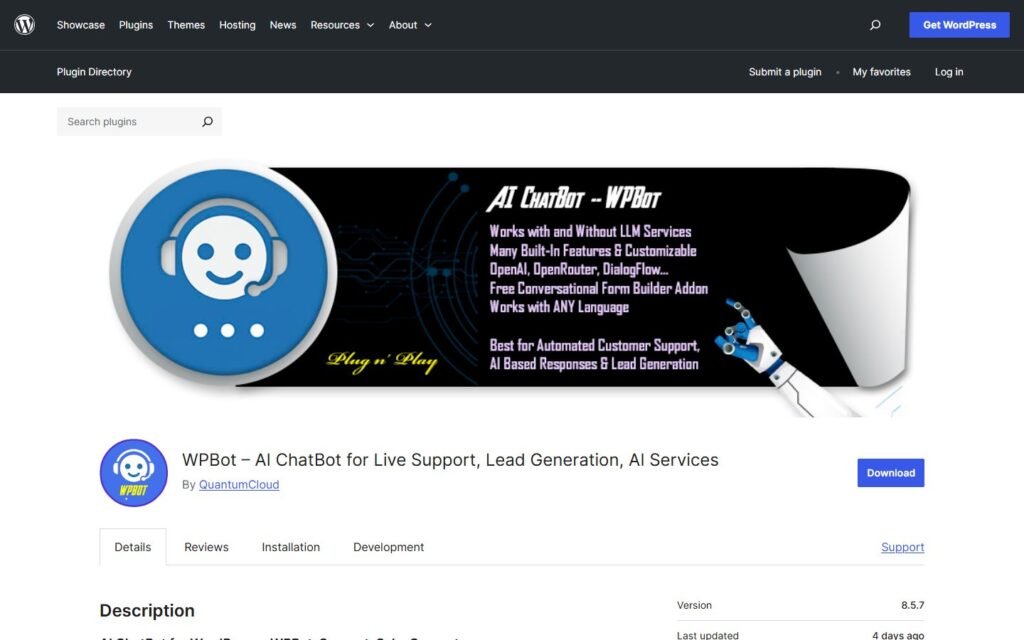
WPBot is a native WordPress chatbot plugin from QuantumCloud. Its official WordPress.org listing presents it as a no-code chatbot that can work with built-in menu-driven responses or connect to AI providers such as OpenAI, Gemini, OpenRouter-supported models, and Dialogflow.
Its documented strengths include:
- Automated customer support and FAQ handling
- RAG and vector embeddings trained on website content
- Knowledge uploads using formats such as PDF, XML, CSV, and JSON
- Multilingual and RTL support
- Email and phone-number collection
- Conversational forms with conditional paths
- Google Calendar appointment scheduling
- WooCommerce product search and in-chat cart actions
- Exit-intent, scroll, and inactivity triggers
- Abandoned-cart recovery tools
- Chat history, analytics, and AI insights
- Human handoff through live chat or Slack
- Customer engagement across channels including WhatsApp, Telegram, Messenger, and Instagram in supported Pro configurations
- CRM and automation connections through tools such as webhooks, Zapier, FluentCRM, and HubSpot
This is a broad chatbot feature set. WPBot is especially relevant to searches such as WordPress AI chatbot, WooCommerce chatbot, AI lead generation plugin, WPBot alternative, and WPBot vs AI Engine.
It is important, however, to understand what “multichannel” means in this context. WPBot documents WhatsApp and Telegram as customer communication channels for chatbot engagement. That is different from using a private Telegram or WhatsApp conversation as an owner command center for administering WordPress.
What Is Niwa AI?
Niwa AI is designed around a wider operating model.
On the owner side, the website owner can send instructions from Telegram or WhatsApp and ask Niwa to perform supported WordPress and WooCommerce work. Publicly described examples include changing prices, updating stock, publishing or removing products, rewriting website content, creating coupons, producing SEO posts, reviewing sales trends, researching competitors, and reporting business information.
On the storefront side, Niwa can answer customer questions, guide product selection, capture intent, recommend relevant products or upgrades, address hesitation, and support follow-up when a buyer leaves without converting.
This is why Niwa is better described as an operator than as only a chatbot. A visitor conversation can become an operational task. A product question can reveal missing content. A repeated objection can lead to a page update. A stock problem can lead to supplier communication. A sales report can lead to a new offer or campaign.
For a deeper look at the customer-facing side, see how an AI sales agent handles common WooCommerce objections. For a practical conversion example, read the guide to AI-assisted abandoned cart recovery.
WPBot vs Niwa AI: Feature Comparison
| Capability | WPBot | Niwa AI |
|—|—|—|
| Visitor-facing AI chatbot | Yes | Yes |
| FAQ and website-content answers | Yes | Yes |
| RAG or website knowledge grounding | Yes | Uses website and business context for supported workflows |
| Lead capture | Yes, including email, phone, and conversational forms | Yes, with buyer-intent context and follow-up workflows |
| WooCommerce product discovery | Yes | Yes |
| Add products to cart from chat | Documented | Conversion and product-guidance workflows are documented; exact interface can depend on configuration |
| Appointment booking | Google Calendar scheduling is documented | Not a primary public positioning point |
| Behavioral triggers | Exit intent, scrolling, inactivity, and related triggers are documented | Contextual engagement and hesitation-response workflows are documented |
| Abandoned-cart support | Onsite and offsite recovery features are documented | Email or WhatsApp follow-up workflows are documented |
| Human live-chat escalation | Documented through live chat and Slack options | Human/owner follow-up can be incorporated into messaging workflows |
| Customer conversations on WhatsApp or Telegram | Supported in applicable WPBot Pro configurations | Supported as part of messaging and follow-up workflows |
| Owner administration through WhatsApp or Telegram | Not clearly documented as WPBot’s core workflow | Yes |
| Change WooCommerce stock or prices from owner chat | Not clearly documented as a core WPBot chatbot feature | Yes |
| Publish or update WordPress content from owner chat | Not clearly documented as a core WPBot chatbot feature | Yes |
| SEO article production and publishing | Not a current core WPBot positioning point | Yes |
| Business sales reporting to the owner | Chat analytics are documented; broader business reporting is not the core positioning | Yes |
| Competitor research and monitoring | Not clearly documented as a core WPBot feature | Yes |
| Connected owner-side business workflows | Available integrations can pass data to other systems | A central product focus |
| White-label agency deployment | Strong documented option | Not the primary positioning |
| Choice of multiple AI providers | Strong documented option | Managed through Niwa’s supported intelligence layer and configuration |
Public features can change. “Not clearly documented” does not mean a feature could never be created through custom development or a separate automation product. It means the capability is not presented as a standard core feature in the primary WPBot materials reviewed for this article.
Where WPBot Does Well
1. A deep customer-chatbot toolkit
WPBot is not merely a basic question-and-answer bubble. Its public documentation covers knowledge grounding, structured menus, conversational forms, WooCommerce interactions, scheduling, retargeting triggers, live-chat escalation, voice options, analytics, and multiple customer channels.
For businesses that know they need a chatbot and want detailed control over its visitor-facing behavior, this specialization is valuable.
2. Flexible AI-provider support
WPBot supports several ways to power conversations. Businesses can connect major AI services, use OpenRouter for a wider model selection, integrate Dialogflow, or combine AI with built-in scripted features.
That flexibility can help technical teams control model choice, API cost, and chatbot behavior.
3. Conversational forms and lead collection
WPBot’s form and lead features are a real strength. A company can collect contact details, run conditional question paths, book appointments, and send captured data toward marketing or CRM systems.
This is more sophisticated than a generic “leave your email” chatbot prompt.
4. Retargeting and WooCommerce conversion features
WPBot documents product search, product details, cart actions, shipping-status interactions, behavioral triggers, and abandoned-cart recovery. Those capabilities make it a credible option for store owners focused specifically on customer engagement and revenue recovery.
The broader principle is similar to the one explained in our AI checkout assistant guide: conversion tools are most useful when they resolve uncertainty while the purchase is still active.
5. Agency and white-label options
WPBot offers agency-oriented deployment and white-label features. Teams managing many client websites may value centralized licensing, rebranding, and cross-site embedding more than owner-side business operations.
Where Niwa AI Is Different
1. Telegram and WhatsApp are owner interfaces, not only customer channels
Both products can involve WhatsApp or Telegram, but the use case is different.
WPBot’s documentation focuses on extending customer chatbot conversations across messaging channels. Niwa lets the business owner use a private messaging conversation to request supported WordPress, WooCommerce, publishing, research, and reporting work.
For example, an owner can ask Niwa to update a product price, change stock, create a coupon, publish content, or summarize business performance without navigating wp-admin.
This is an operational distinction, not simply a channel checklist.
2. Niwa performs WordPress and WooCommerce administration
WPBot can help a shopper find and add a product. Niwa is also built to help the owner manage the product itself.
That can include supported tasks around:
- Products and product content
- Prices and stock
- Coupons and categories
- Pages and headlines
- SEO articles and publishing
- Website summaries and reports
WPBot’s customer-commerce features are strong, but its core chatbot documentation does not present private owner-chat administration as the main product experience.
3. Niwa connects conversion signals to website action
A visitor-facing chatbot may capture a question or lead. The next challenge is turning that information into improvement.
Niwa’s operator model can connect signals to actions. If shoppers repeatedly ask the same shipping question, the owner can ask Niwa to improve the relevant page. If visitors cannot find the right product, Niwa can help analyze the gap. If a competitor launches a stronger offer, Niwa can research it and help prepare a response.
That connection between conversation, analysis, publishing, and conversion work is a central Niwa advantage.
4. Business reporting goes beyond chat analytics
WPBot documents chatbot statistics, histories, engagement reporting, and AI insights. Those are useful for evaluating the chatbot.
Niwa’s reporting position is broader: sales trends, operational summaries, store signals, and recommended next steps for the business owner. The goal is not only to report what happened in the chat widget, but to explain what is happening across the WordPress or WooCommerce business.
5. Competitor research and content publishing are part of the operating loop
Niwa publicly documents competitor analysis and SEO blog production among its owner-side workflows. This can turn external market observations into site content or commercial action.
WPBot’s current core materials focus much more strongly on chatbot configuration, customer communication, lead capture, and conversion triggers. Competitor monitoring and owner-requested SEO publishing are not prominent standard WPBot features.
Which Is Better for WooCommerce?
It depends on which side of WooCommerce you need help with.
WPBot is a strong fit for customer-facing WooCommerce chat. It can help visitors search products, view details, interact with carts, check relevant information, and respond to behavioral triggers. Its abandoned-cart and retargeting capabilities are meaningful advantages for a dedicated chatbot deployment.
Niwa AI is the stronger fit when the owner also wants operational control. Niwa can support product guidance and conversion conversations while helping the owner change stock, prices, product content, coupons, and related store information from messaging apps.
A store may therefore choose WPBot when it wants a specialized customer-chat stack, and Niwa when it wants customer conversion support tied to a broader WordPress operating layer.
Which Is Better for Lead Capture?
WPBot has an established, highly configurable lead-capture toolkit. Its conversational forms, conditional logic, appointment booking, contact collection, webhooks, and CRM integrations are clear strengths.
Niwa’s differentiation is what happens around the lead. Niwa can retain conversational intent, support follow-up, connect the opportunity to website or product work, and help the owner act on recurring customer needs.
Businesses prioritizing complex chatbot forms may prefer WPBot. Businesses prioritizing an ongoing lead-to-action workflow may prefer Niwa.
For more context, read our practical guide to AI lead capture for ecommerce.
Which Is Better for Content Publishing?
Niwa is the clearer choice for owners who want to request and publish website content as an operating workflow.
Niwa’s public product description includes rewriting headlines, creating pages or SEO posts, using current industry information, and publishing through WordPress. WPBot’s current main product positioning is customer chat and conversion engagement rather than an owner-controlled editorial agent.
WPBot previously included content-generation-related changes in its release history, but a historical feature should not be treated as a current core capability without clear present-day documentation. This comparison therefore does not credit WPBot with a full publishing workflow.
Which Is Better for Agencies?
WPBot may be the more natural choice for an agency selling or managing branded chatbot deployments across many client websites. Its white-label and multi-site commercial options are directly documented.
Niwa may suit an agency or operator that wants deeper hands-on administration and business workflows for a smaller number of closely managed WordPress businesses.
The better fit depends on whether the service being delivered is primarily a chatbot product or an ongoing AI-assisted operating service.
Final Verdict
WPBot is a capable and feature-rich WordPress chatbot. It does particularly well in customer support, lead capture, conversational forms, appointment scheduling, WooCommerce interactions, behavioral retargeting, human handoff, multichannel engagement, and agency deployment.
Niwa AI competes from a different direction. It combines customer-facing conversion assistance with owner-side WordPress operations, WooCommerce administration, Telegram and WhatsApp control, content publishing, business reporting, competitor research, and connected follow-through.
Choose WPBot when the chatbot itself is the center of the project.
Choose Niwa AI when you want an AI layer that can talk to visitors and help the owner operate the website and business behind those conversations.
Frequently Asked Questions
Is WPBot an AI agent or a chatbot?
WPBot describes itself primarily as an AI chatbot for support, sales, lead generation, and AI services. It includes automation, RAG, WooCommerce, forms, retargeting, and integrations, so it is more capable than a simple scripted bot. Its central public experience remains visitor and customer conversation rather than broad owner-side WordPress administration.
Can WPBot work with WooCommerce?
Yes. WPBot documents WooCommerce product discovery, product details, cart actions, order or shipping-related interactions, behavioral marketing, and abandoned-cart recovery features. Availability can vary by version, add-on, and configuration.
Does WPBot support WhatsApp and Telegram?
WPBot Pro documentation lists WhatsApp and Telegram among supported customer-engagement channels. This should not be confused with Niwa’s owner-side use case, where the site owner sends private operational instructions through Telegram or WhatsApp.
Can WPBot capture leads?
Yes. WPBot supports email and phone collection, conversational forms, conditional paths, scheduling, webhooks, and integrations with marketing or CRM systems in applicable configurations.
Can WPBot publish WordPress posts from chat?
A current owner-controlled publishing workflow is not prominently documented as a core WPBot chatbot feature. Niwa AI explicitly positions WordPress content and SEO publishing as supported owner-side work.
Can Niwa AI replace WPBot?
For some businesses, yes, especially when they want both customer assistance and owner-side WordPress operations. For teams that require WPBot’s specific form builder, white-label deployment, model flexibility, or specialized chatbot configuration, the products may serve different needs rather than being direct one-for-one replacements.
Which product is better for a WooCommerce owner without technical staff?
Niwa may be the better fit when the owner wants to manage store operations through familiar messaging apps as well as assist shoppers. WPBot may be better when the immediate goal is deploying a configurable customer-facing chatbot and the owner is comfortable managing the rest of the store through existing tools.
What is the best WPBot alternative for WordPress business operations?
Niwa AI is a relevant alternative when “chatbot” is too narrow and the requirement includes WordPress administration, WooCommerce changes, publishing, reporting, competitor monitoring, and conversion workflows through an owner conversation.
Source and Verification Note
WPBot capabilities in this comparison were checked against the current official WPBot listing on WordPress.org and WPBot’s official documentation. Niwa AI capabilities were checked against the current Niwa AI product page. Feature availability may depend on product tier, add-ons, setup, integrations, and later product updates.

