

SensAI vs Niwa AI: WooCommerce Support Agent or Business Operator?
Compare SensAI and Niwa AI for WooCommerce support, product discovery, WordPress operations, messaging administration, reporting, leads, and conversions.
SensAI and Niwa AI both bring conversational AI to WordPress and WooCommerce, but they solve different layers of the problem.
SensAI is a focused customer-facing support assistant. It learns from public WordPress content and WooCommerce product data, then helps visitors find information, compare options, and navigate toward relevant products or pages. Niwa AI combines a storefront assistant with an owner-side WordPress operator that can carry out administrative, publishing, reporting, monitoring, and conversion workflows.
This comparison uses SensAI’s current WooCommerce Marketplace listing and official documentation as of July 16, 2026. The goal is not to declare one product universally better. It is to clarify which operating model fits your store.
Quick verdict
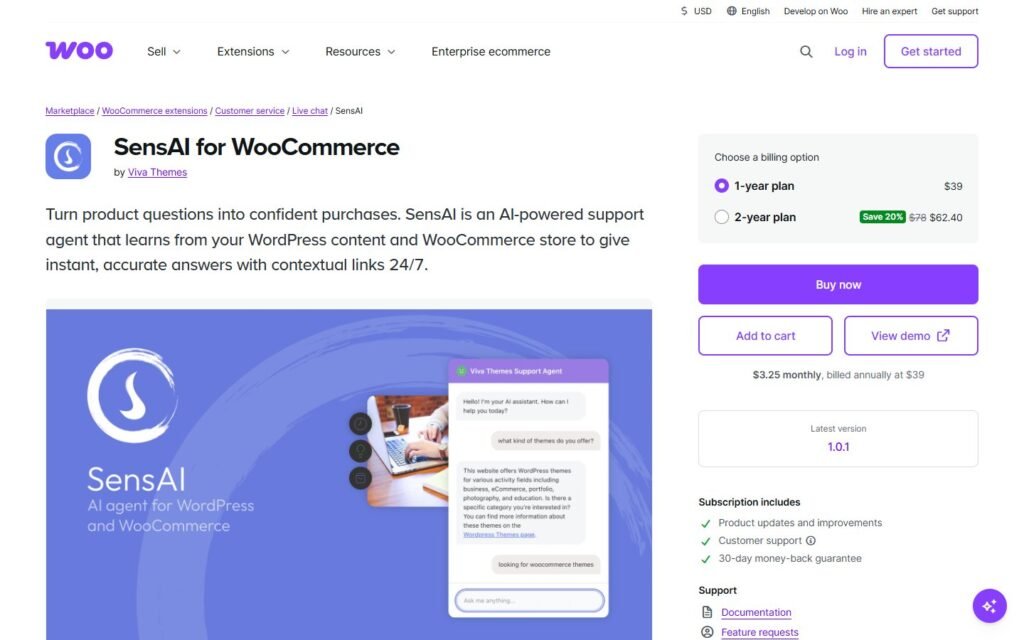
Choose SensAI if you want a lightweight WooCommerce support chatbot grounded in your existing website content, with product recommendations, multilingual answers, contextual links, optional visitor details, and straightforward WordPress-based setup.
Choose Niwa AI if you want AI to work on both sides of the business: helping shoppers on the storefront while also letting the owner manage WordPress and WooCommerce from Telegram or WhatsApp, publish content, review business signals, research competitors, and run conversion-oriented workflows.
The simplest distinction is:
SensAI helps visitors understand the website. Niwa AI also helps the owner operate and improve the business behind it.
For a broader explanation of that operating model, see How Niwa Works.
What SensAI does well
SensAI is an AI-powered support agent sold through the WooCommerce Marketplace. Its official product documentation presents it as an informational assistant that indexes selected WordPress content, products, and categories, then uses that material to answer visitor questions.
That focused scope gives SensAI several practical strengths.
Product-aware answers and guided discovery
SensAI can answer questions about product titles, features, attributes, categories, prices, services, policies, articles, and other indexed content. For broad questions, it can use category-first guidance instead of overwhelming a visitor with a long list of items.
It can also ask clarifying questions when a request is ambiguous. A shopper looking for a desk, for example, might be asked about preferred material before receiving suggestions. When relevant content exists, SensAI can add contextual links such as “View Product” or “Read More.”
This makes it useful for stores where many lost sales begin with a discovery problem: the shopper cannot quickly identify the right category, product, or information page.
A clear content-grounding model
SensAI’s official documentation states that answers are based on indexed website content. Store owners can choose which post types to include, exclude specific sections with a CSS class, rebuild the index, and automatically index new or updated content.
That is a sensible model for stores that already maintain accurate product pages, FAQs, policies, and educational content. It also creates a clear limitation: answer quality depends heavily on the quality and structure of the source material.
Multilingual visitor support
SensAI automatically detects the visitor’s language and replies in the same language. This can be valuable for multilingual stores that want basic product and content guidance without creating a separate chatbot flow for every language.
Chat history and lightweight lead details
Chat history is optional and stored in the WordPress database. The documented controls include retention settings, search and filtering, and CSV or JSON export. SensAI can also show an optional visitor form for a name and email address.
That gives a store useful visibility into common questions and provides a basic lead-capture path. The owner can review what visitors asked and use repeated questions to improve content.
Membership-aware controls
SensAI excludes restricted content by default and documents integrations with WooCommerce Memberships and MemberPress. It can also be configured so the chat appears only to logged-in users.
For membership or content-heavy WordPress sites, that is a meaningful advantage over generic website chatbots that indiscriminately crawl public pages.
What Niwa AI is designed to do
Niwa AI has a broader role. It is built as a WordPress AI operator for the site owner and a conversion assistant for website visitors.
On the owner side, Niwa can receive instructions through Telegram or WhatsApp. The owner can ask her to update WooCommerce stock or prices, publish or remove products, create coupons, work with pages and Elementor content, prepare SEO posts using current research, summarize business information, monitor competitors, or report sales trends.
On the storefront, Niwa can answer questions, guide product selection, capture buying intent, recommend relevant products or upgrades, and support follow-up workflows. The difference is that visitor conversations can feed a wider operating loop rather than remaining isolated inside a chat-history screen.
That loop matters because the same repeated buyer question may indicate a missing FAQ, weak product copy, a catalog issue, or a new content opportunity. Our guide to AI conversation intelligence for ecommerce explains why those conversations should influence business decisions, not merely reduce support tickets.
SensAI vs Niwa AI comparison table
| Capability | SensAI | Niwa AI |
|—|—|—|
| Customer-facing website chat | Yes | Yes |
| Answers grounded in WordPress content | Yes | Yes |
| WooCommerce product-aware guidance | Yes | Yes |
| Product comparisons and contextual links | Yes | Yes |
| Automatic multilingual replies | Yes | Yes |
| Optional name and email collection | Yes | Yes, within broader lead workflows |
| Searchable chat history and export | Yes | Conversation and business insight workflows |
| Membership-content controls | Documented for WooCommerce Memberships and MemberPress | Not a primary documented differentiator |
| Perform purchases or process orders for visitors | No | Conversion guidance and store operations; checkout remains controlled by the store |
| Perform WordPress administrative actions | No, official docs describe SensAI as informational only | Yes |
| Update WooCommerce products, stock, or prices | No | Yes |
| Publish and manage WordPress content | No | Yes |
| Owner administration through Telegram | Not documented | Yes |
| Owner administration through WhatsApp | Not documented | Yes |
| Business and sales reporting | Not documented as a SensAI feature | Yes |
| Current external research and competitor monitoring | No, SensAI states it cannot access external websites | Yes |
| Conversion workflows beyond answering questions | Limited to informational guidance and optional visitor details | Yes |
| Supplier, email, and operational follow-up workflows | Not documented | Yes |
Feature sets can change. This table reflects the official public information available on July 16, 2026.
The biggest difference: information versus action
The most important difference is not chatbot design or the number of supported AI models. It is whether the system is limited to explaining information or can perform approved work.
SensAI’s documentation is explicit: it cannot make purchases, process orders, access visitor accounts, access external websites, or perform actions on behalf of the user. That is not necessarily a flaw. It is a clear product boundary that may suit stores seeking a controlled informational assistant.
Niwa is designed around action. If an owner discovers that a product price is wrong, a product is out of stock, or a landing page needs new copy, the intended workflow is not just to identify the problem. The owner can ask Niwa to handle the appropriate WordPress or WooCommerce task and report the result.
The same distinction applies to content. SensAI can guide visitors to an existing article. Niwa can help research, draft, create, and publish a new article when a content gap is identified.
Which is better for WooCommerce product discovery?
SensAI is a credible option for product discovery. It can use categories, attributes, prices, and indexed product information to clarify a shopper’s needs and link to relevant products. Its category-first response pattern is especially useful for larger catalogs with clear taxonomy.
Niwa is a stronger fit when product discovery needs to connect with a broader conversion system. A product question might lead to lead capture, a product-page improvement, a targeted coupon, a bundle recommendation, or an owner alert.
This is the principle behind effective AI lead capture for ecommerce: the assistant should help first, understand the blocker, and collect contact details only when a useful follow-up exists.
SensAI can collect a visitor’s name and email through an optional form. Niwa’s broader goal is to preserve the reason for the lead: what the person wanted, where they hesitated, which product they considered, and what the business should do next.
Which is better for WordPress administration?
This is the clearest separation.
SensAI is not documented as a WordPress administration agent. It indexes content and answers questions about that content, but its official documentation says it does not perform actions.
Niwa is built to perform approved WordPress and WooCommerce operations. That includes product, stock, price, coupon, page, content, and publishing work. The owner can send the instruction from a messaging app rather than opening wp-admin for every small task.
If your main requirement is “help shoppers understand my catalog,” SensAI may be enough. If the requirement is “help shoppers, then let me run the store through conversation,” Niwa covers a much wider workflow.
For another comparison focused specifically on conversational WordPress administration, see SiteGround AI Agent vs Niwa AI.
Which is better for reporting and competitor monitoring?
SensAI’s chat history can reveal common visitor questions, and its export options can support manual analysis. That is useful first-party conversation data.
However, SensAI explicitly states that it cannot access external websites. Its public documentation does not position it as a competitor-monitoring, market-research, or business-reporting system.
Niwa can combine internal business signals with current external research. An owner can ask for sales summaries, product or stock insight, competitor analysis, or an SEO article informed by current industry information. This gives Niwa a wider role in planning and decision support.
The distinction is practical:
- SensAI can show what visitors asked inside its chat.
- Niwa is designed to help interpret business signals and carry the next approved task forward.
Where SensAI may be the better choice
SensAI may be the better choice when:
- You want a narrowly scoped informational chatbot.
- Your website already has strong, well-structured content.
- Product discovery and content navigation are the main problems.
- You want multilingual replies with minimal flow-building.
- You need documented membership-content controls.
- You prefer to bring your own OpenAI API key and manage usage directly.
- You do not want the assistant performing administrative actions.
A focused tool can be easier to understand, deploy, and govern. SensAI is transparent about what it can and cannot do, which is a strength for businesses that value a strict boundary between visitor support and site administration.
Where Niwa AI may be the better choice
Niwa may be the better fit when:
- You want to manage WordPress or WooCommerce from Telegram or WhatsApp.
- You need product, stock, price, coupon, page, or publishing actions.
- You want content creation connected to current research.
- You need sales summaries and owner-focused reporting.
- You want competitor monitoring rather than answers limited to your own site.
- You want buyer conversations connected to lead, conversion, and follow-up workflows.
- You want one operating layer across storefront assistance and back-office work.
You can see the visitor-side conversion model on Turn Website Visitors Into Leads, or review the broader product directly on the Niwa AI homepage.
Final verdict
SensAI is a focused WooCommerce support and discovery assistant. It does several things well: content-grounded answers, product guidance, multilingual conversation, contextual links, optional visitor details, chat-history exports, and membership-aware controls.
Niwa AI competes at a broader level. It combines customer-facing assistance with owner-side WordPress operations, WooCommerce administration, messaging-app control, publishing, reporting, external research, competitor monitoring, and conversion workflows.
Choose SensAI when the job is to help visitors find and understand what is already on the site.
Choose Niwa AI when the job extends from answering the visitor to operating, learning from, and improving the business.
Frequently asked questions
Is SensAI a WooCommerce AI agent?
Yes. SensAI is sold through the WooCommerce Marketplace as an AI-powered support agent. It learns from WordPress content and WooCommerce product data to answer questions and guide visitors.
Can SensAI update WooCommerce products or orders?
No. SensAI’s official documentation describes it as informational and explicitly says it cannot perform actions, make purchases, or process orders.
Can SensAI recommend and compare products?
Yes. SensAI can recommend products, compare options, display pricing in the store’s currency format, ask clarifying questions, and link visitors to relevant product pages when the necessary information exists in the indexed content.
Does SensAI capture leads?
SensAI offers an optional visitor information form for name and email. That provides basic contact capture, while Niwa is positioned around broader intent capture and follow-up workflows.
Does SensAI work through Telegram or WhatsApp?
SensAI’s official product and documentation pages focus on a website chat widget and WordPress settings. Owner-side administration through Telegram or WhatsApp is not documented as a SensAI feature.
Can SensAI research competitors or external websites?
No. Its official documentation states that it cannot access external websites or information. Niwa AI is designed to support current research and competitor-monitoring workflows.
Does SensAI require an OpenAI API key?
Yes. The store owner adds an OpenAI API key, builds the content index, and pays any resulting OpenAI usage in addition to the plugin subscription.
Which is better for a small WooCommerce store?
It depends on scope. SensAI can be a good focused choice for product questions and website navigation. Niwa is better suited to an owner who also wants conversational store administration, publishing, reporting, research, and conversion workflows.
Sources reviewed
This comparison prioritizes the official SensAI WooCommerce Marketplace listing, the official SensAI documentation, and WooCommerce’s guide to SensAI intelligence features. Niwa capabilities were checked against the current niwachat.com product information.

