

WPadmin.AI vs Niwa AI: WordPress Developer or Business Agent?
Compare WPadmin.AI and Niwa AI for WordPress development, WooCommerce operations, messaging administration, leads, reporting, and conversions.
WPadmin.AI and Niwa AI both use conversational AI to reduce the work involved in running a WordPress website. However, they solve different problems.
WPadmin.AI is primarily positioned as an AI assistant and developer inside the WordPress dashboard. Its free plugin provides site-aware guidance, while its Premium service can prepare technical changes on a staging copy and sync approved work to the live site.
Niwa AI is positioned as a broader WordPress business agent. It combines website and WooCommerce operations with owner access through messaging apps, content workflows, business reporting, lead capture, customer-facing assistance, competitor research, and conversion-focused follow-up.
This fair comparison explains what each platform does well, where their public feature sets differ, and which type of WordPress owner each one is likely to suit.
Quick verdict
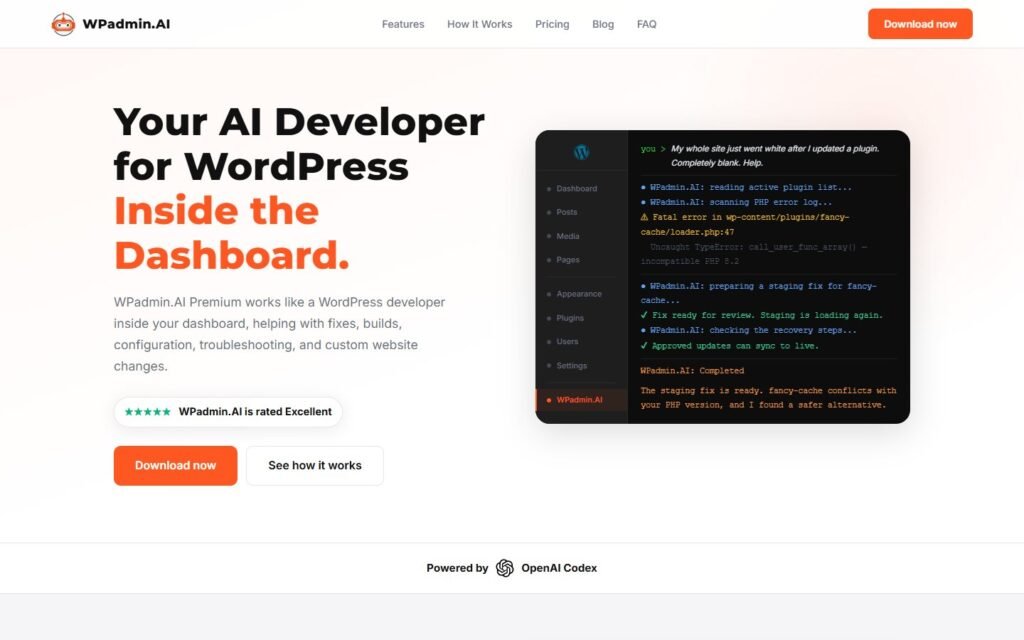
Choose WPadmin.AI when your main need is WordPress troubleshooting, development, theme or plugin work, and a staging-first process for reviewing technical changes before they reach the live website.
Choose Niwa AI when you want an operational agent that can help run the business around the website: handling WordPress and WooCommerce tasks, publishing content, reporting important commercial signals, supporting lead and conversion workflows, and receiving owner instructions through Telegram or WhatsApp.
The simplest distinction is:
WPadmin.AI is built around AI-assisted WordPress development. Niwa AI is built around operating and growing a business that runs on WordPress.
What is WPadmin.AI?
WPadmin.AI has a free assistant and a paid Premium service.
According to its official WordPress.org listing, the free plugin places an AI chatbox in the WordPress dashboard. It can provide site-aware answers, troubleshooting steps, plugin and theme suggestions, content help, configuration guidance, and explanations related to WooCommerce, SEO, security, forms, and performance.
The free version is guidance-focused. Its documentation explicitly says that the free plan does not make changes to the website.
WPadmin.AI Premium goes further. The company presents it as an AI developer for WordPress that can investigate problems and prepare changes on a staging or test copy of the site. Documented examples include:
- fixing WordPress errors and broken pages;
- troubleshooting plugin conflicts;
- changing layouts and sections;
- building forms, small features, plugins, and themes;
- handling WooCommerce fixes;
- improving performance;
- configuring plugins and themes;
- helping with SEO setup and site customizations.
A major part of the Premium workflow is reviewability. The user describes a task, answers scope questions when necessary, approves a plan, reviews the completed work on staging, and then uses one-click Sync to move approved changes to the live site.
That makes WPadmin.AI especially relevant to searches such as “AI developer for WordPress,” “WordPress AI troubleshooting plugin,” and “AI plugin that can fix a WordPress site.”
What is Niwa AI?
Niwa AI approaches WordPress from an owner and business-operations perspective.
Niwa can help with WordPress and WooCommerce administration, but the workflow is not limited to a chatbox inside wp-admin. The product is designed so an owner can issue instructions through Telegram or WhatsApp, ask for work to be completed, and receive a concise result or report.
The operational scope can include product and stock work, price or coupon changes, content publishing, site maintenance, commercial reporting, competitor research, and follow-up workflows. On the visitor side, Niwa can support product questions, buying objections, recommendations, lead capture, and conversion-oriented conversations.
The How Niwa Works page describes the broader outcome: turning website attention into purchases, leads, demos, and useful founder insight rather than treating AI as only a content generator or support widget.
WPadmin.AI vs Niwa AI feature comparison
| Capability | WPadmin.AI | Niwa AI |
|—|—|—|
| Natural-language WordPress help | Yes | Yes |
| Dashboard-based AI assistant | Yes | Yes |
| Free guidance-only option | Yes, with documented monthly limits | Product access depends on Niwa’s current offer |
| Technical troubleshooting | Strong documented focus | Supported as part of broader site operations |
| Staging-first development workflow | Strong documented Premium feature | Uses controlled execution and review workflows, but WPadmin.AI’s packaged staging-and-sync process is a distinctive strength |
| Plugin and theme development | Documented Premium capability | Can support site and code operations when authorized |
| WooCommerce troubleshooting | Yes | Yes |
| Routine WooCommerce business operations | Some use cases documented, especially fixes | Core operational use case |
| Telegram owner administration | Not documented in the public feature set reviewed | Yes |
| WhatsApp owner administration | Not documented in the public feature set reviewed | Yes |
| Content drafting and publishing workflows | Content help is documented | Yes, including publishing workflows |
| Customer-facing sales assistance | Not positioned as a core public feature | Yes |
| Lead capture and qualification | Not documented as a core feature | Yes |
| Business reporting for the owner | Not documented as a core feature | Yes |
| Competitor research and monitoring | Not documented as a core feature | Yes |
| Conversion and follow-up workflows | Not positioned as a core feature | Yes |
Public products change quickly. This comparison reflects the official WPadmin.AI website and WordPress.org plugin information reviewed for this article.
Where WPadmin.AI is stronger
A fair comparison should recognize that WPadmin.AI has several meaningful advantages.
A clear developer-style workflow
WPadmin.AI Premium is tightly positioned around technical WordPress work. It asks users to describe a fix, build, or customization in plain language and then follows a structured development process.
For owners whose biggest problem is a broken layout, plugin conflict, slow website, custom feature request, or difficult theme adjustment, that specialization is valuable.
Staging before production
Its most distinctive public feature is the staging-first model. WPadmin.AI prepares work on a test copy, gives the user a chance to review it, and provides one-click Sync for approved changes.
That is a sensible approach for high-impact technical work. A business should not casually test plugin, theme, or PHP changes on a revenue-generating live site.
Broad compatibility positioning
WPadmin.AI says it can work with custom themes, private plugins, and site-specific code because the Premium service reads the existing WordPress setup rather than relying only on a fixed integration list. Its WordPress.org listing also names compatibility with common builders and tools, including WooCommerce, Elementor, Gutenberg, Divi, Bricks, WPBakery, Yoast SEO, Rank Math, Gravity Forms, WPForms, Wordfence, LiteSpeed Cache, and WP Rocket.
Useful free assistance
The free plugin gives less technical site owners an accessible place to ask WordPress questions without immediately hiring a developer. It is important to distinguish that guidance layer from Premium execution: the free plan explains and recommends, while Premium is the service positioned to prepare deeper changes.
Where Niwa AI is stronger
Niwa’s advantages appear when the job extends beyond development and into everyday business operations.
Administration from Telegram and WhatsApp
WPadmin.AI’s public workflow begins inside the WordPress dashboard. Niwa is designed to let the owner work from messaging apps as well.
That matters for routine requests that should not require opening a laptop and navigating wp-admin: checking sales, changing stock, updating a price, preparing a post, reviewing a lead, or asking what needs attention today.
WooCommerce operations, not only WooCommerce fixes
WPadmin.AI documents WooCommerce troubleshooting and development use cases. Niwa’s scope is broader on the operational side, including catalog work, stock and pricing tasks, coupons, order-related workflows, reporting, and customer conversations.
Niwa also connects those operational tasks with buyer behavior. The article on seven objections an AI sales agent for WooCommerce should handle shows why this matters: shipping, returns, compatibility, price, trust, timing, and human handoff can all block a purchase even when the website is technically functioning correctly.
Lead capture with commercial context
WPadmin.AI is not publicly positioned as a storefront lead-capture system. Niwa can help a visitor first, identify the buying need or blocker, and then collect useful follow-up context.
This is different from simply displaying a contact form. As explained in the AI lead capture for ecommerce guide, a useful lead includes the visitor’s need, buying stage, objection, and reason for follow-up, not only a name and email address.
Business reporting and conversation intelligence
A technically healthy site can still lose revenue because customers cannot find information, misunderstand an offer, or hesitate at checkout.
Niwa is designed to surface those business signals. Repeated questions about delivery, compatibility, payment, returns, or product choice can become recommended content and conversion improvements. The AI conversation intelligence guide explains how everyday chat questions can reveal product-page gaps, checkout friction, and follow-up opportunities.
Competitor and content monitoring
WPadmin.AI’s public materials focus on the current WordPress installation and technical work around it. Niwa can also research external competitors, monitor content opportunities, and turn findings into website or publishing tasks.
This closes an important loop: discover an opportunity, prepare the content or site change, publish it, and report the result without treating research and execution as disconnected activities.
Which is better for WordPress development?
For a narrowly defined technical job, WPadmin.AI may be the better fit.
Its Premium product is explicitly built for fixes, builds, theme work, plugin work, staging review, and one-click deployment. If your main search intent is “AI WordPress developer,” that focus is compelling.
Niwa can support technical site operations, but development is one part of a wider operating system. The decision depends on whether you primarily need a specialized AI development workflow or an agent that combines technical work with recurring business administration.
Which is better for WooCommerce?
It depends on the type of WooCommerce work.
Choose WPadmin.AI for troubleshooting checkout problems, investigating plugin conflicts, changing code, adjusting a theme, or preparing a custom WooCommerce improvement on staging.
Choose Niwa AI when the requirement includes ongoing store operation: product and stock work, pricing, content, owner reporting, customer questions, lead qualification, abandoned-intent follow-up, and conversion improvements.
The products can therefore address different layers of the same store. WPadmin.AI is strongest when the store needs a developer. Niwa is strongest when the owner needs an operator who also understands the website.
Which product is safer for site changes?
WPadmin.AI deserves credit for making its staging, approval, testing, and sync process central to the Premium offer. That is easy for a prospective customer to understand.
Niwa also uses controlled workflows and should receive explicit authorization for sensitive changes. The key purchasing question is not whether an AI product claims to be safe. It is whether the workflow makes scope, review, permissions, verification, and recovery clear before a high-impact change reaches production.
For development-heavy work, WPadmin.AI’s dedicated staging copy is a strong advantage. For daily business operations, Niwa’s value is the ability to apply appropriate controls while keeping routine tasks fast enough to be genuinely useful.
Who should choose WPadmin.AI?
WPadmin.AI is a strong option for:
- WordPress owners who frequently need technical help;
- non-developers who want clear dashboard guidance;
- businesses dealing with plugin, theme, form, SEO, cache, or performance issues;
- agencies or owners who value staging review before deployment;
- users whose primary goal is to build or repair WordPress functionality.
Who should choose Niwa AI?
Niwa AI is a stronger fit for:
- WooCommerce owners who want operational help, not only technical fixes;
- founders who want to administer WordPress through Telegram or WhatsApp;
- businesses that need content publishing and site work in one conversation;
- teams that want leads, buyer intent, and repeated objections summarized into action;
- owners who need business reporting, competitor monitoring, and conversion workflows alongside WordPress administration.
Final verdict
WPadmin.AI and Niwa AI are not identical products competing only on the number of commands they can run.
WPadmin.AI is strongest as a WordPress AI assistant and development service. Its free dashboard guidance is approachable, while its Premium staging-and-sync workflow is well suited to technical fixes, builds, and customizations.
Niwa AI is stronger as a continuing business operator. It combines WordPress and WooCommerce work with messaging-app administration, publishing, reporting, lead capture, competitor research, storefront assistance, and conversion workflows.
Choose the product that matches the outcome you actually need. If the website needs an AI developer, WPadmin.AI has a focused proposition. If the business needs an AI operator connected to WordPress, customers, and commercial signals, Niwa AI covers the wider workflow.
To see that broader workflow applied to your own store or business site, book a Niwa AI demo.
Frequently asked questions
Is WPadmin.AI a WordPress AI agent?
WPadmin.AI is an AI assistant inside the WordPress dashboard, while its Premium service is positioned as an AI developer that can prepare deeper site changes on a test copy. It is more development-focused than a customer-facing sales or business-operations agent.
Does the free WPadmin.AI plugin change the website?
No. Its official WordPress.org FAQ says the free plan focuses on answers, guidance, suggestions, and troubleshooting steps. Premium is required for the deeper staging-based development workflow.
Can WPadmin.AI work with WooCommerce?
Yes. Its official materials document WooCommerce questions, troubleshooting, checkout issues, and Premium development or customization work. However, its public positioning is centered more on technical assistance than ongoing sales, reporting, lead, and conversion operations.
Does WPadmin.AI support Telegram or WhatsApp administration?
Telegram and WhatsApp owner administration were not documented in the official WPadmin.AI feature pages reviewed for this comparison. Its described workflow is centered on the WordPress dashboard and its Premium staging service.
Can Niwa AI publish WordPress content?
Yes. Content preparation and publishing are part of Niwa’s wider WordPress operating workflow, alongside WooCommerce administration, reporting, research, lead capture, and customer-facing assistance.
Is WPadmin.AI better than Niwa AI?
Neither is universally better. WPadmin.AI is the more focused choice for staging-based WordPress development and troubleshooting. Niwa AI is the broader choice for businesses that want WordPress operations connected with messaging administration, WooCommerce, publishing, reporting, leads, competitor intelligence, and conversion workflows.
Can a business use both?
Potentially. A business could use WPadmin.AI for specialized development work and Niwa AI for ongoing operations and commercial workflows. Before combining any automation tools, define permissions clearly and avoid letting multiple systems make overlapping changes without review.

