

HubSpot WordPress Plugin vs Niwa AI: CRM or Business Operator?
Compare HubSpot’s WordPress CRM, forms, chat, email, and analytics with Niwa AI’s WordPress operations, messaging, reporting, and conversion workflows.
The search for a WordPress AI agent often leads to tools that solve very different problems. Some help write content. Some add a chatbot. Others connect WordPress to a larger CRM and marketing platform.
The HubSpot WordPress plugin belongs mainly to that third group. It connects a WordPress website with HubSpot’s CRM, forms, live chat, chatbots, email marketing, contact timelines, segmentation, and reporting. Niwa AI takes a different approach: it is designed as a conversational business operator for WordPress and WooCommerce, with owner administration through messaging, website operations, publishing, business reporting, customer assistance, lead capture, monitoring, and conversion workflows.
This comparison explains what HubSpot does well, where Niwa AI differs, and which product is the better fit for each type of business.
Quick verdict: Choose HubSpot when CRM-centered marketing, contact management, forms, email, and sales-team workflows are the priority. Choose Niwa AI when you want to operate the WordPress business itself through conversation, including WooCommerce work, publishing, reporting, messaging administration, customer intent, and conversion actions.
What Is the HubSpot WordPress Plugin?
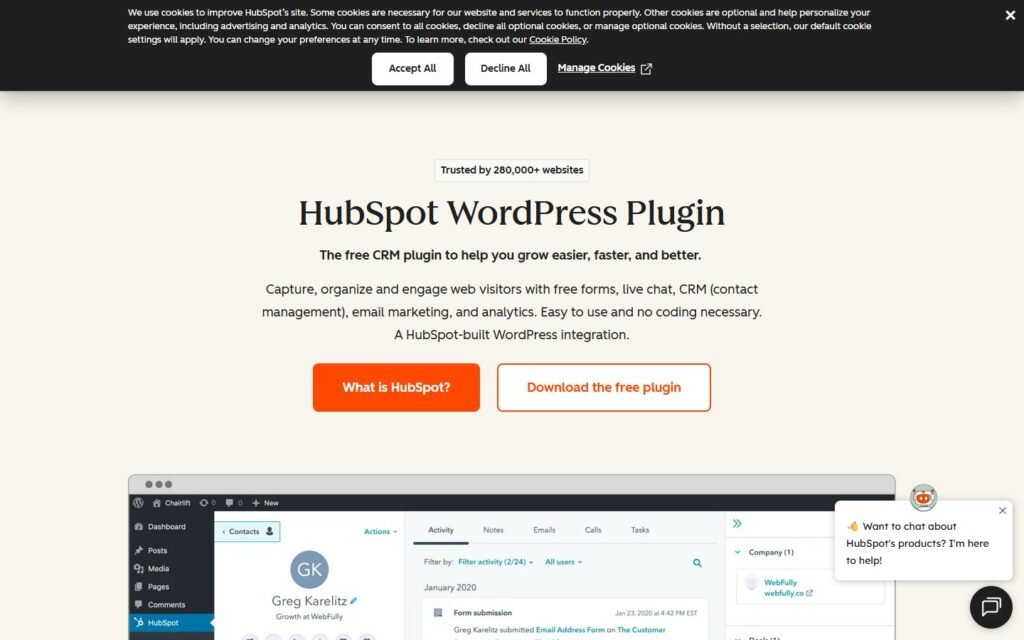
The official HubSpot WordPress plugin connects a WordPress site to HubSpot’s customer platform. HubSpot’s current product page highlights several core capabilities:
- CRM and contact management
- Forms and popups
- Live chat and chatbots
- Email marketing
- Marketing automation
- Website and campaign analytics
- Integrations with WooCommerce, Gravity Forms, Stripe, Zapier, and many other applications
The plugin can sync visitor activity into contact records, including page views, live-chat conversations, and form submissions. That gives marketing and sales teams a unified contact timeline instead of leaving important signals scattered across separate WordPress tools.
HubSpot also has a broader AI platform called Breeze. Its AI capabilities extend beyond the WordPress plugin and can use CRM records, conversations, deals, and other HubSpot data to assist marketing, sales, and service teams.
This is important context: the HubSpot WordPress plugin is primarily a bridge between WordPress and the HubSpot platform. It is not positioned mainly as a natural-language WordPress administrator.
What Is Niwa AI?
Niwa AI is built around a different operating model. Instead of treating WordPress only as a lead source for an external CRM, Niwa is designed to work directly with the website owner and the business running on WordPress.
The owner can ask Niwa to perform or coordinate practical work such as:
- updating WordPress content
- creating and publishing articles or pages
- working with WooCommerce products, stock, prices, coupons, and orders
- preparing business reports and explaining important changes
- researching and monitoring competitors
- handling website and operational checks
- capturing visitor intent and lead context
- supporting product discovery and buyer questions
- activating conversion-focused workflows
Niwa’s owner-facing experience can also run through Telegram or WhatsApp, reducing the need to open wp-admin for every routine request. You can see the broader operating model on How Niwa Works.
HubSpot WordPress Plugin vs Niwa AI: Feature Comparison
| Capability | HubSpot WordPress Plugin | Niwa AI |
|—|—|—|
| Primary role | CRM, marketing, sales, and service connection | WordPress and WooCommerce business operator |
| WordPress forms and popups | Strong native HubSpot tools | Can support lead-capture workflows, but not positioned as a dedicated form-builder suite |
| CRM contact records | Major strength | Captures and routes useful lead context; not positioned as a replacement for a full enterprise CRM |
| Live chat and chatbots | Yes | Yes, with a broader conversion and operational context |
| Email marketing | Strong HubSpot capability | Can support content and communication workflows; not a full HubSpot-style marketing hub |
| WordPress content publishing | HubSpot can create emails and forms from WordPress; direct WordPress publishing is not the plugin’s main operational promise | Core operator workflow |
| WooCommerce integration | Available through HubSpot integrations and ecosystem apps | Direct WooCommerce operations and customer-facing commerce workflows |
| Product, stock, price, coupon, and order work | Depends on the connected integration and configured HubSpot workflow | Designed as direct operator tasks |
| Telegram owner administration | Not documented as a core WordPress plugin capability | Yes |
| WhatsApp owner administration | Not documented as a core WordPress plugin capability | Yes |
| Business reporting | Strong CRM, marketing, and sales reporting | Business-focused reports tied to website, store, content, and operational context |
| Lead capture | Major strength | Yes, with buying intent and conversation context |
| Competitor monitoring | Not a core documented WordPress plugin feature | Supported operator workflow |
| Conversion workflows | Marketing automation, forms, chat, segmentation, and follow-up | On-site assistance, lead capture, commerce actions, reporting, and conversion interventions |
| Best fit | Teams centered on CRM-led marketing and sales processes | Owners who want the WordPress business operated through conversation |
This comparison reflects publicly documented capabilities checked on July 18, 2026. Product plans and features can change.
Where HubSpot Is Stronger
A fair comparison should begin with HubSpot’s real advantages.
A Mature CRM Foundation
HubSpot’s strongest advantage is its CRM. Contact activity can be organized into one record, helping teams understand what a prospect viewed, which form they submitted, which chat they started, and how they engaged with follow-up emails.
For B2B companies, agencies, service firms, and sales teams, that unified history is highly valuable. HubSpot is designed to support a formal funnel with contacts, companies, deals, lists, campaigns, sales activity, service conversations, and reporting.
Forms, Popups, and Email Marketing
HubSpot offers polished tools for building forms, popups, and responsive marketing emails. These capabilities are much broader than a simple lead-capture widget.
If your priority is creating landing-page forms, segmenting contacts, sending newsletters, logging engagement, and building automated follow-up sequences, HubSpot has a mature ecosystem around those jobs.
Marketing and Sales Reporting
HubSpot is also stronger when a business needs standardized CRM, campaign, sales, and marketing reporting across a team. Its platform is designed for structured customer lifecycle management, not only website administration.
A Large Integration Ecosystem
HubSpot connects with a large range of tools, including WooCommerce and common WordPress form plugins. Businesses already committed to HubSpot can make WordPress part of a broader marketing and sales stack without replacing their CRM processes.
Where Niwa AI Is Different
Niwa is not trying to rebuild HubSpot’s entire CRM suite. Its advantage is that it stays closer to the website, store, owner, and immediate business task.
WordPress Operations, Not Only Visitor Tracking
HubSpot’s WordPress plugin is mainly focused on capturing, organizing, and engaging visitors through HubSpot tools. Niwa is designed to act on the WordPress installation itself.
That difference becomes obvious in everyday requests. An owner may need to:
- change a product price
- update stock
- publish a comparison article
- create a coupon
- review a website problem
- summarize sales activity
- investigate a competitor
- explain why conversions changed
Those are operational requests rather than CRM records. Niwa’s purpose is to turn the owner’s instruction into completed WordPress and business work.
WooCommerce Administration and Customer Intent
HubSpot can connect with WooCommerce, but the typical value is syncing commerce data into CRM and marketing workflows. Niwa is designed to work directly with WooCommerce operations while also helping the shopper.
That can include product guidance, stock and price context, buying objections, lead capture, checkout incentives, and post-conversation follow-up. The Niwa AI Conversion Booster shows how store behavior can connect to a direct conversion action instead of becoming only another analytics event.
Telegram and WhatsApp as an Owner Command Center
HubSpot supports customer communication across multiple channels in its wider platform, but its official WordPress plugin documentation does not present Telegram or WhatsApp as a command interface for operating WordPress.
Niwa is built around that owner experience. The founder or store manager can send an instruction from a messaging app, receive the result, and continue the workflow without repeatedly navigating WordPress screens.
This should not be confused with simply placing a WhatsApp chat button on a website. The distinction is administration through messaging: the owner talks to the agent, and the agent works on the business.
For the customer-facing side of messaging, see AI Website Chat and WhatsApp for Ecommerce.
Content Publishing as an Operational Workflow
HubSpot has substantial content and email tools, especially inside Content Hub and Breeze. The WordPress plugin, however, is not primarily marketed as an agent that takes a WordPress publishing brief, researches the topic, checks existing site content, prepares the article, publishes it, and verifies the result.
That is the type of end-to-end workflow Niwa is designed to handle. Content is treated as a business operation with SEO intent, internal linking, publication state, and reporting, not only as generated text.
Competitor Monitoring
Competitor monitoring is another difference. HubSpot has reporting, campaign, CRM, and content intelligence, but competitor research and recurring monitoring are not core features documented for the official WordPress plugin.
Niwa can connect competitor research to WordPress action. For example, the owner can ask for a current search review, identify an uncovered comparison topic, verify the facts, publish the article, and report the result.
The practical advantage is not merely receiving a competitor summary. It is turning market information into a completed website action.
Business Reporting With Website Context
HubSpot’s reporting is a strength, particularly for CRM and marketing teams. Niwa’s reporting angle is different: reports can connect website state, WooCommerce activity, content, customer questions, competitor movement, and operational issues in the same founder-facing conversation.
This resembles the process described in AI Conversation Intelligence for Ecommerce: the useful result is not a pile of transcripts or charts, but a clear explanation of repeated objections, missed opportunities, and the next action to take.
Lead Capture: HubSpot’s Database Strength vs Niwa’s Intent Context
Both products can contribute to lead generation, but they approach it differently.
HubSpot is excellent at storing contacts, segmenting them, tracking interactions, and running marketing or sales follow-up. If the company already has a structured sales process, this is a major benefit.
Niwa focuses on understanding the conversation that produced the lead. Instead of collecting only a name and email address, the workflow can preserve what the visitor wanted, which product or service they considered, what blocked the decision, and what follow-up would be useful.
That difference is explained further on Turn Website Visitors Into Leads and in the practical guide to AI lead capture for ecommerce.
These approaches can also complement each other. A business could use Niwa to qualify and structure website intent, then pass suitable leads into a CRM process. The products do not have to be treated as mutually exclusive when HubSpot is already deeply embedded in the company.
Which Is Better for WooCommerce?
Choose HubSpot when the priority is to move WooCommerce customer and order signals into CRM, marketing, segmentation, and sales workflows. It is especially suitable when a team already relies on HubSpot for contact management and lifecycle communication.
Choose Niwa when the priority is to operate the store and improve the buying journey from the same conversational system. Niwa is the closer fit for owners who want product and order work, content publishing, customer assistance, founder messaging, reporting, competitor monitoring, and conversion workflows together.
The key question is whether WooCommerce is mainly a data source for your CRM or the business environment you want the agent to operate.
Which Is Better for a Service Business?
HubSpot is often the stronger choice for a service business with multiple sales representatives, formal deal stages, email campaigns, contact scoring, and a mature CRM process.
Niwa is a strong fit for a founder-led service business that wants the website to do more than collect a form submission. Niwa can answer visitor questions, capture the reason behind the inquiry, support content publishing, monitor competitors, report business signals, and help the owner manage the site through messaging.
For businesses considering this operating model, Book a Niwa Demo provides a direct way to review the workflow on a real website.
Can HubSpot and Niwa AI Work Together?
Potentially, yes.
HubSpot can remain the system for CRM records, sales pipelines, campaigns, email automation, and team reporting. Niwa can operate closer to WordPress, WooCommerce, the owner, and the live website conversation.
A combined workflow could look like this:
- A visitor asks a detailed question on the WordPress website.
- Niwa answers, identifies the visitor’s intent, and captures useful context.
- A qualified lead is passed into the company’s CRM process.
- HubSpot manages lifecycle communication, segmentation, sales activity, and campaign reporting.
- Niwa continues supporting website operations, content, commerce, monitoring, and conversion tasks.
Whether that architecture is appropriate depends on the business, integration setup, permissions, and plan requirements. It should be designed around a clear source of truth rather than duplicating customer records across tools without a plan.
Final Verdict
HubSpot and Niwa AI solve different layers of the WordPress business stack.
HubSpot is the better choice when the central need is CRM-led growth: contact records, forms, popups, email marketing, segmentation, sales processes, customer lifecycle activity, and standardized reporting.
Niwa AI is the better choice when the central need is conversational business operation: WordPress and WooCommerce work, Telegram or WhatsApp administration, content publishing, founder-facing reporting, lead context, competitor monitoring, and conversion actions.
The simplest distinction is this:
HubSpot helps WordPress feed a mature customer platform. Niwa helps the owner operate and grow the business running on WordPress.
For some companies, one product will clearly fit better. For others, Niwa can operate the website and business layer while HubSpot remains the CRM. The right decision depends less on which platform has more features and more on where you need the agent to act.
Frequently Asked Questions
Is HubSpot a WordPress AI agent?
The official HubSpot WordPress plugin connects WordPress to HubSpot’s CRM, forms, live chat, chatbots, email, segmentation, analytics, and reporting. HubSpot also offers Breeze AI across its wider platform. However, the WordPress plugin is not primarily documented as a natural-language agent for administering WordPress itself.
Does HubSpot manage WooCommerce products and orders through chat?
HubSpot offers WooCommerce integrations that can sync commerce data into CRM and marketing workflows. Its official WordPress plugin documentation does not position conversational product, stock, price, coupon, and order administration as the plugin’s main purpose.
Can HubSpot administer WordPress through Telegram or WhatsApp?
HubSpot has broader customer communication capabilities, but Telegram or WhatsApp owner administration of WordPress is not documented as a core capability of the official WordPress plugin. Niwa is designed specifically around owner instructions through messaging.
Is HubSpot better than Niwa AI for CRM?
Yes, if the requirement is a mature, full CRM platform with contact records, pipelines, marketing automation, sales tools, segmentation, and team reporting. Niwa is not positioned as a replacement for HubSpot’s complete CRM suite.
Is Niwa AI better for WordPress and WooCommerce operations?
Niwa is the closer fit when the desired outcome is direct operational work across WordPress and WooCommerce, combined with publishing, messaging administration, reporting, customer assistance, monitoring, and conversion workflows.
Can Niwa AI send leads to a CRM?
Niwa can capture and structure lead intent for follow-up workflows. The exact CRM handoff depends on the configured integration and permissions. Businesses should define which platform owns the contact record and how updates are synchronized.
Which tool is better for lead capture?
HubSpot is stronger for mature CRM capture, segmentation, campaigns, and team follow-up. Niwa adds value when the business needs the visitor’s buying context, objections, and desired outcome captured alongside contact details.
Which one should a small WordPress business choose?
Choose HubSpot if you mainly need CRM, forms, email marketing, and a structured sales funnel. Choose Niwa if you want a conversational operator that helps run the website, WooCommerce store, content, reporting, messaging, and conversion workflows.
Sources Reviewed
Current feature claims in this comparison were checked against HubSpot’s official WordPress plugin product page, HubSpot’s WordPress installation knowledge base, the HubSpot App Marketplace listing, and HubSpot’s official Breeze AI product information. Niwa capabilities were checked against published Niwa product and workflow pages on this website.

