

AI Chat Triggers for Ecommerce: Help Shoppers at the Right Moment
Learn the AI chat triggers that help ecommerce stores intervene at the right moment, reduce cart hesitation, qualify leads, and guide shoppers without annoying them.
Most ecommerce chat widgets fail for one of two reasons: they either stay silent until the shopper has already left, or they interrupt every visitor with the same generic “How can I help?” popup. Both feel lazy. A useful AI sales agent should behave more like a trained store assistant: notice buying intent, step in at the right moment, and make the next action easier.
That matters because the highest-value conversations usually happen near friction. Baymard’s checkout research currently reports an average documented online shopping cart abandonment rate of 70.22%. Zendesk’s CX Trends 2026 report also says 74% of consumers now expect customer service to be available 24/7, while 88% expect faster response times than they did a year ago. The commercial opportunity is not “more chat.” It is better-timed help.
What is an AI chat trigger?
An AI chat trigger is a rule that tells your assistant when to open, suggest help, or route a shopper to the next step. The trigger can be based on behavior, page context, cart value, traffic source, language, product category, or conversation history.
For example, a basic website chat might open after five seconds on every page. A better AI trigger waits for a useful signal:
- A shopper views a high-consideration product twice.
- Someone adds a product to cart but hesitates at shipping or payment.
- A visitor from a paid ad lands on a specific offer page.
- A returning customer searches for warranty, returns, delivery, or sizing details.
- A B2B visitor opens the pricing or demo page but does not submit the form.
That is where an AI agent like Niwa becomes more than a support bubble. It can read the context, answer the likely question, recommend the next product, collect details for a lead, or hand the conversation to your team when the buyer is ready.
The triggers that usually produce commercial value
1. Product confusion trigger
Use this when a shopper compares multiple similar products, revisits the same product, or spends unusually long on specifications. The AI assistant should not push a discount first. It should help the shopper choose.
Example: “Need help choosing between these two models? Tell me what you will use it for and I’ll narrow it down.”
This trigger pairs well with a guided selling flow like the one described in AI Product Finder for Ecommerce. The goal is to reduce decision fatigue before the visitor leaves to compare options elsewhere.
2. Cart hesitation trigger
Use this when a shopper has items in the cart but pauses, returns to product pages, opens delivery information, or reaches checkout without completing the order. The assistant should focus on practical blockers: shipping time, returns, payment methods, discount eligibility, stock, and fit.
Example: “Want me to check delivery, return policy, or size before you complete the order?”
This is close to checkout support, but it should not feel desperate. The best version gives the shopper a clear answer, not a pressure tactic. For more on this part of the journey, see AI Checkout Assistant: Reduce Last-Minute Buyer Doubt.
3. High-intent return visitor trigger
Returning visitors are often warmer than first-time visitors. If someone comes back to the same product, category, pricing page, or demo page, the AI assistant can acknowledge the context and offer a shortcut.
Example: “Welcome back. Want a quick comparison or should I help you pick the best option for your use case?”
For B2B and service businesses, this trigger can qualify the visitor and move them toward a demo. For ecommerce, it can recover momentum before the shopper starts the research cycle again.
4. Paid traffic trigger
Visitors from Google Ads, Meta ads, or influencer campaigns often arrive with a promise already in mind. The chat assistant should continue that promise, not restart the conversation from zero.
Example: A visitor lands from an ad for “AI assistant for WooCommerce.” The assistant can open with: “I can show how Niwa handles product questions, checkout objections, and lead capture on a WooCommerce store. What are you trying to improve first?”
This makes the landing page feel more connected to the campaign. It also helps your team learn which ad promises create real buyer intent and which ones create empty clicks.
5. Support-risk trigger
Some questions do not look like sales questions, but they decide whether the shopper trusts the store. Delivery, returns, warranty, payment security, and post-purchase support should be answered instantly and consistently.
Example: “I can explain returns, delivery times, or warranty in plain English before you order.”
This trigger is especially useful because it protects both conversion and support capacity. If the answer is simple, AI handles it. If the customer needs an exception, the assistant can collect the context before human handoff. That same logic applies after purchase, which is why post-order automation deserves its own workflow: Post-Purchase AI Support for Ecommerce.
How to avoid annoying shoppers
The mistake most chat tools make is treating attention as permission. A visitor landing on your homepage does not automatically want a popup. A shopper scrolling a product page does not automatically want a discount. Good triggers should respect intent.
Use these rules:
- Do not open chat on every page load: wait for a buying or friction signal.
- Limit repeat prompts: if the visitor dismisses the assistant, do not reopen it immediately.
- Make the first message specific: “Need help with sizing?” beats “How can I help?”
- Offer choices: shipping, returns, recommendation, discount eligibility, or human help.
- Escalate cleanly: if the buyer asks for something sensitive, hand off with context instead of pretending AI can solve everything.
A simple trigger map for your store
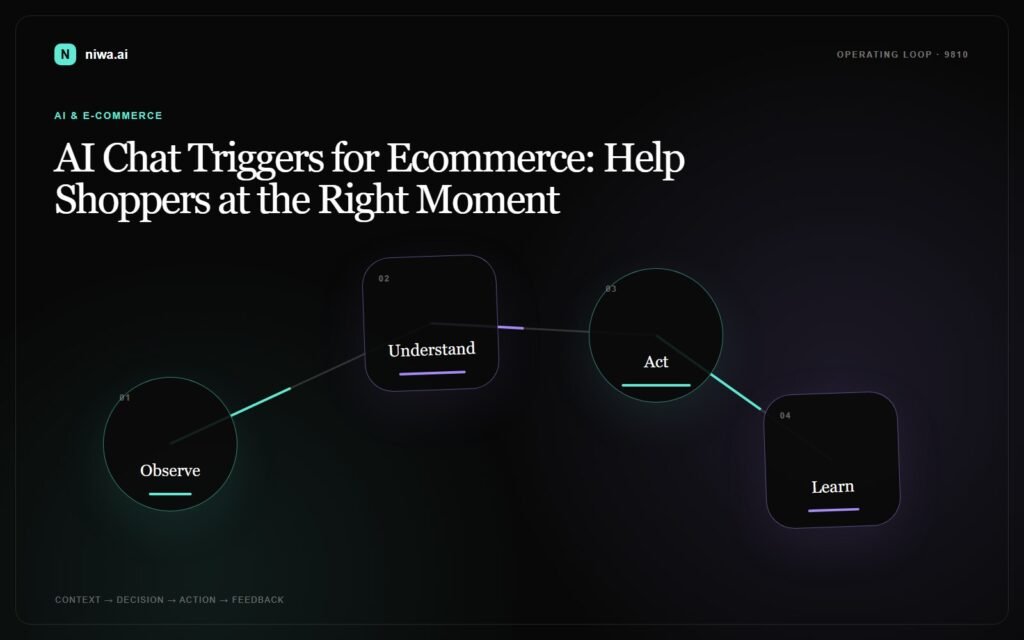
If you are setting this up for the first time, start with five triggers instead of twenty. Too many rules create noise and make performance hard to read.
- Product page, 45-60 seconds: offer product comparison or recommendation help.
- Cart page, 20-30 seconds: offer delivery, returns, or payment clarification.
- Checkout exit intent: ask whether shipping, trust, discount, or payment blocked the order.
- Returning visitor: offer to continue the previous product or category journey.
- Demo or contact page: qualify the lead and invite them to book a call.
Then measure the right outcomes. Do not celebrate chat volume by itself. Track qualified conversations, recovered carts, assisted conversion rate, average order value, support tickets avoided, and successful handoffs to your team.
Where Niwa fits
Niwa AI is designed for the moments when a visitor is close enough to matter but not yet confident enough to act. On a WooCommerce store, that can mean product questions, checkout doubt, cart recovery, FAQ automation, or post-purchase support. On a business website, it can mean lead qualification, demo booking, and CRM-ready handoff.
The practical difference is context. A static chatbot waits for the user to type. A well-configured AI agent notices the page, the intent, and the likely blocker, then opens the shortest path to an answer or next step. You can see the broader workflow on How Niwa Works.
Final takeaway
AI chat does not improve conversion because it talks more. It improves conversion when it appears at the right moment, with the right context, and gives the shopper a useful next step.
If your store already gets traffic but loses buyers around product choice, cart hesitation, or checkout doubt, start with trigger-based AI assistance before adding more campaigns.
Book a Niwa AI demo and see how Niwa can handle product questions, cart objections, and lead conversations on your website.

