

Bit Flows vs Niwa AI: Workflow Builder or WordPress Operator?
Compare Bit Flows and Niwa AI for WordPress automation, WooCommerce, AI agents, messaging, publishing, leads, reporting, and conversion workflows.
Bit Flows and Niwa AI both bring AI-powered action into WordPress, but they solve the problem from different directions. Bit Flows is a visual automation and integration builder for creating workflows inside WordPress. Niwa AI is a conversational WordPress business operator designed to carry out owner requests, manage store operations, publish content, surface business insight, and support conversion workflows.
This comparison is based on publicly documented features available on July 18, 2026. It is intended to help WordPress and WooCommerce owners choose the right operating model, not declare one universal winner.
Quick verdict
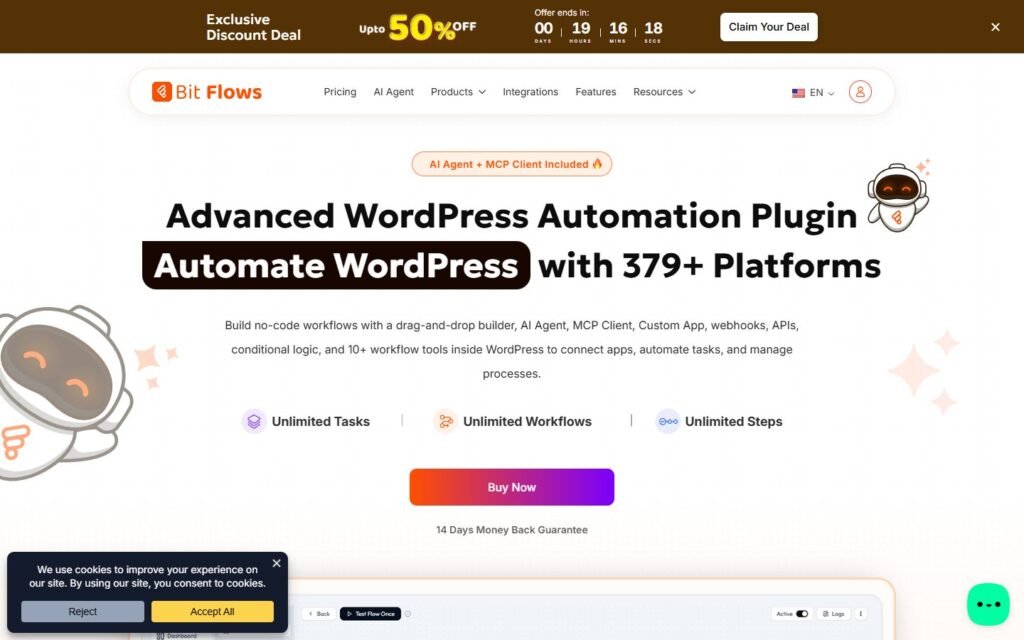
Choose Bit Flows if you want to design detailed trigger-and-action workflows, connect WordPress with hundreds of external tools, add AI decision nodes, use conditional routing, and retain visual control over how each automation runs.
Choose Niwa AI if you want to tell your website what to do through natural conversation, especially through Telegram or WhatsApp, without having to build a separate workflow for every routine business request.
The simplest distinction is:
Bit Flows gives you a flexible automation canvas. Niwa AI gives you an operating conversation with your WordPress business.
Both approaches can save time. The better choice depends on whether you prefer to build the process first or describe the outcome when you need it.
What Bit Flows does
Bit Flows is a self-hosted WordPress automation plugin from Bit Apps. Its official product pages describe it as a no-code workflow builder similar in concept to Zapier or n8n, but running inside WordPress.
Its strongest documented capabilities include:
- A drag-and-drop visual workflow builder.
- Multi-step workflows with conditions, routers, delays, schedules, iterators, loops, parsers, and webhooks.
- A built-in AI Agent that can analyze input, reason with context, select tools, and route work.
- Connections to major AI models including OpenAI, Gemini, Claude, Perplexity, and DeepSeek.
- WordPress and WooCommerce triggers and actions.
- Connections to CRMs, email tools, Google Sheets, Telegram, WhatsApp, Slack, and many other services.
- Custom API and webhook connections.
- Detailed execution logs, testing, failure notifications, and task retries.
- Human-in-the-loop approval and MCP client functionality in its documented Pro toolset.
- Unlimited workflows and tasks according to its public plugin description.
That is a serious automation toolkit. A technically comfortable site owner or agency can use Bit Flows to connect form submissions, orders, customer records, emails, spreadsheets, notifications, and AI decisions in one visual system.
What Niwa AI does
Niwa AI is positioned as a WordPress AI operator rather than primarily as a workflow canvas. The owner can request an outcome in ordinary language, and Niwa works through the relevant website, WooCommerce, content, reporting, research, or communication steps.
Niwa’s documented owner-side use cases include changing product stock or prices, creating or editing content, managing coupons and categories, writing current SEO articles, reviewing business signals, researching competitors, sending supplier emails, and reporting sales trends.
The owner can communicate through Telegram or WhatsApp, turning a familiar messaging app into an operational command surface. That matters when a store owner needs a product updated, a report prepared, or a page published without opening wp-admin and assembling a workflow.
Niwa also operates on the customer-facing side. She can answer buying questions, guide product discovery, capture lead intent, respond to hesitation, recommend relevant products or add-ons, and support follow-up around abandoned carts or unavailable products.
For a broader explanation of that operating model, see How Niwa Works.
Bit Flows vs Niwa AI comparison table
| Capability | Bit Flows | Niwa AI |
|—|—|—|
| Primary model | Visual workflow automation builder | Conversational WordPress business operator |
| WordPress actions | Yes, through configured triggers and actions | Yes, through natural-language operating requests |
| WooCommerce automation | Strong event-based workflows for orders, customers, products, coupons, inventory, and connected apps | Store operations plus owner reporting, publishing, shopper assistance, and conversion workflows |
| AI decision-making | Built-in AI Agent nodes with models, memory, tools, routing, and conditions | Contextual agent reasoning across owner and customer workflows |
| Telegram and WhatsApp | Documented as workflow integrations/actions for messages and notifications | Documented as owner command channels and customer follow-up channels |
| Content publishing | Can generate and publish content through configured workflows | Can research, create, update, and publish content from an owner request |
| Lead capture | Strong form-to-CRM, email, sheet, and AI qualification workflows | Captures visitor intent and supports conversational qualification and follow-up |
| Business reporting | Can log and route data to tools such as Google Sheets and CRMs | Designed to prepare owner-facing sales trends, summaries, and business reports |
| Competitor monitoring | Possible to construct with AI, API, search, schedule, and notification components; not a prominently packaged use case | Competitor research and monitoring are part of Niwa’s documented owner-side positioning |
| Conversion workflows | Highly customizable if the owner builds the triggers, conditions, and actions | Built around shopper guidance, objections, recommendations, lead capture, and recovery workflows |
| Human approval | Documented Human in the Loop tool in Pro | Confirmation and safety can be applied within conversational operating workflows |
| External integrations | A major strength, with hundreds of documented connections | Focused more on operating the WordPress business than being a general integration canvas |
| Best fit | Automation builders, agencies, technical operators, and integration-heavy stacks | Owners who want delegated WordPress and WooCommerce operations from conversation |
Where Bit Flows is stronger
Visual workflow control
Bit Flows is the stronger fit when you want to see every trigger, branch, action, and data mapping on a canvas. A team can define exactly what happens after an order, form submission, user registration, webhook, scheduled event, or AI decision.
That clarity is valuable for repeatable processes. If every new wholesale inquiry must be scored, added to a CRM, written to a spreadsheet, assigned to a salesperson, and acknowledged by email, Bit Flows can make that sequence explicit.
Breadth of integrations
The product’s official pages emphasize hundreds of integrations and tools. This gives Bit Flows an advantage for businesses whose main challenge is moving data reliably among WordPress, SaaS apps, CRMs, spreadsheets, communication platforms, and custom APIs.
Technical workflow components
Conditions, routers, loops, parsers, delays, webhooks, task logs, retries, custom apps, API requests, and MCP connections make Bit Flows attractive to agencies and advanced users. It is not only an AI writing plugin; it is a broad automation environment with AI added as a decision-making layer.
Predictable event-driven automation
Once a workflow is configured, Bit Flows can run it repeatedly in the background. That is ideal for stable processes such as synchronizing contacts, routing form entries, recording orders, sending notifications, or generating content from a structured queue.
Where Niwa AI is stronger
Outcome-first administration
Niwa does not require the owner to translate every request into triggers, nodes, mappings, and branches. The owner can ask for an outcome: update a price, check low stock, compare a competitor, publish an article, summarize sales, or investigate a problem.
This is a meaningful advantage for founders who want delegation rather than another system to configure.
Telegram and WhatsApp as command channels
Bit Flows officially supports Telegram and WhatsApp as integrations within workflows. That is useful for sending alerts, updates, and automated messages.
Niwa’s distinction is that messaging is part of the administrative interface itself. The owner can talk to the WordPress operator from a phone, request work, answer a clarification, approve a consequential action, and receive the result.
The difference is not “supports Telegram” versus “does not support Telegram.” Both products document messaging capabilities. The difference is messaging action inside a designed workflow versus messaging conversation as the operating experience.
Business interpretation, not only data movement
Bit Flows can move order or form data into Google Sheets, a CRM, email, or another system. It can also use AI to analyze inputs inside a workflow.
Niwa is positioned to turn business data into an owner-facing explanation: what changed, why it matters, what appears unusual, and which next action is worth taking. That is closer to an operator preparing a report than an automation merely recording a row.
Competitor research and content decisions
A capable Bit Flows user could assemble a scheduled research workflow using AI, HTTP requests, APIs, data stores, and notifications. Its flexibility should not be underestimated.
However, competitor research and current-industry content are explicitly part of Niwa’s operating proposition. The owner can request research and publishing as a task without first engineering the entire pipeline.
Storefront conversion work
Niwa’s customer-facing layer is a major difference. She is designed to engage visitors, understand what they need, answer objections, recommend products, capture useful intent, and guide the next conversion step.
That connects administration with revenue. A product update, lead conversation, report, and follow-up are not necessarily separate systems, they can be parts of the same commercial context.
Read Turn Website Visitors Into Leads for the lead-capture side, and AI Conversation Intelligence for Ecommerce for how recurring customer questions can reveal conversion problems.
WordPress and WooCommerce operations
Both products have credible WordPress and WooCommerce use cases, but their operating patterns differ.
With Bit Flows, you might configure a WooCommerce order trigger, evaluate order data with an AI Agent, update a spreadsheet, add the buyer to a CRM, generate a coupon, and notify a team member on Telegram. Once designed, that workflow can run consistently at scale.
With Niwa, an owner might ask: “Show me products that are low in stock, summarize their recent sales, prepare the changes, and contact the supplier.” The value comes from interpreting the request and carrying it across connected operational steps.
Choose Bit Flows when the process is known and should run repeatedly. Choose Niwa when requests change day to day and the owner wants to delegate the objective conversationally.
Many businesses may eventually use both patterns: fixed automations for predictable events and an operator for changing decisions, exceptions, investigation, and growth work.
Content publishing and SEO
Bit Flows officially documents AI content generation and autoblogging workflows using multiple model providers. It can take a topic or keyword, generate text, and publish it through an automation.
Niwa can also research, draft, update, and publish WordPress content. The practical difference is orchestration. Bit Flows is ideal when the publishing pipeline is predefined. Niwa is suited to requests that require checking current search intent, avoiding duplicate site topics, evaluating a competitor, selecting internal links, and then publishing with business context.
For SEO teams, the choice is between a reusable content-production flow and a delegated editorial operator. Both can be useful, but they are not identical.
Lead capture and conversion workflows
Bit Flows is strong after a measurable event occurs. A form submission can be qualified by AI, routed to the right CRM, added to a sheet, followed by email, and reported to a sales channel.
Niwa focuses on the conversation before and around that event. She can ask what the visitor needs, identify buying intent, answer product questions, and turn an uncertain visit into a useful lead or next action.
A good conversion system often needs both layers:
- Understand and guide the visitor.
- Capture structured intent.
- Route the lead or order correctly.
- Follow up with context.
- Report what the business should improve.
Niwa is designed around that connected commercial journey. Bit Flows gives builders the components to engineer a tailored version of it.
Which one should you choose?
Choose Bit Flows when:
- You enjoy building visual automations.
- Your business depends on many external integrations.
- You need explicit triggers, branches, data mapping, APIs, and repeatable background workflows.
- You want AI Agent nodes inside a broader automation system.
- Your team has the skill and time to design and maintain the workflows.
Choose Niwa AI when:
- You want to manage WordPress and WooCommerce through conversation.
- Telegram or WhatsApp should function as an owner command channel.
- Your requests change frequently and do not fit one fixed workflow.
- You need publishing, reporting, research, store operations, and conversion work in one operating relationship.
- You want the system to assist both the owner and the website visitor.
If you want to see that model applied to your own website, book a Niwa demo.
Final assessment
Bit Flows is one of the more capable WordPress-native automation builders in the current market. Its visual editor, AI Agent, integration breadth, workflow tools, logs, API support, and self-hosted model make it a strong option for sophisticated automation.
Niwa AI targets a different layer. Instead of asking the owner to become the workflow architect for every new need, Niwa aims to become the conversational operator who receives the objective, works across WordPress and WooCommerce, and reports back with the result.
For integration-heavy, repeatable processes, Bit Flows may be the better foundation. For day-to-day delegation, owner messaging, changing operational requests, business interpretation, customer guidance, and conversion-focused work, Niwa AI is the more direct fit.
Frequently asked questions
Is Bit Flows an AI agent or an automation plugin?
It is both. Bit Flows is primarily a visual WordPress workflow automation platform, and its built-in AI Agent can analyze information, use connected tools, make decisions, and route work inside those workflows.
Can Bit Flows automate WooCommerce?
Yes. Its official plugin documentation describes WooCommerce triggers and actions for order, customer, inventory, coupon, notification, CRM, spreadsheet, and other connected workflows.
Does Bit Flows support Telegram and WhatsApp?
Yes. Bit Flows documents Telegram and WhatsApp integrations for workflow actions such as messages, notifications, and connected automation. Niwa AI differs by positioning Telegram and WhatsApp as conversational owner-administration channels as well as supporting follow-up workflows.
Can Bit Flows publish WordPress content automatically?
Yes. Bit Flows documents content generation and autoblogging workflows using AI providers such as OpenAI, Gemini, and Claude, with WordPress publishing actions.
Is Niwa AI easier for a non-technical owner?
For owners who prefer describing an outcome instead of building workflow logic, Niwa’s conversational model is likely the easier fit. Bit Flows is no-code, but advanced automations still require process design, field mapping, testing, and maintenance.
Which is better for lead capture?
Bit Flows is strong for routing and processing form submissions after capture. Niwa AI is designed to engage visitors conversationally, understand intent, qualify interest, and connect that context to follow-up. The better choice depends on whether your main gap is workflow routing or the visitor conversation itself.
Can Bit Flows monitor competitors?
Its AI, API, scheduling, webhook, storage, and notification components could be assembled into a custom monitoring workflow. However, competitor monitoring is not as prominently packaged in its public positioning as it is in Niwa’s owner-side use cases.
Are Bit Flows and Niwa AI direct substitutes?
Not completely. They overlap in WordPress actions, WooCommerce automation, AI decisions, content, messaging, and lead workflows, but their interfaces and operating models differ. Bit Flows is a workflow-building platform; Niwa AI is a conversational operating layer.
Sources reviewed
Competitor capabilities were checked against the official Bit Flows website, the official Bit Flows AI Agent page, and the current Bit Flows listing in the WordPress.org plugin directory. Niwa capabilities were checked against current public pages on niwachat.com. Feature availability and packaging can change, so buyers should confirm plan-specific details before deployment.

