

SiteLeads vs Niwa AI: Lead Widget or WordPress Business Agent?
Compare SiteLeads and Niwa AI for WordPress lead capture, WhatsApp, Telegram, WooCommerce operations, publishing, reporting, and conversions.
SiteLeads and Niwa AI both use AI to help a WordPress business capture more value from website traffic, but they approach the job from different directions.
SiteLeads is primarily a lead-generation contact widget and website AI assistant. It brings WhatsApp, phone, email, Telegram, Messenger, Instagram and other contact options into one floating interface, while its optional AI assistant answers questions and collects visitor details.
Niwa AI is positioned as a broader WordPress business operator. It combines customer-facing conversion assistance with owner-side WordPress and WooCommerce actions, content publishing, reporting and administration through conversational channels.
The practical choice is not simply “which chatbot is better?” It is whether you need a focused contact-and-lead layer or an AI agent that can participate in wider website operations.
Quick Verdict
Choose SiteLeads if your priority is a polished, easy-to-launch contact widget with many visitor communication channels, lead capture, targeting rules and an AI assistant trained on selected website content.
Choose Niwa AI if you want to go beyond visitor contact and use AI for WordPress and WooCommerce operations, owner administration through Telegram or WhatsApp, publishing, business reporting, lead workflows, competitor monitoring and conversion-oriented storefront assistance.
For a closer look at the broader operating model, see How Niwa Works.
What SiteLeads Does Well
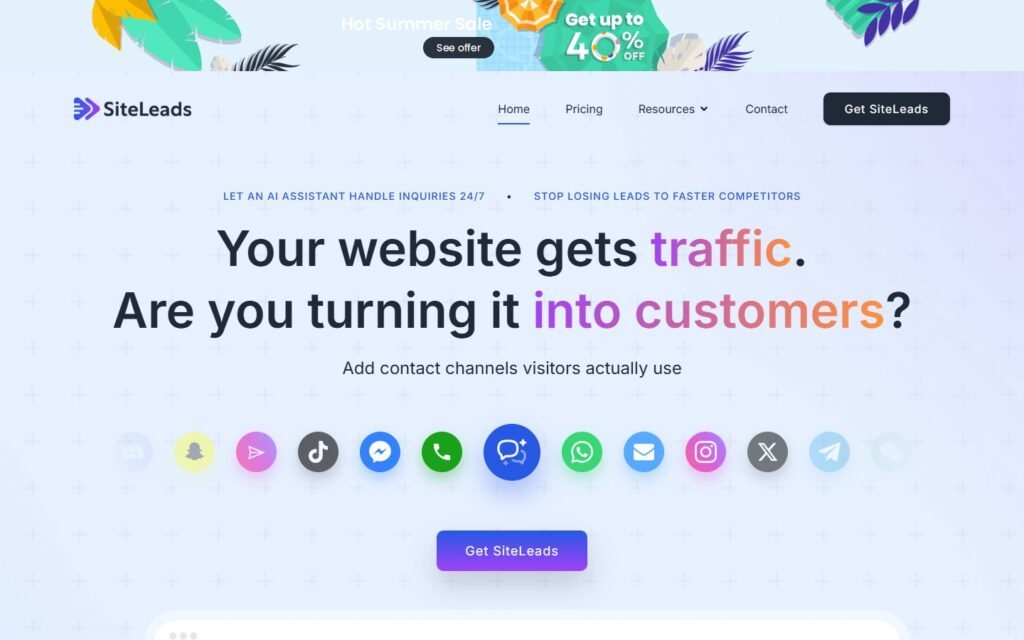
SiteLeads has a clear and useful proposition: make it easier for a visitor to contact the business and prevent after-hours traffic from disappearing without a conversation.
Its official WordPress listing and product documentation describe:
- A floating contact widget with WhatsApp, WhatsApp Business, phone, email, Messenger, Telegram, Instagram, SMS and other channels.
- An optional AI assistant trained on selected website pages and uploaded documents.
- Automated question answering and natural collection of visitor names and contact details.
- A WordPress-accessible lead dashboard.
- Multiple contacts, availability scheduling and mobile-oriented layouts.
- Display controls based on page, time, scroll depth, exit intent, geography and traffic source, depending on plan.
- Analytics for clicks, conversations, sources and channel conversion performance.
That is a strong package for local businesses, agencies and service companies whose main website goal is to generate calls, messages and qualified enquiries. SiteLeads also deserves credit for keeping the initial setup approachable: the basic contact widget can work without an AI account, while the AI assistant can be added when needed.
Its free tier is useful for testing the concept, although official plan details place limits on AI messages, captured leads, crawled pages and file uploads.
What Niwa AI Does Differently
Niwa AI is designed around a wider question: what if the business owner could talk to WordPress like a member of the team?
Niwa can connect the owner’s conversational instructions with practical website work. Depending on configured tools and permissions, that can include WooCommerce product and stock operations, pricing and coupon tasks, page or headline changes, SEO content creation, summaries, sales insight and ongoing operational workflows.
Niwa also works on the storefront side. It can help visitors understand products, compare choices, answer objections, identify purchase intent, capture leads and guide shoppers toward a relevant product, add-on, demo or next action.
That combination matters. A lead widget usually ends when the contact is captured or handed to another channel. A WordPress business agent can connect the conversation to the underlying site, catalog, content and owner workflow.
Explore Niwa’s visitor-conversion approach on Turn Website Visitors Into Leads or review the setup path on Get Started.
SiteLeads vs Niwa AI Comparison Table
| Capability | SiteLeads | Niwa AI |
|---|---|---|
| Primary purpose | Contact widget, AI Q&A and lead capture | WordPress business operations plus customer-facing conversion assistance |
| Website AI assistant | Yes; trained on selected pages and documents | Yes; uses website and business context for customer and owner workflows |
| Lead capture | Yes; a core documented feature | Yes; part of broader visitor and conversion workflows |
| Visitor WhatsApp and Telegram options | Yes; contact channels can be displayed in the widget | Can support customer communication workflows, depending on configuration |
| WordPress administration from Telegram or WhatsApp | Not documented in the official materials reviewed | A core owner-side use case |
| WooCommerce product, price and stock operations | Not documented as an operator feature | Supported owner-side operational use cases |
| Content and SEO publishing | Not documented as a core feature | Supported workflow, including SEO blog creation and publishing |
| Business reporting | Widget, conversation and lead analytics are documented | Broader operational and sales summaries can be requested through the agent |
| Competitor monitoring | Not documented in the official feature set reviewed | Can be configured for current competitor research and monitoring workflows |
| Display targeting | Strong page, time, source, location, scroll and exit-intent controls | Conversion engagement is part of the broader storefront workflow |
| Best fit | Businesses needing a focused multichannel lead widget | Businesses wanting one AI layer across WordPress operations and conversion work |
WordPress and WooCommerce Operations
This is the clearest difference.
SiteLeads is WordPress-native in the sense that it installs as a plugin, is configured in WordPress and makes its lead tools available from the dashboard. However, its official materials focus on visitor contact, AI answers, lead storage, targeting and analytics. They do not present SiteLeads as an agent for changing products, prices, stock, coupons, posts or pages.
Niwa AI is built for those operational requests. A store owner can use natural language to request practical changes and reports instead of treating every small task as a separate dashboard session or webmaster ticket.
For a WooCommerce business, that makes Niwa the more suitable option when the AI needs to work with the store rather than only sit on top of it.
Telegram and WhatsApp: Same Channels, Different Roles
Both products mention channels such as WhatsApp and Telegram, but the role of those channels is different.
With SiteLeads, the channels are primarily visitor contact destinations inside the website widget. A visitor taps WhatsApp, Telegram, phone or another option to reach the business. This is valuable and friction-reducing.
With Niwa AI, Telegram or WhatsApp can also act as an owner administration interface. The owner can ask for a site task, a report, research or an operational update conversationally.
A business may value both concepts, but they should not be confused: displaying a Telegram contact button is not the same as administering WordPress through an AI agent in Telegram.
Content Publishing, Reporting and Monitoring
SiteLeads provides useful performance analytics around its own conversion layer, including interactions, conversations, leads and channel performance. That can help a business understand whether the widget is producing enquiries.
Niwa’s reporting scope is broader. It can be used for business and store summaries, sales trends and operational questions, subject to the connected site data and permissions.
The same distinction applies to publishing and competitor research. SiteLeads’ documented job is to learn from content and answer visitors; it is not marketed as a WordPress publishing or competitor-monitoring system. Niwa can research current industry or competitor information and turn approved findings into WordPress content and recurring reports.
Lead Capture and Conversion Workflows
SiteLeads is especially compelling when the desired conversion is a message, phone call or captured contact. Its multiple channels, scheduling, targeting and attention-grabbing widget formats are directly aligned with that outcome.
Niwa is better suited to more varied conversion paths. Depending on the business, the right outcome may be:
- Capturing an enquiry.
- Recommending the right product.
- Handling a common objection.
- Sending a visitor to checkout.
- Suggesting an add-on or upgrade.
- Booking a demo.
- Following up after cart abandonment.
- Recording demand for an unavailable item.
If you want to see how that could fit your own website, Book a Niwa Demo.
Can SiteLeads and Niwa AI Be Used Together?
Potentially, yes. They are not exact substitutes in every implementation.
A business could use SiteLeads for its highly visible contact-channel widget and specialized display targeting, while using Niwa AI for owner-side WordPress administration, WooCommerce operations, content, reporting and broader customer journeys.
Before combining them, check for overlapping chat interfaces, duplicated greetings and competing triggers. Two widgets opening at the same moment can reduce clarity rather than improve conversion. The best setup gives each tool a distinct responsibility.
Which One Should You Choose?
SiteLeads is the stronger focused choice when:
- You mainly want more WhatsApp messages, calls, emails or Telegram contacts.
- You need a simple multichannel contact widget.
- You want an AI assistant that answers from website content and captures details.
- You value granular widget targeting and channel analytics.
Niwa AI is the stronger broader choice when:
- You want to administer WordPress through natural-language conversation.
- You need WooCommerce product, stock, price or promotion workflows.
- You want AI-assisted publishing and current research.
- You need business summaries rather than only widget analytics.
- You want customer conversations connected to conversion and operational actions.
- You want one agent spanning leads, storefront guidance and owner-side work.
The fairest conclusion is that SiteLeads is a capable lead-generation layer, while Niwa AI is designed as a more comprehensive business-operating layer for WordPress.
Frequently Asked Questions
Is SiteLeads a WordPress AI agent?
SiteLeads includes an AI assistant trained on website pages and documents, but its documented scope centers on answering visitor questions, qualifying visitors and capturing leads. It is not presented as a general WordPress administration agent.
Does SiteLeads support WhatsApp and Telegram?
Yes. Its contact widget supports WhatsApp, Telegram and numerous other visitor contact channels. That does not mean it uses those channels to execute owner-side WordPress administration tasks.
Can SiteLeads manage WooCommerce products or stock?
The official product pages and WordPress listing reviewed for this comparison do not document product, price, inventory or coupon administration as SiteLeads features.
Can Niwa AI capture leads?
Yes. Niwa supports customer-facing conversations and conversion workflows that can collect intent and contact information, while also connecting those interactions to broader website and business tasks.
Which is better for a local service business?
If the main objective is to increase calls and messages through a visible contact widget, SiteLeads is a strong fit. If the business also wants AI-driven WordPress changes, publishing, reporting and owner workflows, Niwa AI offers the broader scope.
Which is better for WooCommerce?
Niwa AI is the more appropriate choice when the requirement includes catalog operations, stock, pricing, product guidance, reporting or conversion workflows tied to WooCommerce. SiteLeads can still be useful as a contact and lead-capture layer.
Is SiteLeads free?
SiteLeads offers a free plan. Its official pricing currently lists limits for AI messages, captured leads, website pages and uploaded files, so businesses should check the current plan page before deciding.
Sources Checked
This comparison was researched using the official SiteLeads WordPress.org plugin listing, the official SiteLeads website and pricing information, and the official SiteLeads documentation for AI assistant setup. Niwa AI capabilities were checked against the current Niwa AI website and verified site pages. Features not documented by the competitor were described as “not documented,” rather than assumed to be impossible.

