

AI Copilot vs Niwa AI: Content Tool or WordPress Business Agent?
Compare AI Copilot and Niwa AI for WordPress content, WooCommerce, chatbots, publishing, messaging, reporting, leads, and conversion workflows.
AI Copilot by QuadLayers and Niwa AI both bring conversational AI into WordPress, but they are designed around different kinds of work. AI Copilot is primarily an editor-centered content and chatbot toolkit. Niwa AI is designed as a broader WordPress business agent that can connect publishing with site operations, WooCommerce work, owner messaging, reporting, lead context, competitor monitoring, and conversion workflows.
This comparison addresses search intent around WordPress AI agent, AI Copilot WordPress, best WordPress AI plugin, and AI Copilot alternatives. It reflects the official QuadLayers product page, documentation, pricing information, and WordPress.org plugin listing reviewed on July 16, 2026. Where a feature is not documented, this article says exactly that rather than claiming it is technically impossible.
Quick Verdict
Choose AI Copilot if your main priority is creating and improving content inside WordPress. It is a practical option for writers, editors, bloggers, and ecommerce teams that want AI generation, revision tools, templates, chatbot functionality, images, bulk content features, and Gutenberg or Classic Editor integration.
Choose Niwa AI if you want an agent that works beyond the editor: administering WordPress and WooCommerce through approved workflows, accepting instructions through Telegram or WhatsApp, publishing finished content, preparing business reports, monitoring competitors, capturing customer intent, and connecting conversations with commercial next steps.
The simplest distinction is:
AI Copilot helps people create and improve content in WordPress. Niwa AI is designed to help operate the business that runs on WordPress.
Neither approach is automatically better. The right choice depends on whether you need a content-production toolkit or an ongoing operating agent.
What Is AI Copilot by QuadLayers?
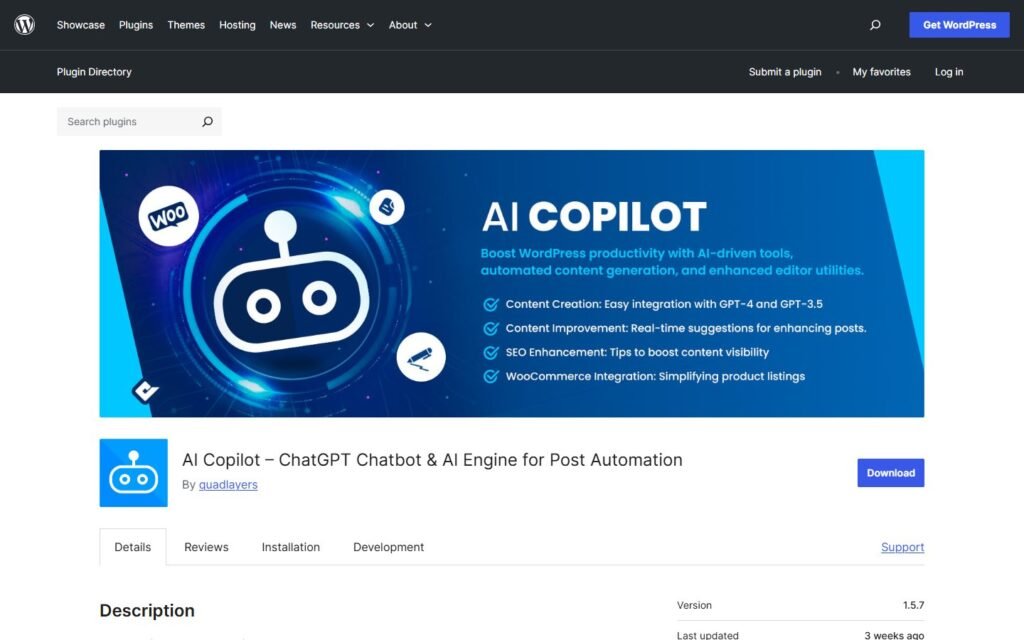
AI Copilot is a WordPress plugin from QuadLayers. Its official materials position it around AI-assisted content creation, content review, editor actions, chatbots, images, templates, and API-consumption tracking.
Its documented capabilities include:
- Generating content for posts, pages, products, and other post types
- Reviewing and improving existing content
- Producing structured drafts with titles, sections, excerpts, tags, and images
- Gutenberg and Classic Editor integration
- WooCommerce integration for ecommerce content and product-listing productivity
- Translation, correction, summarization, expansion, paraphrasing, and SEO-oriented editor actions
- Custom content templates and custom action templates
- A website chatbot that can use site content and a knowledge base
- Stock-image suggestions through Pexels
- AI image generation through DALL-E in supported plans
- API usage statistics by user, role, module, and model
- A playground for testing chat, completion, assistant, and image workflows
- Bulk post creation and bulk revision in premium plans
This is a meaningful feature set. AI Copilot is not merely a one-button paragraph generator. It combines generation, revision, reusable templates, chatbot tools, visual assets, and usage controls inside WordPress.
Its strongest use case is a human-led editorial workflow: the user opens WordPress, configures the prompt, previews the result, generates the content, reviews individual sections, and writes the selected output into the editor.
What Is Niwa AI?
Niwa AI starts from a different question: what if a site owner could message an AI operator as naturally as they message a capable team member?
Niwa connects conversation with approved WordPress and WooCommerce actions. Depending on the installation, connected tools, and permissions, its workflows can include:
- Creating, updating, and publishing posts and pages
- Managing products, prices, stock, coupons, and order-related work
- Receiving owner instructions through Telegram or WhatsApp
- Investigating site issues and reporting the result
- Producing business-oriented summaries and performance reports
- Researching competitors and monitoring relevant changes
- Capturing visitor questions, buying intent, and useful lead context
- Supporting product discovery and purchase decisions
- Connecting conversations with follow-up and conversion actions
The goal is not just to place AI controls inside the WordPress editor. The goal is to reduce the distance between an owner’s instruction and a completed business outcome.
That distinction is also visible in our SiteGround AI Agent vs Niwa AI comparison, which examines the difference between dashboard-centered administration and broader owner-centered operation.
AI Copilot vs Niwa AI: Feature Comparison
| Capability | AI Copilot by QuadLayers | Niwa AI |
|—|—|—|
| Primary positioning | WordPress content, editor, image, and chatbot toolkit | WordPress business operator and conversion agent |
| AI content generation | Yes | Yes |
| Existing-content revision | Yes, with editor actions and bulk revision in premium plans | Yes, through delegated content workflows |
| Gutenberg integration | Yes | Can create and update WordPress content without making the editor the main owner interface |
| Classic Editor integration | Yes | Content operation is not centered on one editor interface |
| Custom post types | Official documentation describes support across post types | Supported through approved WordPress workflows where configured |
| WooCommerce | Documented for ecommerce content and product-listing productivity | Broader store operations, including products, prices, stock, coupons, and business workflows |
| Website chatbot | Yes, with site-content and knowledge-base functionality | Yes, with customer-intent and conversion-oriented workflows |
| Image assistance | Pexels suggestions and supported AI image generation | Images can be included in delegated publishing workflows when tools are connected |
| Bulk content creation | Yes, in premium plans | Batch publishing can be delegated through available operating tools |
| WordPress administration beyond content | Not a prominently documented core capability | Yes, through approved operator workflows |
| Telegram administration | Not documented as a native owner channel in the official materials reviewed | Yes |
| WhatsApp administration | Not documented as a native owner channel in the official materials reviewed | Yes |
| Business reporting | API-consumption statistics are documented; packaged business reporting is not the main positioning | Yes, focused on store, site, content, and operational signals |
| Lead capture | Chatbot support and sales use cases are documented; structured lead capture and owner follow-through are not prominently documented | Designed to preserve visitor intent and connect it with follow-up |
| Competitor monitoring | Not prominently documented as a recurring owner workflow | Yes, as research, monitoring, reporting, and content input |
| Conversion workflows | A chatbot can support sales; broader conversion orchestration is not prominently documented | A central focus across product guidance, intent, handoff, and follow-up |
| Best fit | Writers, editors, bloggers, content teams, and users wanting editor-native AI | Owners wanting delegated site, store, publishing, reporting, and growth workflows |
Public products evolve. “Not documented” does not mean that custom development could never add a feature. It means the capability was not presented as a native or central function in the official materials reviewed for this comparison.
Where AI Copilot Is Stronger
A fair comparison should begin with the areas where AI Copilot has clear advantages.
A focused editor experience
AI Copilot is built for people who spend time in the WordPress editor. The content panel lets users define a topic, number of sections, paragraphs, word count, language, style, and tone. It then prepares a title, structured sections, an excerpt, tags, and an image suggestion.
That level of editor control is useful when a writer wants AI assistance without delegating the whole assignment. Individual sections can be reviewed and inserted, and the output can be regenerated before it is written into the post.
Niwa is more delegation-oriented. If your preferred workflow is “help me improve this paragraph while I edit,” AI Copilot may feel more direct. If your preferred workflow is “research this opportunity, prepare the complete article, configure its SEO elements, and publish it,” Niwa is closer to the requested outcome.
Reusable content and action templates
AI Copilot allows users to save custom content templates and custom editor actions. That is valuable for teams with repeatable formats, brand rules, localization needs, or standardized revision tasks.
Its action system supports practical operations such as correcting, enhancing, translating, summarizing, expanding, and paraphrasing selected text. Users can also create their own prompt-based actions and decide where those actions appear.
This gives content teams a visible, reusable editorial system inside wp-admin.
Granular image tools
The official documentation describes both stock-image discovery through Pexels and AI image generation through DALL-E. Users can select source, orientation, size, placement, and other settings, review the result, and save it to the WordPress media library.
For a hands-on author who wants to generate text and visual assets in the same editor session, that is a real strength.
Transparent AI usage statistics
AI Copilot documents API-consumption reporting by user, role, module, and model. That helps teams understand how their OpenAI usage is distributed and identify expensive or heavily used workflows.
Niwa’s reporting proposition is different. It is aimed more at explaining what is happening in the website or business than at serving as a dedicated AI token-accounting dashboard.
A configurable chatbot
AI Copilot includes a website chatbot that can use site content and a knowledge base. QuadLayers positions it for support and sales as well as general interaction.
Businesses that primarily want to add a chatbot and tune its appearance, content knowledge, and assistant behavior may find this focused functionality attractive.
Where Niwa AI Is Different
Niwa’s advantage is not that AI Copilot lacks useful AI. It has substantial content and chatbot functionality. The difference is the scope of the working relationship.
WordPress and WooCommerce operations, not only content
AI Copilot’s official WooCommerce positioning emphasizes content management and product listings. Its content documentation also shows that the editor panel can appear across post types, including orders and other content objects.
However, the reviewed official materials do not prominently document AI Copilot as a general store operator for inventory changes, price updates, coupon creation, order workflows, or broader WordPress administration.
Niwa is designed around approved operational tasks. The owner can ask for a product update, stock check, pricing change, coupon, content publication, site investigation, or report as part of one continuing conversation.
That makes Niwa a stronger fit when the requirement is not simply “write a better product description,” but “help me run the store.”
Telegram and WhatsApp as owner interfaces
AI Copilot lives primarily in WordPress: its settings, playground, editor tools, content panel, chatbot configuration, bulk tools, and statistics are managed in the site interface.
The official AI Copilot materials reviewed for this article do not document Telegram or WhatsApp as native administration channels for the owner.
Niwa treats messaging as a primary operating interface. An owner can send an instruction from a phone, receive a result, answer an approval question when necessary, and continue without navigating several WordPress screens.
This does not make editor tools obsolete. It solves a different problem: giving the owner access to the business agent wherever the owner already communicates.
Delegated publishing rather than assisted drafting
AI Copilot provides strong assisted drafting. The user defines parameters, previews prompts, generates output, chooses sections, and writes the result into the editor. Premium plans add bulk post creation and bulk revision.
Niwa is designed for end-to-end delegation. A request can begin with keyword or competitor research and continue through outlining, drafting, internal linking, categorization, tags, metadata, publication, and reporting.
For teams comparing broader WordPress AI frameworks, our AI Engine vs Niwa AI guide explores a similar distinction between flexible AI components and an owner-centered operating workflow.
Business reporting instead of only API reporting
AI Copilot’s documented statistics are useful: they show approximate API usage across users, roles, modules, and models.
That is different from business reporting. The reviewed materials do not prominently position AI Copilot as a system for explaining sales movement, low-stock risks, content performance, customer signals, operational exceptions, or recommended next actions.
Niwa’s reporting is intended to answer owner questions such as: What changed? What needs attention? Which products or pages are underperforming? What should we do next?
Competitor monitoring connected to action
AI Copilot can create content from a supplied topic and prompt. The official features reviewed do not prominently document recurring competitor discovery or monitoring as a native workflow.
Niwa can treat competitor research as an operating process: identify a relevant competitor, review current positioning, compare search intent, detect a content opportunity, prepare a fair article or landing page, publish it, and report completion.
The value is not merely web research. It is connecting the finding to a useful business action.
Lead context and conversion follow-through
AI Copilot’s chatbot is documented for customer support and sales, and it can use website content and a knowledge base. Those are valuable capabilities.
The reviewed official materials do not prominently describe a packaged workflow for structured lead capture, preserving conversational buying intent, notifying the owner with useful context, or connecting that context to follow-up actions.
Niwa’s conversion layer is built around the commercial meaning of the conversation. A product question can lead to a recommendation, a captured preference, a qualified lead, a handoff, or an approved follow-up.
This is the same practical problem explored in our guide to AI lead capture for ecommerce: a contact field is more useful when the business also understands what the visitor wanted and why the visitor hesitated.
Niwa also supports the pre-purchase logic described in our AI checkout assistant guide, where resolving shipping, returns, payment, trust, or product-fit uncertainty can protect a sale before the shopper leaves.
Which Is Better for Content Publishing?
For hands-on writing inside WordPress, AI Copilot is a strong choice. It offers detailed generation controls, editor actions, reusable templates, image tools, and bulk features. Writers who want to remain in control of every section may prefer that interface.
For delegated publishing, Niwa AI is the better fit. The owner can describe the business objective and let the agent handle the broader workflow, including research, structure, drafting, internal links, SEO metadata, categories, tags, publication, and completion reporting.
The distinction is assisted production versus delegated completion.
Which Is Better for WooCommerce?
AI Copilot can help WooCommerce teams create and improve product content. Its integration with post types and product listings makes it useful for descriptions, SEO text, translation, revision, and bulk editorial work.
Niwa is more suitable when the store needs content and operations in one conversation. Product copy can be connected with price, stock, coupon, reporting, customer questions, and follow-up workflows.
Choose AI Copilot when the main bottleneck is producing and polishing ecommerce content. Choose Niwa when the bottleneck is coordinating the ongoing work of the WooCommerce business.
Can AI Copilot Replace Niwa AI?
It can replace part of the content stack for businesses that mainly need drafting, revision, templates, images, and a configurable chatbot.
It does not currently present itself, in the official materials reviewed, as a complete substitute for Niwa’s owner messaging, general WordPress and WooCommerce operations, delegated publishing, business reporting, competitor monitoring, lead-context preservation, or conversion follow-through.
Likewise, Niwa does not make AI Copilot irrelevant. A content team may prefer AI Copilot’s granular editor actions even if the owner uses Niwa for broader operational work. The products can overlap without being identical.
Final Recommendation
Choose AI Copilot by QuadLayers if you want a focused WordPress content toolkit with strong editor integration, reusable prompts, chatbot functionality, image assistance, bulk content features, and API-consumption tracking.
Choose Niwa AI if you want an agent that stays closer to the entire WordPress business: owner instructions through Telegram or WhatsApp, site and WooCommerce operations, delegated publication, business reports, competitor workflows, lead context, and conversion actions.
The deciding question is straightforward:
Do you want AI inside the WordPress editor, or do you want an AI agent helping operate the WordPress business?
If the second description is closer to your goal, explore Niwa AI and see how WordPress administration can extend beyond the dashboard.
Frequently Asked Questions
Is AI Copilot a WordPress AI agent?
AI Copilot uses AI to generate and revise content, perform editor actions, power a website chatbot, suggest or generate images, and support bulk content work. It can reasonably be described as an AI content assistant or toolkit. Its official positioning is more editor- and content-centered than a general autonomous WordPress operator.
Does AI Copilot work with WooCommerce?
Yes. QuadLayers documents WooCommerce integration and support for content across post types. Its public positioning emphasizes product-listing and ecommerce-content productivity rather than broad store administration.
Can AI Copilot publish complete WordPress posts?
AI Copilot can generate structured post content and write selected output into the WordPress editor. Premium plans document bulk post creation and revision. The standard workflow remains editor-centered, with the user reviewing and controlling the content process.
Does AI Copilot include a chatbot?
Yes. The WordPress.org listing and QuadLayers documentation describe a customizable chatbot that can use site content and a knowledge base for support, sales, and other interactions.
Does AI Copilot support Telegram or WhatsApp administration?
Telegram and WhatsApp are not documented as native owner-administration channels in the official AI Copilot materials reviewed on July 16, 2026. Custom integration may be possible, but it should not be presented as a standard feature without supporting documentation.
Can AI Copilot manage WooCommerce stock, prices, orders, and coupons?
The official materials reviewed document WooCommerce integration for content and product-listing productivity. They do not prominently document AI Copilot as a general operator for stock, pricing, order, and coupon workflows. Niwa AI is designed to support broader approved WooCommerce operations.
Does AI Copilot provide business reports?
AI Copilot documents API-consumption statistics by user, role, module, and model. That is useful for managing AI usage. Packaged reporting about sales, store performance, customer behavior, or operational priorities is not its main documented proposition.
Which is better for SEO content?
AI Copilot is strong for hands-on SEO-oriented writing and revision inside the editor. Niwa is stronger when SEO work needs to include live research, competitor selection, intent analysis, internal linking, metadata, publication, and completion reporting as one delegated workflow.
Are AI Copilot and Niwa AI direct competitors?
Only partly. Both work with AI, WordPress content, WooCommerce, and conversational interfaces. AI Copilot is primarily a content, editor, and chatbot toolkit. Niwa AI is designed as a broader owner-facing business operator and conversion agent.

