

Amaya Chatbot AI vs Niwa AI: WooCommerce AI Compared
Compare Amaya Chatbot AI and Niwa AI for WooCommerce product chat, WordPress operations, messaging, publishing, reporting, leads, and conversions.
Amaya Chatbot AI and Niwa AI both bring conversational AI to WooCommerce, but they are designed for different jobs. Amaya is primarily a customer-facing product-information chatbot. Niwa combines customer conversations with owner-side WordPress and WooCommerce operations, messaging administration, publishing, reporting, monitoring, and conversion workflows.
This comparison uses Amaya’s current WooCommerce Marketplace listing and official WooCommerce documentation as of July 18, 2026. It gives Amaya full credit for what it does well and avoids treating undocumented features as product gaps unless the distinction matters to the buying decision.
Quick verdict
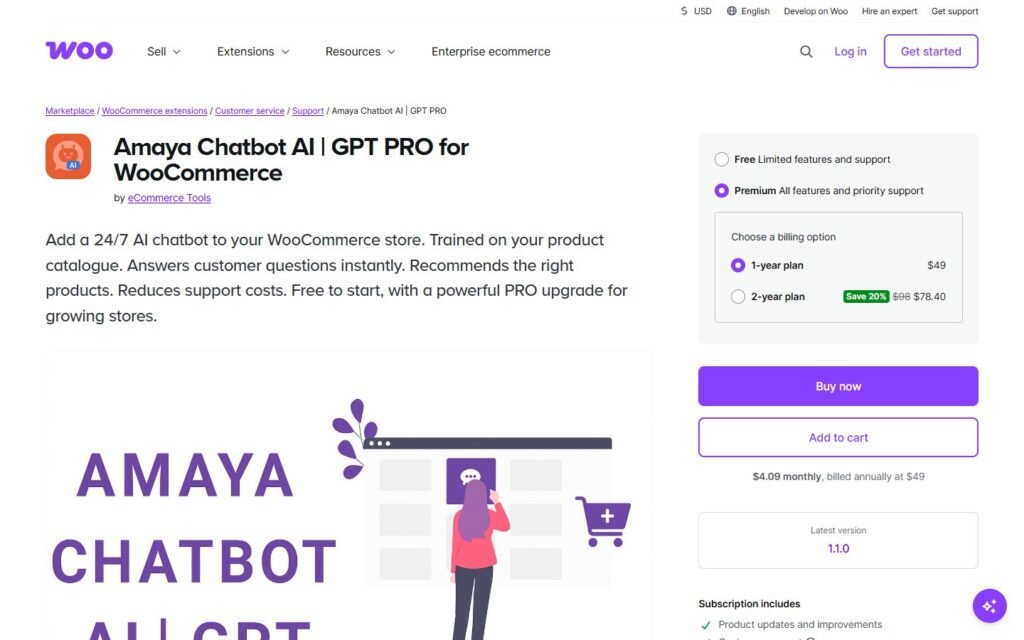
Choose Amaya Chatbot AI if your main goal is to add a focused WooCommerce chatbot that learns from product pages, answers pre-sale questions, recommends relevant products, and can be configured with your own OpenAI API key.
Choose Niwa AI if you want a wider WordPress business agent: one that can help customers on the storefront while also taking authorized instructions from the owner, operating WooCommerce, publishing content, producing business reports, monitoring competitors, capturing leads, and connecting conversations to conversion follow-up.
The shortest version is:
Amaya is a specialized WooCommerce product chatbot. Niwa is designed as a broader operator for the business running on WordPress.
For a fuller explanation of Niwa’s operating model, see how Niwa works.
What Amaya Chatbot AI does well
Amaya Chatbot AI is a WooCommerce-specific chatbot available through the WooCommerce Marketplace. Its strongest advantage is focus: it is built to answer shopper questions using the store’s own catalog and content rather than acting as a general-purpose WordPress administrator.
According to Amaya’s official Marketplace listing and documentation, the plugin can:
- Sync WooCommerce product information into its knowledge base.
- Answer product-related questions in real time.
- Recommend products based on what a shopper is looking for.
- Use product descriptions, attributes, and page content as context.
- Let the owner customize the chat widget’s appearance and welcome message.
- Connect to OpenAI through the store owner’s API key.
- Let the owner select the model and adjust response behavior.
- Add custom question-and-answer data to the knowledge base.
The PRO version expands that foundation with features such as automatic knowledge-base syncing, support for additional WordPress post types and pages, custom FAQs and instructions, preset questions grouped by topic, customer chat history, configurable retention, and post-level inclusion or exclusion controls.
That is a credible feature set for stores whose biggest problem is repetitive pre-sale questions. If shoppers routinely ask about ingredients, sizing, compatibility, differences between products, or which option fits a particular need, Amaya can make those answers more immediate.
What Niwa AI is designed to do
Niwa AI covers a broader operating layer. Customer chat is part of the product, but it is not the whole product.
On the storefront, Niwa can support product discovery, answer buying questions, capture lead intent, and help move a hesitant visitor toward a useful next step. On the owner side, Niwa is designed to receive authorized instructions through channels such as Telegram and WhatsApp and carry out work across WordPress and WooCommerce.
Depending on the configured tools and permissions, that work can include:
- Looking up and updating WooCommerce products, prices, stock, variations, and sale settings.
- Creating and publishing WordPress content.
- Reviewing store or site information and producing business-oriented reports.
- Capturing and routing leads with the conversation context preserved.
- Researching competitors and monitoring relevant changes.
- Supporting conversion workflows such as follow-up, cart recovery, review requests, and product recommendations.
- Reporting the completed action back to the owner in the messaging channel where the request began.
This owner-plus-shopper model is the central difference. Niwa is intended to connect website conversations with real operational work, not only answer questions inside a chat widget.
Amaya Chatbot AI vs Niwa AI comparison table
| Capability | Amaya Chatbot AI | Niwa AI |
|—|—|—|
| Primary role | WooCommerce product-information and recommendation chatbot | WordPress business operator plus customer-facing AI |
| Customer-facing website chat | Yes | Yes |
| Product catalog grounding | Yes, through product knowledge-base sync | Yes, through WooCommerce and site context |
| Product recommendations | Yes | Yes |
| Custom knowledge and FAQs | Yes | Yes, through site content and configured business knowledge |
| Chat history and shopper-question insights | Available in Amaya PRO | Supported as part of conversation and lead workflows |
| WordPress content publishing | Knowledge can include posts and pages; publishing is not a documented core function | Yes |
| WooCommerce product administration | Not documented as an owner command interface | Yes, with authorized tools and permissions |
| Order and store operations | Not prominently documented | Yes, where the relevant WooCommerce tools are enabled |
| Telegram administration | Not documented | Yes |
| WhatsApp administration | Not documented | Yes |
| Business reporting | Shopper conversation insight is available; broader business reporting is not prominently documented | Yes |
| Structured lead capture and routing | Not prominently documented as a core workflow | Yes |
| Competitor research and monitoring | Not documented | Yes |
| Conversion workflow execution | Product guidance and recommendations | Product guidance plus operational follow-up workflows |
| OpenAI API key | Required for the documented Amaya setup | Depends on the Niwa deployment and configured model access |
Product features change, so buyers should confirm current plan limits and integrations before purchasing. This table reflects publicly documented Amaya features and Niwa’s verified operating scope on July 18, 2026.
The biggest difference: chatbot versus operator
Amaya’s workflow begins with a shopper question. The chatbot searches the knowledge it has been given, produces an answer, and may recommend a product. That is useful, focused work.
Niwa’s workflow can begin with either a shopper or the owner.
A shopper might ask which product fits a particular requirement. Niwa can answer, recommend an option, capture buying intent, and prepare a useful handoff. An owner might send a Telegram message asking for a stock check, a price change, a new article, a sales summary, or a competitor review. Niwa can use the appropriate authorized tool, complete the task, verify it, and report the result.
This distinction matters because answering a question and changing the business system are not the same capability. A storefront chatbot can reduce friction. An operator can reduce friction and then act on what the business learned.
The same principle appears in AI lead capture for ecommerce: collecting contact details is only the beginning. The useful outcome comes from preserving intent and turning it into the right next action.
WordPress and WooCommerce operations
Amaya’s official documentation concentrates on chatbot configuration, OpenAI integration, widget settings, product syncing, and knowledge-base management. Its Marketplace page does not position it as a natural-language control layer for editing products, managing stock, changing prices, publishing posts, or completing general WordPress administration.
That is not a criticism. Narrower scope can be an advantage when a merchant wants a straightforward customer-facing assistant with clear knowledge boundaries.
Niwa is the stronger fit when the owner wants conversational operations as well as customer chat. A request can move from analysis to execution: identify low-stock items, update a product, prepare content, publish an approved article, or return a report without requiring the owner to navigate several wp-admin screens.
If you are comparing broader WordPress operator products rather than storefront chatbots, the SiteGround AI Agent vs Niwa AI comparison provides a useful second perspective.
Telegram and WhatsApp administration
Amaya runs as a website chat widget for shoppers and is configured inside WooCommerce. Its current official materials do not document Telegram or WhatsApp as owner administration channels.
Niwa treats messaging access as part of the operating interface. The owner can send an instruction from Telegram or WhatsApp, while permissions and role controls determine which actions are allowed. This is especially useful when the person running the store is away from a desk and needs a fast stock lookup, product update, report, or publishing action.
There is an important distinction here: a “WhatsApp chatbot” normally means customers talk to the business through WhatsApp. Niwa’s model can also use messaging as a secure administrative channel for the owner. Those are different use cases and should not be confused.
Content publishing, reporting, and competitor monitoring
Amaya PRO can add posts, pages, policies, and custom information to the chatbot’s knowledge base. That improves the answers Amaya gives, but indexing content is not the same as creating, editing, approving, and publishing content.
Niwa supports publishing workflows as an operator function. She can research a topic, prepare structured content, create a WordPress draft or post through authorized tools, and verify the saved status. The same operational model applies to recurring business information: sales summaries, stock checks, lead reports, and monitored competitor changes can become actions or founder-facing reports rather than isolated dashboard data.
Amaya’s chat history can still provide valuable qualitative insight. Store owners can review repeated shopper questions and use them to improve product descriptions or FAQs. In that narrow area, Amaya does something practical and commercially useful.
Niwa extends the loop: identify the repeated objection, update the relevant content or product information, publish the improvement, and monitor the result.
Lead capture and conversion workflows
Amaya is strongest before purchase. It can answer questions and recommend products when a visitor is uncertain. That can reduce hesitation and support conversion.
Its official listing does not prominently describe structured lead qualification, CRM-style routing, owner messaging follow-up, abandoned-cart outreach, or cross-channel conversion workflows. Buyers should not assume those capabilities without confirming them directly with the vendor.
Niwa is designed to preserve the commercial context behind a conversation. A useful lead is more than an email address: it includes what the visitor wanted, which product they considered, what blocked the purchase, and what action should happen next.
That makes Niwa a better fit when the goal is a connected conversion system rather than only an on-page recommendation chatbot. Stores evaluating this use case can also review how Niwa turns website visitors into leads.
Where Amaya may be the better choice
A fair comparison should identify the situations where the competitor is the sensible purchase.
Amaya may be better when:
- You want a focused WooCommerce product chatbot rather than a broad operator.
- Your main support burden is repetitive product questions.
- You prefer to provide and control your own OpenAI API key.
- You want granular knowledge-base controls and custom FAQs.
- You want customer chat history to reveal missing product information.
- You do not need Telegram or WhatsApp owner administration.
- You are comfortable handling WordPress publishing, store operations, reporting, and follow-up through separate tools.
The product’s narrow focus may make setup and governance easier for teams that only need customer-facing catalog assistance.
Where Niwa may be the better choice
Niwa may be better when:
- You want one agent to help both the shopper and the business owner.
- You need WooCommerce actions, not only product answers.
- You want to manage work through Telegram or WhatsApp.
- You want AI-assisted content creation and WordPress publishing.
- You need business reporting connected to recommended actions.
- You want lead context preserved for follow-up.
- You want competitor research or monitoring connected to your site workflow.
- You are building conversion workflows that continue after the first chat response.
The advantage is breadth and continuity. Niwa is intended to stay with the task from request to verified result.
Which one should you choose?
Choose Amaya Chatbot AI when the problem is clearly defined: shoppers need faster, catalog-grounded product answers and recommendations inside your WooCommerce store.
Choose Niwa AI when the problem is broader: the store needs customer assistance, owner-side operations, publishing, reporting, monitoring, lead handling, and conversion work connected through one agent.
They can also represent two different stages of adoption. A store may begin with a specialist product chatbot. As its needs grow, it may want an operator that can act across the business rather than only speak inside the storefront.
To evaluate Niwa against your own workflows, review the getting started guide or book a Niwa demo.
Frequently asked questions
Is Amaya Chatbot AI a WordPress AI agent?
It is a WordPress and WooCommerce AI plugin, but its documented role is primarily a customer-facing product chatbot. It answers product questions, uses catalog content as knowledge, and recommends relevant items. It is not currently positioned as a general WordPress administration agent.
Can Amaya update WooCommerce products, prices, or stock through chat?
Amaya’s current official Marketplace listing and documentation focus on syncing product information into the chatbot’s knowledge base. They do not prominently document owner-issued chat commands for changing product data, prices, or inventory.
Does Amaya support Telegram or WhatsApp administration?
Telegram and WhatsApp owner administration are not documented in the current official Amaya materials reviewed for this comparison. Confirm directly with the vendor if this changes.
Does Amaya capture leads?
Amaya stores customer chat history in its PRO feature set, which can reveal shopper questions and content gaps. Its official listing does not prominently present structured lead qualification and routing as a core workflow.
Which is better for product recommendations?
Both can support product recommendations. Amaya is attractive when recommendations and product Q&A are the primary requirement. Niwa is stronger when recommendations must connect to wider lead, reporting, owner-operation, or follow-up workflows.
Which is better for running a WooCommerce business from a phone?
Niwa is the better fit when the owner wants to issue authorized operational requests through Telegram or WhatsApp. Amaya’s documented interface is centered on the storefront chat widget and WooCommerce settings.
Can Amaya and Niwa be used together?
Potentially, but overlapping customer-facing chat widgets could confuse shoppers. A business considering both should define one clear customer conversation entry point and test performance, privacy, data retention, and responsibilities before deploying them together.
Sources reviewed
This comparison was checked against the official Amaya Chatbot AI WooCommerce Marketplace listing and the official Amaya Chatbot AI documentation. Niwa capabilities were checked against the live Niwa site, its operating documentation, and verified WordPress workflows available on July 18, 2026.

