

Divi AI vs Niwa AI: Website Builder or WordPress Business Operator?
Compare Divi AI and Niwa AI for WordPress design, WooCommerce, publishing, messaging, reporting, leads, and business operations.
Divi AI and Niwa AI both bring artificial intelligence into WordPress, but they solve very different problems. Divi AI is primarily a design and website-creation assistant inside the Divi Builder. Niwa AI is designed as a WordPress business operator that can work across site administration, WooCommerce, publishing, reporting, customer conversations, and conversion workflows.
That distinction matters. Someone searching for a “WordPress AI agent” may want help building a page, or they may want an agent that can help run the business after the page is live. This comparison explains what each platform does well, where their documented capabilities differ, and which one better matches your workflow.
Feature claims in this article were checked against public product information available on July 17, 2026.
Quick verdict
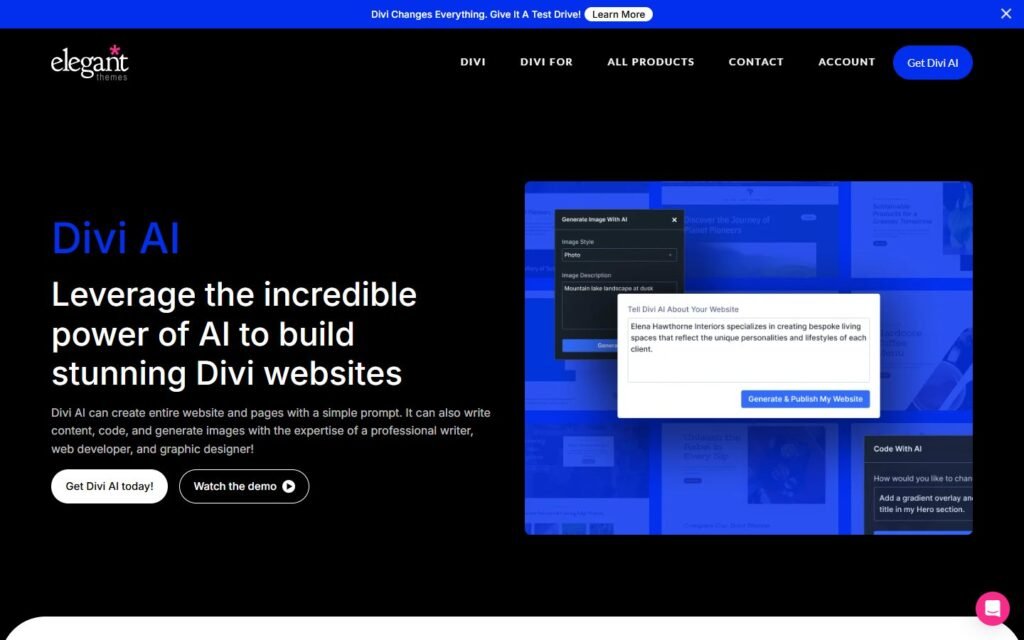
Choose Divi AI if your main goal is to create or improve a Divi website visually. It is especially useful for generating page layouts, writing and refining copy, creating or modifying images, and producing Divi-aware CSS, HTML, and JavaScript without leaving the Visual Builder.
Choose Niwa AI if you want an agent that helps operate the WordPress business after the website is built: handling WordPress and WooCommerce tasks, publishing content, reporting on business activity, researching competitors, supporting lead and conversion workflows, and receiving owner instructions through Telegram or WhatsApp.
The simplest summary is:
Divi AI helps you build and design the website. Niwa AI helps you operate the website and the business around it.
For a closer look at Niwa’s operating model, see How Niwa Works.
What Divi AI does well
Divi AI is built directly into the Divi Builder. Elegant Themes documents four core areas: layout generation, text generation, image generation and editing, and code generation.
That integration is Divi AI’s biggest advantage. The assistant can use the context of the current page and website while creating material for Divi sections, rows, modules, text fields, image fields, code modules, and custom CSS areas. Users do not need to move between a generic chatbot and the page builder for every prompt.
Page and layout generation
Divi AI can generate page layouts from a description, giving site owners and designers a faster starting point than arranging every section manually. This is valuable for landing pages, service pages, campaign pages, and early website prototypes.
Context-aware writing
Divi AI can write and refine headings, paragraphs, calls to action, module text, and other website copy. Its official documentation says the system considers page content and website details, which can produce more relevant drafts than a prompt without any site context.
Image generation and editing
Divi AI can generate images, use existing images as references, alter image styles, and modify selected parts of an image. For a designer building a visually consistent page, that workflow can reduce time spent searching stock libraries or moving between separate image tools.
Divi-specific code generation
Divi AI can generate HTML, CSS, and JavaScript inside the Visual Builder. Elegant Themes also positions its code model as familiar with Divi’s module codebase. That makes it useful when a page needs an effect or visual element that is not available through a standard module setting.
WooCommerce storefront design
Divi itself provides extensive WooCommerce modules for product pages, prices, product galleries, stock displays, add-to-cart elements, ratings, reviews, upsells, related products, cart components, and checkout components. Divi AI can assist with the design and content layer around those experiences.
This is a genuine strength: Divi is a mature visual environment for creating custom WooCommerce storefronts.
What Niwa AI does differently
Niwa AI starts from a different question. Instead of asking only, “How can AI help build this page?”, Niwa asks, “What work does the owner need completed across the website and business?”
Niwa can act on owner instructions, work with WordPress and WooCommerce data, publish content, prepare reports, support research, and participate in customer-facing conversion workflows. The owner can communicate through the channels they already use, including Telegram and WhatsApp, rather than depending exclusively on a page-builder interface.
Niwa is therefore closer to an operator than a design copilot. She is intended to connect a request with a finished business action and a clear report of what happened.
That same approach supports the customer side of the website. Niwa can help turn visitor questions and hesitation into useful next steps, rather than treating every interaction as a page-design problem. The Turn Website Visitors Into Leads page explains this conversion-focused layer in more detail.
Divi AI vs Niwa AI feature comparison
| Capability | Divi AI | Niwa AI |
|—|—|—|
| Primary role | Visual website and content creation inside Divi | WordPress and business operations |
| AI page layout generation | Yes | Can support page and content publishing workflows, but visual Divi layout generation is not its primary positioning |
| Text generation and rewriting | Yes, inside Divi modules | Yes, including broader publishing workflows |
| AI image generation and editing | Yes | Not the primary differentiator |
| Divi-aware CSS, HTML and JavaScript | Yes | Can support technical and site workflows, but Divi-specific visual coding is not its core positioning |
| WordPress administration through conversation | Limited mainly to the Divi creation environment | Yes |
| WooCommerce storefront design | Strong Divi/WooCommerce module system | Can support content and conversion work, but Divi is stronger for visual store-template design |
| WooCommerce operational tasks | Not the main documented purpose of Divi AI | Yes |
| Owner administration through Telegram | Not prominently documented as a Divi AI feature | Yes |
| Owner administration through WhatsApp | Not prominently documented as a Divi AI feature | Yes |
| Blog and SEO publishing workflows | Generates copy inside Divi | Supports research-to-publication workflows |
| Business reporting | Not prominently documented as a Divi AI feature | Yes |
| Lead capture workflows | Divi can design lead-generation pages; Divi AI is not primarily a lead-operations system | Yes |
| Competitor research and monitoring | Not prominently documented as a Divi AI feature | Yes |
| Customer-facing conversion assistance | Can create conversion-oriented page assets | Supports buyer conversations and conversion workflows |
| Best fit | Designers, agencies and Divi users building pages | Owners who want an AI operator across WordPress and commerce |
Public products evolve quickly. “Not prominently documented” means that the capability was not part of the product’s clear public AI positioning during this review; it does not claim that no custom integration could ever provide it.
Website creation vs ongoing operations
The biggest difference appears after the website is launched.
Divi AI can help a team produce an attractive landing page, improve its copy, create images, and add custom visual behavior. Those are meaningful jobs, and Divi performs them inside a mature builder workflow.
But the daily life of a WordPress business involves much more than design:
- updating products, prices, stock, coupons or site content;
- publishing researched articles and campaign pages;
- reviewing sales and operational signals;
- answering customer questions;
- capturing leads and identifying buying intent;
- monitoring competitor offers or content;
- following up on conversion opportunities;
- reporting what changed and what should happen next.
These are the areas where Niwa’s operator model becomes more relevant. Niwa is designed to work across connected tasks rather than only generating the visual assets for one page.
The difference is similar to hiring a web designer versus hiring an operations assistant. Both can create value, but they own different outcomes.
Which is better for WordPress content publishing?
Divi AI is strong when the content will be created and edited directly inside a Divi page. It can generate section copy, rewrite existing text, create calls to action, and match content to the context of the page.
Niwa is a better fit when publishing is part of a larger workflow. For example, the owner may want the agent to research a topic, check existing site content for overlap, prepare a substantial article, add internal links, categorize it, publish it, and confirm the live result.
In other words, Divi AI helps produce content components. Niwa can help coordinate the publishing operation around those components.
If you are comparing broader WordPress agents rather than page builders, read SiteGround AI Agent vs Niwa AI.
Which is better for WooCommerce?
The answer depends on whether you mean store design or store operation.
For WooCommerce design, Divi is impressive. Its WooCommerce modules can be used to create product layouts, galleries, price blocks, add-to-cart sections, upsell sections, review displays, carts, and checkout experiences. Divi AI can help generate the surrounding text, imagery, layouts, and code.
For WooCommerce operations, Niwa is the stronger fit. Niwa is designed to work with the owner on product and store tasks, reporting, content, customer intent, and conversion activity. The focus is not just how the shop looks, but what needs to be done today to help the shop run and sell.
A business could reasonably use both: Divi and Divi AI for the storefront’s visual experience, and Niwa AI for ongoing administration, publishing, reporting, and commercial workflows.
Telegram and WhatsApp administration
Divi AI lives where designers expect it: inside the Divi Builder. That is convenient while actively editing a page.
Niwa is designed for a different convenience. The owner can send instructions from Telegram or WhatsApp, allowing work to be requested without navigating through wp-admin or opening the Visual Builder for every operational task.
That matters for founders who manage a store between meetings, from a warehouse, or while away from a desk. Messaging becomes a command interface for the website rather than only a customer-support channel.
Divi AI’s public documentation does not position Telegram or WhatsApp as owner administration interfaces. Niwa does.
Reporting, competitor monitoring and business intelligence
Divi AI focuses on generating and improving website assets. Its public feature set does not prominently position recurring business reporting, competitor monitoring, or cross-workflow commercial analysis as core features.
Niwa’s broader operator role includes helping the owner inspect business activity, research competitors, identify useful signals, and translate findings into actions such as a content update, product change, campaign idea, or conversion improvement.
This is an important distinction between generative AI and operational AI. Generative AI creates an asset. Operational AI helps decide what should happen, completes the allowed action, verifies it, and reports the result.
Lead capture and conversion workflows
Divi AI can help create stronger landing pages, clearer calls to action, persuasive sections, and visually polished forms. Those inputs can improve conversion performance.
However, designing a conversion page is not the same as operating a conversion workflow.
Niwa is designed to support the next layer: understanding what a visitor wants, responding to hesitation, collecting useful lead information, helping shoppers choose, and connecting customer intent with an appropriate follow-up or website action.
For owners focused on revenue rather than only page production, this is often the deciding factor. A polished page is valuable, but the business also needs a system that notices opportunities after visitors arrive.
Where Divi AI is the better choice
Divi AI is the better choice when:
- you already build with Divi and want AI inside that exact workflow;
- your priority is generating complete page layouts quickly;
- you need contextual website copy and module text;
- you want AI-generated or AI-edited images without leaving the builder;
- you need Divi-aware CSS, HTML or JavaScript;
- your WooCommerce challenge is visual product, cart or checkout design;
- an agency or designer will review and refine every generated asset.
Niwa does not need to win these categories to be useful. Divi’s visual-builder integration is a legitimate advantage for design-focused work.
Where Niwa AI is the better choice
Niwa AI is the better choice when:
- you want to administer WordPress and WooCommerce conversationally;
- you want to send owner instructions through Telegram or WhatsApp;
- content creation must continue through publication and verification;
- you need business reports rather than only generated page assets;
- competitor research or monitoring should connect to practical actions;
- lead capture and customer intent matter after the page launches;
- you want conversion workflows that extend beyond design;
- your goal is to reduce the owner’s operational workload.
To see the product in a practical workflow, book a Niwa demo.
Can Divi AI and Niwa AI work together?
Yes. They are more complementary than directly interchangeable.
Divi AI can help create a page’s layout, imagery, copy, and custom visual code. Niwa can help the owner manage the wider WordPress business: publishing, WooCommerce operations, reports, research, customer intent, and follow-up workflows.
A Divi-based WooCommerce store could use Divi AI to build a high-quality storefront and Niwa to help operate what happens after launch.
Final verdict
Divi AI is a capable WordPress design assistant with a particularly strong advantage for people already using Divi. Its page-context awareness, layout generation, image tools, and Divi-specific code generation can substantially speed up visual website production.
Niwa AI serves a broader operational purpose. She is designed for owners who want AI to do more than generate page components, owners who want conversational administration, WooCommerce actions, publishing, reporting, competitor intelligence, lead workflows, and conversion support connected in one operating relationship.
Choose Divi AI when the central task is building the website.
Choose Niwa AI when the central task is running the WordPress business.
FAQs
Is Divi AI a WordPress AI agent?
Divi AI is best described as an AI design and content assistant built into the Divi Builder. It can generate layouts, text, images, and code, but it is not publicly positioned as a general business operator across all WordPress administration, reporting, messaging, and conversion workflows.
Can Divi AI manage WooCommerce products and orders?
Divi provides extensive WooCommerce design modules, and Divi AI can help create content, images, layouts, and code around a store. Its official AI positioning does not primarily focus on conversational product, inventory, order, or business administration. Niwa is designed for broader WooCommerce operational workflows.
Does Divi AI work through Telegram or WhatsApp?
Divi AI’s documented workflow is inside the Divi Builder. Telegram and WhatsApp are not prominently documented as owner administration interfaces for Divi AI. Niwa AI is designed to accept owner instructions through messaging channels including Telegram and WhatsApp.
Is Divi AI better than Niwa AI for building pages?
For visual page generation and Divi-specific design work, Divi AI is the stronger specialist. It can generate layouts and work directly with Divi modules, images, copy, CSS, HTML, and JavaScript.
Is Niwa AI better than Divi AI for running a WooCommerce business?
Niwa is the stronger fit when the need extends beyond design into ongoing store operations, content publishing, reporting, buyer intent, lead capture, competitor monitoring, and conversion workflows.
Can I use both products on the same WordPress site?
They can serve complementary roles. Divi AI can support website design and visual content production, while Niwa can support ongoing WordPress and WooCommerce operations. Compatibility should still be tested on a staging site before adopting any new combination of plugins and services.

