

MCP for WooCommerce vs Niwa AI: Connector or Business Agent?
Compare MCP for WooCommerce by W7S and Niwa AI for store operations, messaging, publishing, reporting, leads, monitoring, and conversion workflows.
The phrase WordPress AI agent now covers several very different products. Some give an external AI assistant secure tools for reading and changing store data. Others are designed as ongoing business operators that combine WordPress administration, customer conversations, reporting, publishing, and conversion work.
MCP for WooCommerce by W7S and Niwa AI belong to those two different categories. Both can reduce the time spent clicking through WordPress and WooCommerce screens, but they solve different problems.
MCP for WooCommerce is a technically capable connector that lets supported AI clients work with a live WooCommerce store through the Model Context Protocol. Niwa AI is positioned as a broader WordPress business agent: an owner-facing operator for website tasks, WooCommerce work, content, reporting, messaging administration, lead handling, monitoring, and conversion workflows.
This comparison uses the public product information available on July 19, 2026. It focuses on documented capabilities rather than assuming that either product supports features its publisher has not publicly described.
Quick verdict
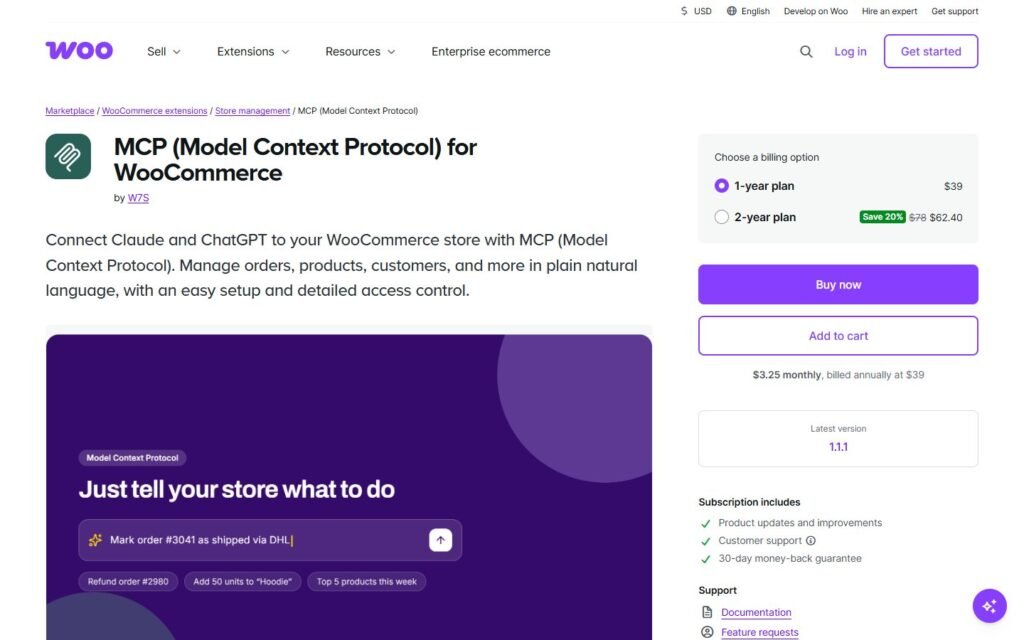
Choose MCP for WooCommerce if your main goal is to connect Claude, ChatGPT, Cursor, Cline, n8n, or another compatible client to WooCommerce with detailed tool permissions. It is especially relevant for technically comfortable store owners, developers, and agencies that want broad WooCommerce data operations through an AI client they already use.
Choose Niwa AI if you want a more integrated operating layer around the WordPress business itself: owner administration through Telegram or WhatsApp, WordPress and WooCommerce tasks, content publishing, business reporting, competitor research, lead context, shopper assistance, and conversion-focused workflows.
The shortest distinction is:
MCP for WooCommerce gives an AI client controlled access to store tools. Niwa AI is designed to stay with the owner from instruction to business outcome.
What is MCP for WooCommerce by W7S?
MCP for WooCommerce is a paid extension listed in the official WooCommerce Marketplace. It enables and expands WooCommerce’s Model Context Protocol endpoint, allowing compatible AI applications to call store tools through natural-language requests.
According to its official WooCommerce product page and documentation, the extension supports operations across:
- orders and order notes;
- products, variations, attributes, categories, tags, shipping classes, custom fields, and reviews;
- customers and coupons;
- refunds, tax, shipping, payments, and webhooks;
- reports and store data;
- supported WooCommerce extensions such as Subscriptions, Bookings, and Memberships when active.
The extension supports read and write operations, with the effective permission scope controlled by the WooCommerce REST API key used for the connection. A read-only key cannot perform write operations. Store owners can also enable or disable groups of tools, review optional activity logs, and use masked logging for customer data.
Its connection options include Claude, ChatGPT, MCP-aware development clients, and OpenAPI-compatible automation tools. The documentation also describes direct MCP, SSE, local bridge, remote connector, and OpenAPI connection patterns.
That is a meaningful strength. MCP for WooCommerce does not try to replace Claude or ChatGPT with another chat interface. It makes the store available to the AI environment the user already prefers.
What is Niwa AI?
Niwa AI approaches the category from the perspective of the business owner rather than only the protocol connection.
The goal is not simply to expose WordPress functions to a general AI client. Niwa is designed to receive an instruction, understand the website and business context, perform the relevant work, and report the result through the channels the owner already uses.
Public Niwa pages and existing product comparisons describe workflows that can include:
- WordPress and WooCommerce administration;
- product, stock, price, coupon, and content work;
- publishing posts and pages;
- owner communication through Telegram and WhatsApp;
- sales and business reporting;
- competitor research and monitoring;
- lead capture and qualification context;
- shopper questions, recommendations, and buying objections;
- conversion workflows around product discovery, checkout, cart value, and follow-up.
If you want a closer look at that operating model, see How Niwa Works and the practical guide to an AI sales agent for WooCommerce.
MCP for WooCommerce vs Niwa AI comparison table
| Capability | MCP for WooCommerce by W7S | Niwa AI |
|—|—|—|
| Primary product type | WooCommerce MCP connector and tool layer | WordPress business agent and operator |
| Natural-language store administration | Yes, through a connected AI client | Yes |
| Orders, products, customers, coupons, and refunds | Broad documented tool coverage | Supported as part of WooCommerce operating workflows |
| Uses Claude or ChatGPT as the client | Yes | Niwa provides its own operating experience and can use connected AI services internally |
| Granular API-key permissions | Yes; read/write scope is documented | Uses controlled founder/admin execution workflows |
| Tool packs and connection controls | Yes | Capability access is managed within the Niwa platform |
| Optional action logging | Yes | Operational reporting and task results are part of the owner workflow |
| WordPress content publishing | Some coverage may be available through discovered third-party tools; WooCommerce is the core focus | A primary documented workflow |
| Telegram administration | Not documented as a native owner interface | Yes |
| WhatsApp administration | Not documented as a native owner interface | Yes |
| Business reporting | WooCommerce reports can be accessed through tools | Designed to explain business signals and next actions |
| Lead capture and qualification | Not positioned as a customer-facing lead system | Yes |
| Storefront shopper assistant | Not the product’s primary role | Yes |
| Competitor research and monitoring | Not documented as a native product workflow | Yes |
| Conversion workflows | Can execute enabled store operations, but does not present itself as a conversion platform | Product positioning includes buyer assistance and conversion workflows |
| Best fit | Technical users wanting a secure WooCommerce connection for an existing AI client | Owners wanting an integrated WordPress, commerce, messaging, and growth operator |
Capabilities can change, so buyers should confirm current requirements and supported integrations before purchasing either product.
Where MCP for WooCommerce is especially strong
A fair comparison should recognize that MCP for WooCommerce has several clear advantages.
Broad, explicit WooCommerce tool coverage
The official product page documents a wide operational surface. This is not merely a product-search chatbot or a read-only catalog feed. With the right key permissions, a connected assistant can create, update, and delete supported data, run order actions, add notes, manage product structures, and work across important store objects.
For a developer or experienced store administrator, that breadth is valuable. It can turn a familiar AI client into a conversational WooCommerce console.
Bring-your-own AI client
MCP for WooCommerce supports several client types instead of forcing the user into one assistant. A team can connect the store to Claude, ChatGPT, Cursor, Cline, n8n, or another compatible MCP or OpenAPI client.
That flexibility is particularly useful for agencies and technical teams with established workflows.
Permission controls are clearly documented
The extension uses WooCommerce API keys and enforces their scope on every call. Read-only credentials cannot write, while higher-privilege credentials can enable operational actions. Tool packs provide another way to limit what the assistant can see.
Its official documentation also describes revocable connector tokens, optional logs, PII masking, write allowlists, and conservative handling of unrecognized operations. These controls matter because connecting an AI client to live orders and customer data creates real operational risk.
It builds on WooCommerce’s native MCP direction
W7S enables and expands the WooCommerce MCP endpoint rather than presenting a completely separate commerce data model. For teams intentionally building around MCP, that alignment can make the extension a practical bridge between WooCommerce and the growing ecosystem of AI clients.
Where Niwa AI is stronger
Niwa’s advantage is not that MCP is unimportant. The advantage is the additional operating context around the connection.
Telegram and WhatsApp as owner interfaces
MCP for WooCommerce focuses on connecting an AI client to store tools. Its official materials do not position Telegram or WhatsApp as native owner administration channels.
Niwa is designed for the owner who wants to send a real business instruction from a messaging app: check yesterday’s sales, update a product, inspect stock, prepare content, review a competitor, or investigate a problem. That can remove another layer of friction for founders who do not want every small task to begin at a desktop.
WordPress publishing as an integrated workflow
MCP for WooCommerce is commerce-first. Its marketplace page notes that it can scan for third-party tools beyond WooCommerce, but content publishing is not its central product story.
Niwa combines administration and publishing. That matters when a request crosses boundaries, for example, research a competitor, identify a search opportunity, write an article, create the WordPress post, publish it, and report the outcome. The job is a complete workflow, not just access to a create post tool.
Business reporting rather than raw retrieval alone
MCP for WooCommerce can expose reports and store data to a capable client. That is useful, but the connector does not itself guarantee that every connected AI workflow will produce a founder-ready explanation.
Niwa is designed around reporting the result in business language: what changed, what deserves attention, and what action should come next. For many owners, the difference between receiving data and receiving a decision-ready summary is significant.
Lead capture and storefront conversion
MCP for WooCommerce is primarily an administration and integration layer. Its official product description does not present it as a storefront sales assistant, lead-capture widget, or proactive conversion system.
Niwa is designed to work on both sides of the website. On the owner side, it helps operate the site. On the shopper side, it can answer buying questions, capture intent, support product selection, and help move qualified visitors toward the next step.
That distinction is explained further in Turn Website Visitors Into Leads and the AI lead capture for ecommerce guide.
Competitor monitoring and cross-functional work
A WooCommerce MCP connection is focused on the systems and tools exposed by the store. Competitor research requires an additional research workflow and an AI client configured to perform it.
Niwa’s broader operating model can connect external monitoring with internal action. A competitor observation can become a pricing review, content brief, product-page update, founder report, or campaign idea. This is where an integrated agent can feel different from a connector, even when both technically use AI tools.
Conversion workflows after the store operation
Updating a product or creating a coupon is an operation. Deciding when that coupon should appear, which shopper behavior should trigger it, and how the result should be measured is a conversion workflow.
Niwa’s product direction includes those business outcomes. One example is the Niwa AI Conversion Booster, which connects cart behavior with a controlled checkout incentive rather than treating coupon creation as the end of the job.
Which is better for WooCommerce operations?
For depth of documented WooCommerce MCP tools, MCP for WooCommerce is a strong specialist. Its marketplace listing explicitly covers orders, products, customers, refunds, coupons, shipping, tax, payments, webhooks, reports, and several major WooCommerce extensions.
For operations connected to owner communication, publishing, reporting, monitoring, lead capture, and conversion, Niwa is the broader choice.
The decision depends on the desired endpoint:
- If the endpoint is “let Claude or ChatGPT securely manipulate my store,” MCP for WooCommerce is a direct fit.
- If the endpoint is “help me operate and grow the WordPress business through one ongoing agent,” Niwa is closer to that requirement.
Some technically mature businesses may even see the products as conceptually complementary rather than mutually exclusive: MCP is an infrastructure standard, while Niwa is an operating experience. The important question is whether the owner wants to assemble the client, prompts, permissions, monitoring, and business workflows, or use a platform designed around those outcomes.
Which is easier for a non-technical founder?
MCP for WooCommerce has made a technical protocol substantially more approachable. It provides a settings area, connection guidance, one-click Claude Desktop configuration, ChatGPT instructions, verification checks, API-key management, and tool packs.
However, the founder still needs to choose an AI client, understand permissions, connect the endpoint, and decide how the client should behave. Certain setups can also involve local bridges, tunnels, Node.js, paid AI plans, or client-specific limitations.
Niwa aims to hide more of that infrastructure behind the operating relationship. The founder communicates through familiar channels and asks for outcomes rather than assembling an MCP stack.
Technical users may prefer the flexibility of W7S. Non-technical founders may prefer the integrated nature of Niwa.
Safety and access control
Both categories require serious safeguards because they can touch live business data.
MCP for WooCommerce has a strong, publicly documented security model. Store owners can use read-only or read/write API keys, restrict tool packs, revoke connector credentials, review optional logs, and rely on permission enforcement for every call. The documentation also explains PII redaction and write restrictions.
Niwa’s operating model emphasizes controlled admin execution, verified outcomes, and reporting back to the authorized owner. The exact safety choice should reflect the task. Reading a report is not the same risk as refunding an order, deleting a product, changing code, or publishing content.
Whichever platform you choose, start with the minimum permissions necessary, test on low-risk tasks, review activity, and keep destructive operations behind explicit authorization.
Final recommendation
MCP for WooCommerce by W7S is a strong choice for developers, agencies, and technically confident store owners who want broad, permission-controlled WooCommerce access from an existing AI client. Its official documentation is unusually detailed, its commerce coverage is broad, and its access model is clear.
Niwa AI is the better fit for owners seeking a broader WordPress business agent-one that combines site and store administration with messaging access, publishing, founder reporting, lead context, competitor monitoring, customer assistance, and conversion workflows.
MCP for WooCommerce asks: Which store tools should this AI client be allowed to use?
Niwa asks: What business outcome does the owner need, and which verified actions will produce it?
That is the core difference between a capable connector and an integrated business operator.
Frequently asked questions
Is MCP for WooCommerce an AI chatbot?
Not by itself. It is a connector and tool layer that allows a compatible AI client, such as Claude or ChatGPT, to work with WooCommerce. The conversational experience comes from the connected client.
Can MCP for WooCommerce change live store data?
Yes, according to its official WooCommerce listing, it supports read and write operations across many store objects when the connected API key has permission. A read-only key cannot create, update, or delete data.
Does MCP for WooCommerce support WordPress content and SEO?
Its core strength is WooCommerce. The marketplace page says it can scan for third-party tools beyond WooCommerce, but the available content or SEO actions depend on what compatible tools are registered on the site. Buyers should verify their exact plugin stack.
Does MCP for WooCommerce include Telegram or WhatsApp administration?
Native Telegram or WhatsApp owner administration is not documented on the official WooCommerce product page or setup guide reviewed for this comparison. A separate integration could potentially be built around MCP, but it should not be assumed to be included.
Is Niwa AI only for WooCommerce?
No. Niwa is designed around WordPress business operations, with WooCommerce as an important commerce layer. Its broader workflows include content, reporting, leads, messaging administration, monitoring, and conversion work.
Which option is better for lead capture?
Niwa is the more direct fit because lead capture and shopper intent are part of its product positioning. MCP for WooCommerce is an administration connector and is not marketed as a native storefront lead-capture system.
Which option is better for agencies?
MCP for WooCommerce can be attractive to technical agencies that want client-specific connections, tool permissions, and freedom to choose the AI client. Niwa can be a stronger fit when the agency wants a managed owner-facing operating experience across administration, reporting, content, and growth workflows.
Can Niwa publish WordPress content?
Yes. Content creation and WordPress publishing are part of Niwa’s documented operating workflows, including research-to-publication tasks with owner reporting.
Sources and verification
Competitor capabilities in this article were checked against the official MCP for WooCommerce Marketplace listing and the official MCP for WooCommerce documentation. Product details and requirements can change, so verify the current listing before purchase.
For Niwa’s approach, explore How Niwa Works or book a Niwa demo to discuss the workflows your WordPress business actually needs.

