Niwa AI Book demo

Cowboy MCP vs Niwa AI: Which WordPress AI Agent Fits You?

Compare Cowboy MCP and Niwa AI for WordPress administration, WooCommerce, publishing, messaging, reporting, leads, and conversion workflows.
Cowboy MCP vs Niwa AI: Which WordPress AI Agent Fits You? — Niwa AI visual guide
Original Niwa AI visual guide for Cowboy MCP vs Niwa AI: Which WordPress AI Agent Fits You?.

The search for a WordPress AI agent now includes two importantly different ideas. One is an AI client, such as Claude, ChatGPT, Cursor, or VS Code, connected to WordPress through the Model Context Protocol. The other is a persistent business operator that owners can message to complete WordPress, WooCommerce, research, reporting, publishing, and conversion work.

Cowboy MCP and Niwa AI represent those two approaches. Cowboy MCP is an open-source WordPress plugin that exposes site-management tools to compatible MCP clients. Niwa AI is designed as an owner-facing WordPress business operator that works through Telegram or WhatsApp and connects website administration with wider commercial workflows.

This comparison is based on Cowboy MCP’s official website and current WordPress.org listing reviewed on July 16, 2026. Where the public documentation does not establish a capability, this article says it is undocumented rather than claiming it is impossible.

Quick verdict

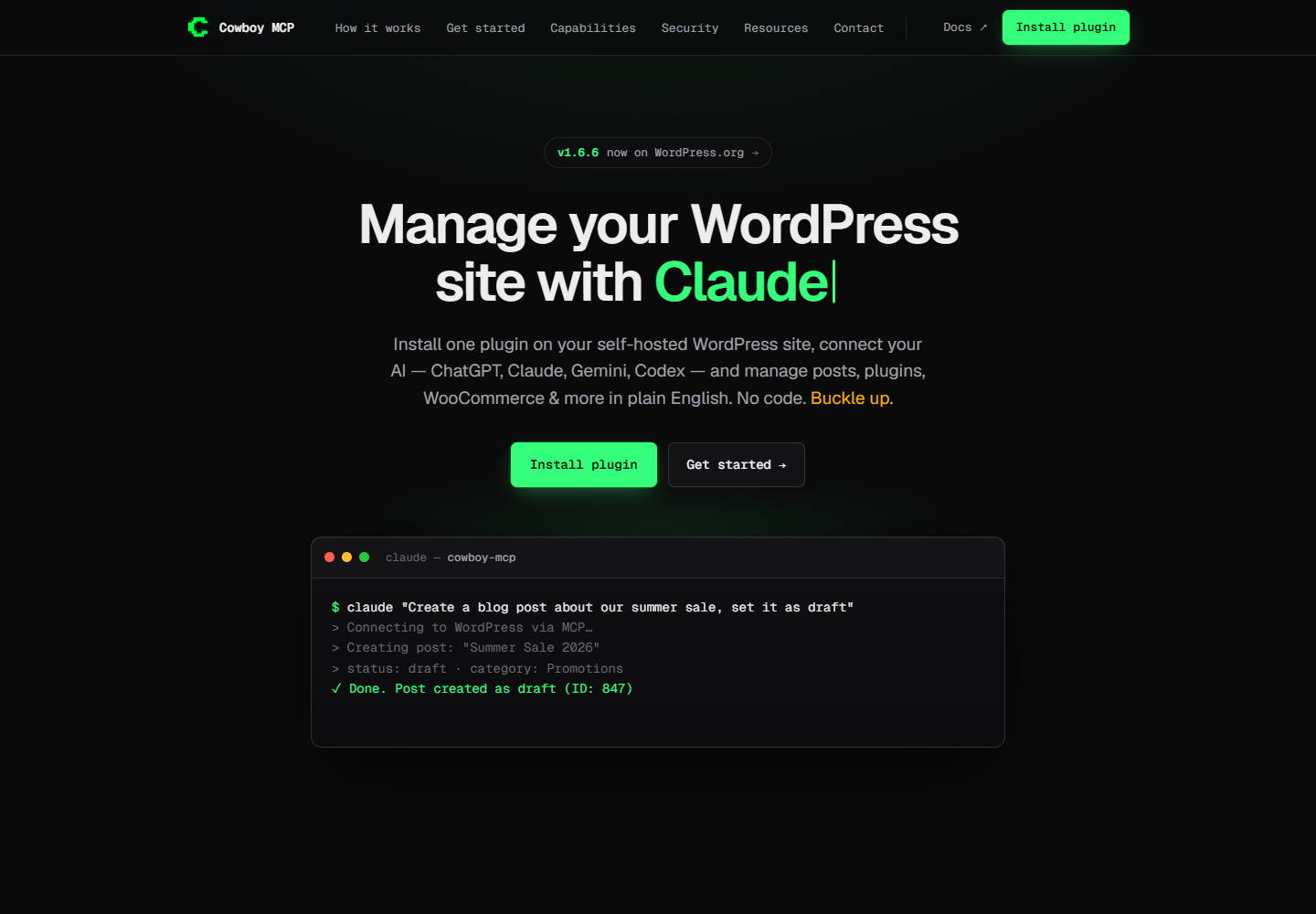
Cowboy MCP vs Niwa AI: Which WordPress AI Agent Fits You?: official wordpress.org website screenshot
Official product page captured for editorial comparison. Source: wordpress.org.

Choose Cowboy MCP if you want a self-hosted, open-source MCP bridge between your WordPress site and an external AI client, with strong technical access to content, WooCommerce, plugins, themes, users, files, database operations, WP-CLI, logs, checkpoints, and audit controls.

Choose Niwa AI if you want to delegate WordPress and WooCommerce work from Telegram or WhatsApp and connect administration with current research, competitor monitoring, founder-friendly reporting, customer intent, lead capture, and conversion workflows.

The simplest distinction is:

Cowboy MCP gives compatible AI clients a broad, controlled toolset for WordPress. Niwa AI gives the owner an ongoing operator for the website and the business around it.

Neither is universally better. Cowboy MCP will appeal strongly to developers, agencies, and technically confident administrators. Niwa is designed for founders and store owners who want the task completed without assembling and operating an MCP client workflow themselves.

What is Cowboy MCP?

Cowboy MCP is a free, open-source WordPress plugin that implements the Model Context Protocol. It lets compatible external AI applications connect to a WordPress installation and use an extensive collection of site-management tools.

Its official materials document support for clients including Claude, ChatGPT, Cursor, VS Code, and other MCP-compatible applications. The plugin is self-hosted: WordPress remains the execution environment, while the selected AI client is the conversational interface.

Cowboy MCP’s documented capabilities include:

  • creating, reading, updating, deleting, searching, and bulk-managing posts, pages, and custom post types;
  • managing categories, tags, metadata, comments, media, menus, widgets, and WordPress options;
  • creating and managing WooCommerce products, orders, customers, coupons, variations, shipping zones, payment settings, taxes, and webhooks;
  • installing, activating, deactivating, updating, and deleting plugins and themes;
  • managing users and roles;
  • working with files and the database;
  • running WP-CLI commands;
  • reading logs and debugging information;
  • taking database checkpoints before changes and undoing operations;
  • using safe-mode restrictions, audit logs, role-based permissions, and configurable tool access.

The official Cowboy MCP site also lists support for common WordPress ecosystems such as Elementor, Yoast SEO, ACF, Gravity Forms, Wordfence, UpdraftPlus, and several cache plugins.

This is not merely an AI writing assistant. It is a substantial WordPress control layer designed for users who want to bring their preferred MCP client to the site.

What is Niwa AI?

Niwa AI is designed as a WordPress and business operator that the owner can message through Telegram or WhatsApp. The founder describes the required outcome, Niwa uses the available website and research tools, performs approved actions, verifies the result, and reports what happened.

Typical owner-side assignments can include:

  • updating posts, pages, settings, menus, and website copy;
  • managing WooCommerce products, prices, stock, coupons, and store information;
  • researching search intent and publishing supported SEO content;
  • checking existing content before selecting a new topic or competitor;
  • preparing business and operational reports for the owner;
  • researching competitors and turning findings into website, content, or offer actions;
  • investigating site problems and applying approved repairs through guarded workflows;
  • running recurring monitoring and administrative routines;
  • connecting visitor conversations with lead context and conversion improvements.

The broader operating model is explained on How Niwa Works: the goal is to carry an assignment from the owner’s request to a verified website or business result, rather than stop after generating advice.

Cowboy MCP vs Niwa AI comparison table

Capability Cowboy MCP Niwa AI
Primary model Self-hosted MCP server and WordPress tool layer Persistent owner-facing WordPress business operator
Main conversational interface Compatible external MCP client Telegram, WhatsApp, and connected site interfaces
Natural-language WordPress administration Yes, through a connected MCP client Yes
Posts, pages, media, taxonomies, and metadata Broadly documented Supported through delegated publishing and site workflows
Plugins, themes, users, options, and diagnostics Major documented strengths Supported through approved administration and repair workflows
File, database, and WP-CLI access Explicitly documented Available through guarded technical workflows when authorized
WooCommerce products and variations Yes Core operational use case
Orders, customers, coupons, taxes, shipping, and payments Broad WooCommerce tool coverage is documented Store administration is supported through owner workflows
Telegram administration Not documented as a native Cowboy MCP channel Core owner communication channel
WhatsApp administration Not documented as a native Cowboy MCP channel Core owner communication channel
Content creation and publishing Yes Yes, including research-to-publication workflows
SEO plugin administration Yoast SEO integration is documented Supported within research, content, metadata, and publishing work
Safety model Safe mode, checkpoints, undo, audit logs, permissions, tool controls Approval, guarded implementation, verification, and result reporting
Business reporting Site and store data can be queried; a packaged founder-briefing workflow is not established in the reviewed materials Founder-facing commercial and operational reporting is a core use case
Competitor monitoring A dedicated external competitor-monitoring workflow is not established in the reviewed materials Explicit research and recurring monitoring use case
Customer-facing lead capture Documented as a backend MCP server, not a visitor-facing chat widget Customer intent and lead workflows are part of the wider model
Customer-facing conversion assistance Can administer site and store systems; a native storefront sales assistant is not documented Product guidance, objection handling, intent capture, and conversion workflows are supported use cases
Open-source, self-hosted MCP architecture Yes Not the primary product proposition
Best fit Developers, agencies, and administrators wanting broad MCP access to WordPress Founders and store owners wanting delegated website and business outcomes through messaging

Where Cowboy MCP is stronger

A fair Cowboy MCP alternative comparison should begin with what the plugin does especially well.

1. Broad and explicit technical control

Cowboy MCP’s clearest advantage is the documented breadth of its tool catalog. It covers everyday content work, but it also reaches into plugins, themes, files, the database, WP-CLI, logs, users, options, cron-related administration, and WooCommerce configuration.

That matters to technical WordPress users. Many AI plugins can draft a post or answer a support question. Far fewer publicly document a control surface that can inspect a debug log, run a WP-CLI command, query a database, update a plugin, change a theme, and manage store records.

For a developer using Cursor or VS Code, Cowboy MCP can make WordPress part of an existing AI-assisted engineering environment instead of requiring a separate proprietary dashboard.

2. Open-source and self-hosted architecture

Cowboy MCP is positioned as free and open source, without a required Cowboy-hosted cloud service or recurring plugin subscription. The WordPress site hosts the MCP server, and the owner chooses the compatible client and model environment.

That gives technically capable teams meaningful control over deployment, model selection, client choice, permissions, and operating costs. It may also reduce platform lock-in: a business can switch between compatible MCP clients without replacing the WordPress tool layer.

Niwa’s proposition is different. The value is the consistent operator relationship and completed workflow, not primarily the ability to assemble a custom MCP stack.

3. Strong WooCommerce administration depth

Cowboy MCP deserves serious consideration as a WordPress AI agent for WooCommerce. Its current documentation covers products, variations, orders, customers, coupons, reports, taxes, shipping zones, payment settings, and webhooks.

This is broader than a chatbot that only reads product descriptions. A connected AI client can work with the actual operating records and configuration of the store, subject to the permissions and safety settings chosen by the administrator.

For a technical store team that wants to query and modify WooCommerce through Claude, ChatGPT, Cursor, or another MCP client, this is a credible strength.

4. Practical safety controls for high-impact operations

Giving an AI access to files, database records, plugins, users, and orders creates real risk. Cowboy MCP addresses that risk with several documented controls:

  • safe mode for restricting destructive operations;
  • database checkpoints before changes;
  • undo and rollback support;
  • audit logs;
  • configurable tool access;
  • role and capability checks;
  • rate limiting;
  • allowlists for sensitive command and file operations.

No safety system removes the need for good backups, staging, and human judgment. Still, Cowboy MCP makes governance a visible part of its product rather than treating broad access as an afterthought.

5. A natural fit for developer and agency tools

Cowboy MCP is especially relevant to users who already live in Claude Desktop, ChatGPT, Cursor, VS Code, or another MCP client. The external client can become a conversational control panel for one or more WordPress tasks.

Its documented compatibility with Elementor, Yoast, ACF, Gravity Forms, Wordfence, UpdraftPlus, and caching plugins also gives it practical value across real-world WordPress stacks.

For a hands-on administrator, this can be more attractive than a highly packaged assistant. Cowboy MCP exposes the tools; the user decides how to compose them.

Where Niwa AI is stronger

Niwa’s advantage becomes clearer when the assignment extends beyond technical access to one WordPress installation.

1. Telegram and WhatsApp are owner command channels

Cowboy MCP connects WordPress to MCP clients. Its reviewed official materials do not document Telegram or WhatsApp as native owner-administration channels.

Niwa is designed around the opposite starting point: the owner can remain in Telegram or WhatsApp and delegate the outcome from a phone. That outcome might be a price update, a new page, a sales explanation, a competitor check, a researched article, a lead follow-up, or a repair.

This distinction matters for searches such as manage WordPress through Telegram, WordPress AI agent for WhatsApp, and WooCommerce administration from messaging apps. The messaging conversation is not merely an alert channel; it is the operating relationship.

For another comparison centered on messaging-based WordPress management, read WordPress Agent vs Niwa AI.

2. A managed workflow instead of a toolkit to assemble

Cowboy MCP provides a broad toolkit, but the owner still needs a compatible client, authentication, configuration, model access, permissions, and a clear operating process. Technical users may see that flexibility as an advantage.

Niwa is designed for owners who do not want to engineer the agent environment. The request begins with a desired result. Niwa selects the available tools, executes the approved work, verifies the postcondition, and reports the outcome.

The difference resembles hiring a well-equipped contractor versus receiving a powerful toolbox. Both can produce excellent work, but they suit different users.

3. Current research connected to verified publishing

Cowboy MCP can create and update WordPress content and can work with SEO-related systems. That makes it capable of publishing once a connected AI client has the necessary information and instructions.

Niwa’s content workflow is designed to own more of the assignment. A founder can ask for a current comparison article, and Niwa can inspect existing posts and pages, identify an uncovered competitor and search intent, research current results, verify product claims, write the article, add internal links and metadata, publish it, and confirm that the new WordPress post is live.

That end-to-end workflow matters because SEO publishing is not only text generation. Duplicate prevention, current research, factual support, internal linking, metadata, publication, and verification are separate responsibilities.

For an admin-native competitor with a different architecture, see LolaCore vs Niwa AI. For a hosting-platform comparison, see SiteGround AI Agent vs Niwa AI.

4. Business reporting designed for the founder

Cowboy MCP exposes WordPress and WooCommerce data that an AI client can query. A skilled user could build useful reporting prompts and automations around those tools.

The reviewed official materials, however, position Cowboy MCP primarily as a secure MCP server and operational toolset, not as a packaged founder-briefing product. That is not a defect; it reflects the product’s technical focus.

Niwa’s reporting model is owner-oriented. The goal is to explain what changed, why it matters, what needs attention, and what should happen next. A report can connect sales, stock, products, content, customer questions, website problems, competitor movement, and planned work.

Cowboy MCP provides powerful access to the underlying systems. Niwa is designed to turn business signals into an ongoing conversation and next action.

5. Competitor monitoring connected to execution

Cowboy MCP’s documented scope centers on the connected WordPress installation and its plugins, files, database, users, and WooCommerce data. The reviewed materials do not establish a dedicated external competitor-monitoring workflow.

Niwa treats competitor research as an operational assignment. A competitor change can lead to a supported comparison post, pricing review, offer revision, product-page improvement, or recurring monitoring task.

The important difference is not whether an AI model can discuss a competitor. It is whether current external research is connected to verified website execution and follow-up.

6. Customer-facing lead and conversion workflows

Cowboy MCP is documented as a backend MCP server. Its official materials focus on giving authorized AI clients access to WordPress administration. They do not present Cowboy MCP itself as a storefront chat widget that speaks with visitors, qualifies leads, recommends products, or handles buying objections.

Niwa’s wider model includes the customer-facing side. She can help answer buying questions, capture the reason behind an inquiry, identify product interest and urgency, record objections, recommend a next step, and turn repeated conversations into website improvements.

This is the principle behind AI Lead Capture for Ecommerce: a useful lead is more than an email address. It should include enough context for a relevant next action.

The conversion layer is explored further in AI Sales Agent for WooCommerce: 7 Objections to Handle, which covers the questions that often block checkout even when the store’s technical administration is working correctly.

Which is better for WordPress administration?

Cowboy MCP may be the stronger choice for a technical administrator who wants extensive, transparent access through an existing MCP client. Its documented coverage of content, plugins, themes, users, files, database operations, WP-CLI, logs, options, permissions, checkpoints, and audit controls makes it one of the more technically ambitious options in the category.

Niwa may be the stronger choice for a delegation-first owner. The founder can stay in Telegram or WhatsApp, request the outcome, approve sensitive work when necessary, and receive a verified result without personally configuring the model, client, MCP connection, and tool composition for each workflow.

The user role matters:

  • a developer or agency engineer may prefer Cowboy MCP’s open control layer;
  • a founder or store owner may prefer Niwa’s managed operating relationship;
  • a technical team could use Cowboy MCP internally while using Niwa for owner communication, research, reporting, publishing assignments, monitoring, and conversion work.

Which is better for WooCommerce?

This is a close and useful comparison because both products have meaningful relevance to WooCommerce.

Cowboy MCP has broad documented administrative coverage. It can expose products, variations, orders, customers, coupons, reports, taxes, shipping, payment settings, and webhooks to a connected AI client. That makes it well suited to technically managed store operations.

Niwa is a stronger fit when WooCommerce administration needs to connect with the owner’s messaging workflow and customer conversion. A task can move from a sales question to a product update, stock action, competitor check, content change, shopper-support improvement, lead follow-up, or conversion experiment.

Choose based on the operating pattern:

  • Choose Cowboy MCP for a powerful, open WooCommerce tool layer inside your preferred MCP client.
  • Choose Niwa for WooCommerce delegation through Telegram or WhatsApp plus research, founder reporting, customer intent, lead, and conversion work.

Can Cowboy MCP and Niwa AI be used together?

Potentially, yes. Their strengths are more complementary than identical.

A developer or agency could use Cowboy MCP as an internal technical access layer for WordPress, WooCommerce, files, database operations, WP-CLI, diagnostics, and plugin integrations. The owner could use Niwa for broader assignments involving research, reporting, content, competitor monitoring, website changes, lead context, and conversion workflows.

The main requirement is governance. If two agents can influence the same site, define:

  • which system owns each type of task;
  • which actions require explicit approval;
  • how backups and checkpoints are handled;
  • how changes are logged and verified;
  • which agent is the source of truth for recurring workflows;
  • what happens when responsibilities overlap.

More AI access is useful only when accountability remains clear.

Frequently asked questions

Is Cowboy MCP a WordPress AI agent?

Cowboy MCP is best described as a WordPress MCP server and agent tool layer. It gives compatible AI clients access to documented WordPress and WooCommerce operations. The conversational intelligence comes from the connected client and model, while Cowboy MCP provides the secure site connection and tools.

Is Cowboy MCP free?

Its official materials describe the plugin as free and open source with no required Cowboy MCP subscription. The user may still have costs associated with the selected AI client, model provider, hosting, or related services.

Does Cowboy MCP work with WooCommerce?

Yes. Its current documentation lists broad WooCommerce support for products, variations, orders, customers, coupons, reports, shipping, taxes, payment settings, and webhooks.

Can Cowboy MCP publish WordPress posts and pages?

Yes. Content creation, editing, deletion, searching, metadata, taxonomies, media, and bulk operations are documented. A compatible connected AI client can use those tools according to the configured permissions.

Can Cowboy MCP manage plugins, themes, files, and the database?

Yes. These are among its documented technical strengths. Because these actions can have a high impact, owners should use its safety controls, maintain independent backups, restrict permissions, and test sensitive workflows carefully.

Can Cowboy MCP manage WordPress through Telegram or WhatsApp?

Telegram and WhatsApp are not documented as native Cowboy MCP owner interfaces in the official materials reviewed on July 16, 2026. Cowboy MCP is designed for compatible MCP clients. A separate integration might theoretically connect other systems, but buyers should not assume that workflow exists without verifying it.

Does Cowboy MCP provide business reports?

It can expose WordPress and WooCommerce data, including documented store reporting tools, to a connected AI client. The reviewed materials do not establish a packaged founder briefing that routinely combines commercial, content, competitor, customer, and operational signals. Technical users could build reporting workflows around the available tools.

Can Cowboy MCP capture leads from website visitors?

Cowboy MCP is documented as a backend MCP server rather than a visitor-facing chat or lead-capture widget. It may administer forms, users, content, and supported plugins, but that is different from directly speaking with shoppers and capturing intent during the website conversation.

Can Cowboy MCP monitor competitors?

A dedicated external competitor-monitoring workflow is not established in the reviewed official documentation. An external AI client may have web-research abilities, but that capability should be evaluated separately from Cowboy MCP’s documented WordPress tool layer.

Which is better for a developer or agency?

Cowboy MCP may be the more attractive option for teams that want open-source, self-hosted MCP access, broad technical tools, client choice, and detailed control. Niwa may be more useful for the owner-facing layer and assignments that cross research, publishing, reporting, monitoring, messaging, and conversion work.

Which is better for a WooCommerce founder?

Choose Cowboy MCP when you or your technical team want a broad WooCommerce control surface in an MCP client. Choose Niwa when you want to delegate store work from Telegram or WhatsApp and connect administration with business reports, competitor research, customer intent, lead capture, and conversion actions.

Final verdict

Cowboy MCP is one of the most technically capable emerging plugins in the WordPress AI agent landscape. Its open-source, self-hosted architecture, extensive WordPress and WooCommerce tools, MCP-client compatibility, file and database access, WP-CLI support, plugin integrations, checkpoints, undo system, permissions, and audit controls make it a credible option for serious administrators.

Niwa AI solves a different problem. It is designed for an owner who wants to send a message, delegate an outcome, approve sensitive work, and receive a verified result. Its advantage is the wider operating scope around WordPress: Telegram and WhatsApp administration, current research, competitor monitoring, end-to-end publishing, founder-friendly reporting, lead context, customer assistance, and conversion execution.

Choose Cowboy MCP when you want a powerful WordPress tool layer for your preferred AI client. Choose Niwa when you want a WordPress business operator that works with you through the messaging channels you already use.

If the delegation-first model fits your business, book a Niwa demo and test it with a real WordPress or WooCommerce assignment.

Niwa
How can I help?
Ask Niwa
