

StifLi Flex MCP vs Niwa AI: WordPress AI Agents Compared
Compare StifLi Flex MCP and Niwa AI for WordPress, WooCommerce, MCP access, messaging administration, reporting, leads, and conversion workflows.
StifLi Flex MCP and Niwa AI both move WordPress beyond menus and manual clicks. Each lets people use natural-language instructions to get work done, but their product centers are different.
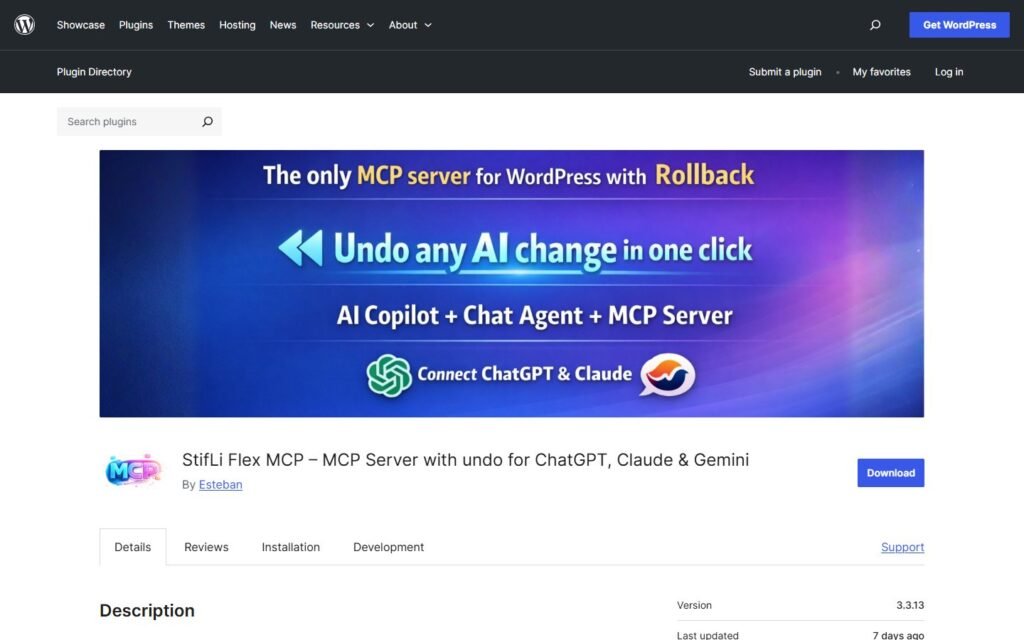
StifLi Flex MCP is a broad technical bridge between WordPress and MCP-compatible AI clients. It also includes WordPress admin AI experiences, a Gutenberg copilot, extensive WooCommerce tools, security controls, logs, approvals, and rollback.
Niwa AI is positioned as a business-facing WordPress operator. Its focus connects website and WooCommerce administration with owner communication through Telegram or WhatsApp, publishing, business reporting, lead capture, competitor monitoring, and conversion-oriented workflows.
This comparison is based on the products’ publicly documented capabilities available on July 18, 2026. It explains where StifLi is genuinely strong, where Niwa takes a different approach, and which product fits which type of user.
Quick verdict
Choose StifLi Flex MCP if you want a configurable MCP server for WordPress, many exposed WordPress and WooCommerce tools, compatibility with external AI clients, developer-oriented customization, and explicit operational safeguards.
Choose Niwa AI if you want the agent to feel closer to a business operator: reachable through the messaging channels an owner already uses, connected to daily website work, and focused on turning site activity into leads, decisions, and conversion actions.
The shortest distinction is:
StifLi Flex MCP gives AI clients a powerful, controlled tool layer for WordPress. Niwa AI connects WordPress operations with the owner’s wider commercial workflow.
What is StifLi Flex MCP?
StifLi Flex MCP is a WordPress plugin that exposes WordPress capabilities through the Model Context Protocol. Its official WordPress.org listing says it works with compatible AI clients including Claude, ChatGPT, Cursor, VS Code, Gemini, Microsoft Copilot Studio, and other MCP applications.
The plugin is unusually broad for this category. Its public documentation describes 122+ AI tools, including 61 WooCommerce tools, covering content, media, taxonomies, users, comments, site information, health, plugins, themes, and store operations.
StifLi is not limited to a remote MCP connection. It also documents:
- an AI Chat Agent inside WordPress administration;
- a Gutenberg AI Copilot for writing and editing content;
- AI image generation and featured-image workflows;
- custom-tool creation using PHP callbacks, WordPress hooks, or HTTP requests;
- webhook triggers and incoming webhook tools;
- reusable workflows for multi-step operations;
- multiple OAuth profiles with separate permissions;
- approval prompts for sensitive actions;
- rate limiting, audit logs, and rollback for supported changes;
- connections to automation tools and services such as n8n, Zapier, Make, Slack, and other integrations.
For developers, agencies, and technically confident administrators, this is a serious strength. StifLi aims to make WordPress highly accessible to external agents without removing the controls needed for consequential actions.
What is Niwa AI?
Niwa AI approaches the same market from the business owner’s perspective.
The product is designed around the idea that operating a WordPress or WooCommerce business involves more than exposing admin functions to an AI model. Owners also need to publish content, review sales, understand customer questions, follow leads, monitor competitors, and react to conversion opportunities.
Niwa therefore emphasizes communication through Telegram and WhatsApp as well as work performed on the website itself. An owner can use conversational instructions for tasks such as updating products, preparing or publishing content, reviewing business signals, researching competitors, and managing ongoing workflows without treating wp-admin as the only command center.
On the visitor side, Niwa’s conversion direction is equally important. The goal is not only to answer a question, but to recognize intent, support product selection, capture a useful lead, and move the shopper toward an appropriate next step.
You can see the broader model on How Niwa Works and the site’s practical guide to turning website visitors into leads.
StifLi Flex MCP vs Niwa AI comparison table
| Capability | StifLi Flex MCP | Niwa AI |
|—|—|—|
| Natural-language WordPress operations | Yes | Yes |
| MCP server for external AI clients | Core capability | Not the primary public positioning |
| WordPress admin AI chat | Yes | Yes |
| Gutenberg writing copilot | Yes | Content creation and publishing workflows |
| WooCommerce product and order tools | Extensive documented toolset | Yes, within business-operator workflows |
| Multi-profile permissions | Documented OAuth profiles and tool permissions | Role- and workflow-based administration |
| Approval for sensitive actions | Documented confirmation system | Supported through guarded operator workflows |
| Audit and rollback controls | Explicitly documented | Depends on the task and workflow |
| Custom PHP, hooks, and HTTP tools | Strong developer capability | Not the primary positioning |
| Telegram or WhatsApp as owner command center | Not documented as the primary interface | Core product direction |
| Business reports | Possible through tools, workflows, and scheduled reporting | Core owner-facing use case |
| Content publishing | Yes | Yes |
| Visitor-facing lead capture | Not documented as a default storefront function | Core conversion use case |
| Competitor monitoring | Possible to build with HTTP/custom workflows; not documented as turnkey | Core business-monitoring direction |
| Storefront product guidance | Not the primary documented function | Core conversion direction |
| Abandoned-cart and conversion workflows | Can be assembled through tools and integrations | Core commercial direction |
Public products change quickly. The table describes documented positioning and capabilities, not every custom workflow a skilled developer could build.
Where StifLi Flex MCP does especially well
1. Broad MCP access to WordPress
StifLi’s strongest advantage is the breadth of its MCP implementation. A business or agency that already uses Claude, ChatGPT, Cursor, Gemini, VS Code, or another compatible client can connect that environment to WordPress instead of adopting a single proprietary chat interface.
That flexibility matters for development teams. The AI client can remain part of the team’s existing toolchain while WordPress becomes an actionable system rather than a read-only source.
2. Deep WooCommerce tooling
The official listing documents 61 WooCommerce tools. They cover products, variations, orders, customers, coupons, reports, reviews, refunds, taxes, payment gateways, shipping methods, and system status.
That makes StifLi relevant to real store administration, not merely blog writing. It can support product maintenance, order queries, reporting, and operational checks through an AI client.
3. Developer extensibility
StifLi lets developers define custom tools through PHP, WordPress hooks, and HTTP requests. It also supports webhooks and reusable workflows.
This is valuable when a WordPress installation has custom post types, internal APIs, membership logic, specialized plugins, or nonstandard business processes. Instead of waiting for the plugin vendor to support every system, a developer can expose the required operation as a controlled tool.
4. Explicit security and recovery controls
MCP access becomes risky when an agent can modify users, install software, delete records, or change store data without boundaries. StifLi addresses that concern with per-profile permissions, confirmation prompts, rate limits, audit logs, and rollback for supported operations.
For agencies and technical teams, that governance may be as important as the number of tools.
Where Niwa AI takes a different approach
1. Telegram and WhatsApp administration
StifLi documents many integrations, including a Telegram notification integration, but its official positioning does not present Telegram or WhatsApp as the owner’s primary conversational command center.
Niwa is designed around that owner-access pattern. The practical advantage is simple: a founder or store manager can request work from the same messaging environment used throughout the day, rather than opening an MCP client or returning to the WordPress dashboard for every request.
That difference is less important to a developer working in Cursor and more important to a nontechnical owner managing inventory, content, leads, and sales between meetings.
2. Conversion workflows as a product goal
StifLi provides tools that can be assembled into powerful automations. Niwa’s public direction starts with the commercial outcome: help the visitor choose, reduce hesitation, capture intent, and create a next action for the business.
For example, Niwa can connect buyer questions with product recommendations, lead capture, human follow-up, or an incentive. The site’s guide to the Niwa AI Conversion Booster shows how a live cart signal can trigger a relevant checkout action rather than remaining only a data point.
3. Business reporting with owner context
StifLi can query WooCommerce reports and build recurring summaries. That is a legitimate reporting strength.
Niwa’s differentiator is the owner-facing interpretation around those reports: what changed, why it matters, which product or conversion issue deserves attention, and which action should follow. The goal is not merely to expose the analytics endpoint, but to connect the report to content, catalog, competitor, lead, or conversion work.
4. Competitor and market monitoring
Because StifLi supports HTTP tools and external automation, a technical user could build competitor-monitoring workflows. However, its official plugin materials do not describe a ready-made competitor intelligence system.
Niwa treats competitor and market research as part of the broader operator role. That makes it a more direct fit for an owner who wants to ask, “What changed in this competitor’s offer, and what should we do?” without first designing the integration.
Which is better for WooCommerce?
For technical WooCommerce administration, StifLi Flex MCP is highly capable. Its documented store toolset is extensive, and developers can add custom operations when the built-in tools are not enough.
For connecting store administration with buyer conversations and commercial follow-through, Niwa is the more natural fit. The distinction is not whether both systems can access product or order data. It is what happens next.
A product report might lead Niwa to prepare content, alert the owner in Telegram, identify a recurring shopper objection, capture a lead, or recommend a conversion workflow. This is the same commercial principle discussed in AI agents for ecommerce: the highest value appears when automation connects separate business steps rather than completing one isolated command.
Some stores may even see the two approaches as complementary. StifLi can be a technical MCP layer for advanced teams, while an operator-focused system can organize the owner and customer workflows around business outcomes. Whether that combination is practical depends on security, overlapping responsibilities, and the exact WordPress stack.
Which should you choose?
Choose StifLi Flex MCP when:
- you specifically need an MCP server for WordPress;
- your team works in external AI clients or development environments;
- you want a large documented WooCommerce tool library;
- developers need custom PHP, hook, HTTP, webhook, or workflow tools;
- granular OAuth profiles, confirmation controls, logs, and rollback are priorities.
Choose Niwa AI when:
- the owner wants to manage the business through Telegram or WhatsApp;
- WordPress and WooCommerce work must connect with reporting and decision support;
- visitor conversations should produce leads and conversion actions;
- competitor monitoring should be part of the operating rhythm;
- you want publishing, administration, and commercial follow-through in one relationship.
If you want to see how that operator model fits your own site, book a Niwa demo.
Frequently asked questions
Is StifLi Flex MCP a WordPress AI agent?
Yes. It provides a WordPress MCP server for compatible AI clients and also includes an AI Chat Agent inside WordPress administration. It is best understood as a broad AI-access and tooling layer rather than only a chatbot.
Does StifLi Flex MCP support WooCommerce?
Yes. Its official WordPress.org listing documents 61 WooCommerce tools spanning catalog, order, customer, coupon, refund, reporting, tax, payment, shipping, and system operations.
Can StifLi publish WordPress content?
Yes. It documents content creation and management tools plus a Gutenberg AI Copilot for writing, rewriting, summarizing, translating, and image-related workflows.
Does StifLi support Telegram or WhatsApp administration?
Its public materials list a Telegram notification integration among supported integrations, but they do not position Telegram or WhatsApp as the primary owner command interface. Niwa is explicitly oriented around owner administration through those messaging channels.
Can StifLi capture leads from website visitors?
StifLi can connect to forms, custom tools, HTTP services, and automations, so a developer can build lead workflows. Its documented AI Chat Agent is an administration feature, however, and the plugin is not primarily presented as a visitor-facing conversion and lead-capture product.
Is Niwa AI an MCP server?
Niwa’s primary public positioning is a WordPress business operator rather than a general-purpose MCP server. Businesses choosing between these products should decide whether their first priority is technical MCP access or an owner- and conversion-centered operating workflow.
Which is easier for a nontechnical owner?
Niwa’s Telegram and WhatsApp approach is likely more familiar to an owner who wants to describe outcomes in ordinary conversation. StifLi offers strong built-in interfaces, but its greatest advantages become clearer when a team understands MCP clients, permissions, integrations, and custom tools.
Final verdict
StifLi Flex MCP is one of the more technically ambitious WordPress MCP plugins. Its large tool catalog, WooCommerce depth, developer extensions, profiles, approvals, logs, and rollback make it a credible option for teams that want controlled AI access to WordPress.
Niwa AI is aimed at a different finish line. The goal is not only to let an AI client operate WordPress, but to let the owner run more of the business through conversation while connecting administration to publishing, reporting, leads, competitor awareness, and conversion.
Neither approach is universally better. StifLi is stronger as an extensible MCP and tooling layer. Niwa is stronger when the desired product is an owner-facing business operator with customer and conversion context.
Sources
- StifLi Flex MCP official WordPress.org plugin listing
- StifLi Flex MCP official product documentation
Feature statements in this comparison were checked against these official sources on July 18, 2026.

