

WordAI vs Niwa AI: Content & SEO Suite or WordPress Business Agent?
Compare WordAI and Niwa AI for WordPress content, SEO, AI chat, WooCommerce operations, messaging, reporting, leads, and conversion workflows.
WordAI and Niwa AI both bring artificial intelligence into WordPress, but they solve different problems. WordAI by SoftCoy concentrates on content generation, SEO analysis, image creation, Search Console insights, a site-trained frontend chat assistant, and lead capture inside the WordPress ecosystem. Niwa AI is positioned as a broader WordPress business agent that connects website work with WooCommerce operations, owner administration through messaging apps, reporting, research, publishing, and conversion workflows.
This comparison is about the WordAI plugin by SoftCoy, not the unrelated rewriting service with a similar name. It reflects publicly documented capabilities checked on July 17, 2026.
Quick verdict
Choose WordAI if your priority is producing and improving WordPress content from wp-admin, scanning posts and products for SEO issues, reviewing Google Search Console opportunities, generating images, or adding a knowledge-based website chat assistant.
Choose Niwa AI if you want an operating layer for the business behind the website: natural-language WordPress and WooCommerce administration, owner access through Telegram or WhatsApp, publishing workflows, business reporting, competitor research, buyer-intent capture, and conversion-focused follow-up.
The short version is:
WordAI is strongest as an AI publishing, SEO, image, and website-chat toolkit. Niwa AI is designed to connect WordPress tasks with day-to-day business operations.
For a broader explanation of that operating model, see How Niwa Works.
What does WordAI do?
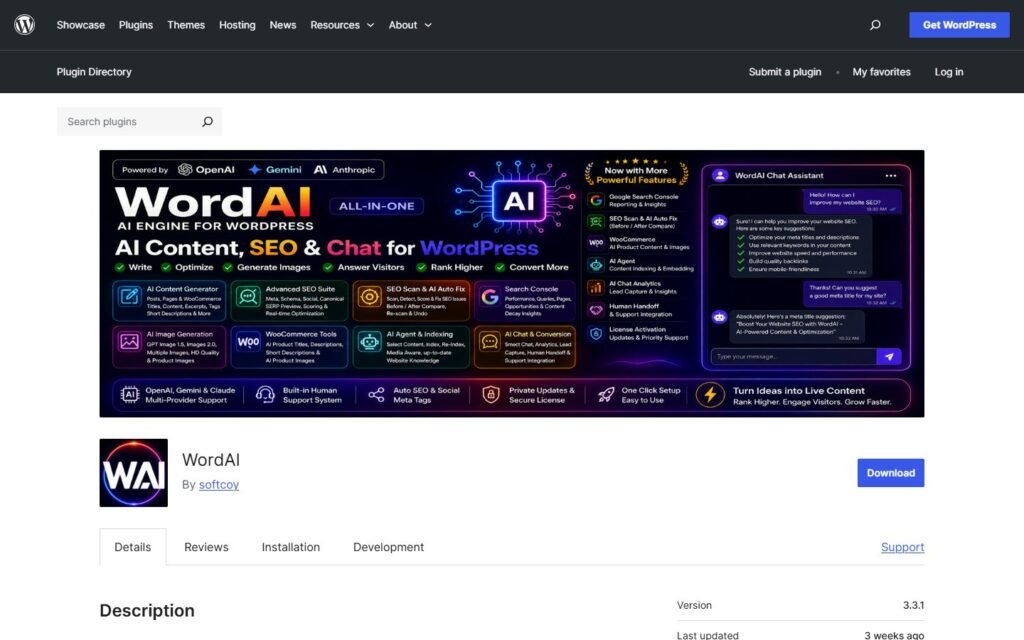
WordAI is a WordPress plugin developed by SoftCoy. Its official WordPress.org listing describes a combined content, SEO, image, AI Agent, and frontend chat workflow.
Its documented features include:
- AI generation for posts, pages, titles, excerpts, tags, and images.
- Support for OpenAI, Google Gemini, and Anthropic Claude providers.
- Writing controls for language, tone, style, paragraph count, headings, content depth, freshness signals, and tag count.
- An SEO Scan dashboard for posts, pages, and products.
- Google Search Console reporting inside wp-admin, including content-decay and competing-page signals.
- AI Agent content embedding using selected WordPress content.
- A frontend AI Chat assistant grounded in the selected knowledge.
- Chat analytics for conversations, feedback, unanswered questions, and knowledge gaps.
- Lead-capture prompts and captured-visitor review.
- WooCommerce product content and image workflows in WordAI Pro.
This is a meaningful feature set for publishers, affiliate sites, content teams, and store owners who want AI writing and SEO tools without continually moving between several services.
What does Niwa AI do?
Niwa AI starts from a different question: what if the owner could ask the website, and the business connected to it, to complete useful work?
Niwa is designed to receive natural-language instructions, act through verified WordPress and WooCommerce tools, and report the result. The owner can work from Telegram or WhatsApp instead of opening wp-admin for every routine task.
That can include publishing content, managing product data, checking operational information, preparing reports, researching competitors, monitoring useful signals, and supporting customer-facing conversion workflows. Niwa also connects visitor conversations with lead capture and follow-up rather than treating website chat as an isolated widget.
The conversion side is explained in more detail in AI Lead Capture for Ecommerce and Turn Website Visitors Into Leads.
WordAI vs Niwa AI comparison table
| Capability | WordAI | Niwa AI |
|—|—|—|
| AI post and page generation | Yes | Yes, through publishing workflows |
| Title, excerpt, tag, and image generation | Strong documented focus | Supported where configured, but not the sole product focus |
| Built-in SEO scanning | Yes | SEO research and publishing workflows rather than the same dedicated scan dashboard |
| Google Search Console reporting in wp-admin | Yes | Not positioned as the same dedicated Search Console interface |
| Multiple AI providers | OpenAI, Gemini, and Claude documented | Depends on the configured Niwa deployment |
| Site-trained frontend chat | Yes | Yes, as part of the customer-facing assistant layer |
| Chat analytics and knowledge-gap review | Yes | Conversation and business-signal reporting are part of the broader operating model |
| Lead capture | Yes | Yes, with emphasis on intent and actionable follow-up |
| WooCommerce content generation | WordAI Pro | Yes, alongside wider WooCommerce administration |
| WooCommerce operational actions | Not the primary documented focus | Core use case where the relevant tools are enabled |
| Telegram administration | Not documented as a primary owner interface | Yes |
| WhatsApp administration | Not documented as a primary owner interface | Yes |
| Business reporting | Search and chat analytics are documented | Broader operational and commercial reporting |
| Competitor research and monitoring | Not prominently documented | Supported as a business research workflow |
| Conversion workflows beyond chat | Lead capture and conversion-focused chat are documented | Broader lead, follow-up, cart, content, and owner-action workflows |
Public capabilities can change, and premium features may differ from free features. Buyers should confirm the exact plan and integrations required for their workflow.
Where WordAI is stronger
A fair comparison should recognize that WordAI has several clear advantages for the right user.
A concentrated content-production workspace
WordAI brings writing controls, title suggestions, excerpts, tags, image generation, and editor insertion into a single WordPress workflow. A content team that spends most of its time creating or refreshing articles may value this concentration more than a broader operations agent.
Dedicated SEO Scan and Search Console views
WordAI explicitly documents SEO scoring for posts, pages, and products, along with issue discovery and AI-assisted improvements. Its Search Console reporting also surfaces content-decay and competing-page opportunities inside wp-admin.
That makes WordAI particularly relevant to search intent such as “WordPress AI SEO plugin,” “AI content generator for WordPress,” and “Search Console AI assistant.”
Flexible model-provider choice
The plugin supports OpenAI, Gemini, and Claude for content generation. Teams that want to select a provider or bring their own API key may consider that an important advantage.
A clear site-knowledge chat workflow
WordAI lets administrators choose which content items are embedded for the AI Agent. Its chat analytics then expose visitor questions, feedback, unanswered questions, and knowledge gaps. That is a practical loop for improving both the assistant and the website’s content.
Where Niwa AI is different
Niwa’s advantage is not that it replaces every dedicated SEO or content feature. It is that it extends the conversation beyond content creation.
WordPress and WooCommerce operations
WordAI’s WooCommerce positioning centers on product content, product images, SEO scanning, and conversion-oriented chat features. Niwa is designed for operational requests as well: working with products, prices, stock, coupons, orders, publishing, and other site-management tasks when the required tools and permissions are enabled.
For a store owner, that distinction matters. Generating a better product description is useful. Being able to ask an agent to inspect a product, update its data safely, publish supporting content, and report the result is a broader workflow.
Telegram and WhatsApp as owner interfaces
WordAI’s documented experience is centered on wp-admin and its frontend chat widget. Niwa is designed so the owner can administer the business from Telegram or WhatsApp.
That means a founder can issue instructions, receive reports, and approve important actions from the messaging environment already used during the day. The value is not merely convenience; it shortens the distance between noticing a problem and acting on it.
Business reporting instead of only tool-specific analytics
WordAI documents Search Console reports and AI Chat Analytics. Those are useful, focused dashboards.
Niwa’s reporting model is broader: combine website, WooCommerce, customer, content, and market signals into a founder-readable update. The goal is not just to display data, but to clarify what changed, why it matters, and what action should follow.
Competitor monitoring and research
WordAI is not prominently documented as a competitor-monitoring product. Niwa can use current research workflows to inspect competitor positioning, offers, search intent, and content opportunities, then connect the findings to a publishing or business action.
This is especially useful when the owner wants one agent to research an opportunity, create the content, publish it, verify the result, and send a report.
Conversion workflows connected to operations
Both products document lead-related capabilities. WordAI supports frontend lead capture and analytics. Niwa’s positioning goes further into the operational follow-through: preserve buyer intent, notify the owner, connect the conversation to a useful next step, and support related content, product, or follow-up work.
That philosophy is also visible in AI Checkout Assistant: Reduce Last-Minute Buyer Doubt and AI CRM Handoff for Ecommerce.
Which is better for content and SEO?
For a user who mainly wants AI writing, image generation, SEO scoring, and Search Console opportunity discovery inside WordPress, WordAI may be the more focused choice. Its public feature list is built directly around those jobs.
Niwa is a better fit when content is one part of a larger operating system. For example, the owner may want to research a competitor, identify a search opportunity, create and publish an article, monitor the result, and connect incoming leads to the business workflow.
The distinction is specialization versus orchestration. WordAI specializes in content, SEO, images, and site chat. Niwa orchestrates a wider set of website and business actions.
Which is better for WooCommerce?
WordAI Pro is relevant to stores that want AI-generated product content and images, product SEO scanning, and a website assistant grounded in selected content. Its lead capture and chat analytics can also help reveal what shoppers ask.
Niwa is a stronger conceptual fit when the store needs both customer-facing assistance and owner-side operations. That includes product and store administration, reporting, messaging-based control, publishing, lead follow-up, and conversion workflows.
A store focused on improving catalog copy may prefer WordAI’s dedicated creation interface. A founder who wants an agent to help run the store may prefer Niwa.
WordAI vs Niwa AI: which should you choose?
Choose WordAI when:
- Your primary need is AI content generation inside wp-admin.
- You want dedicated SEO scanning for posts, pages, and products.
- You want Google Search Console opportunities presented inside WordPress.
- You value built-in AI image generation.
- You want a site-trained chat assistant with analytics and lead capture.
- You prefer choosing among OpenAI, Gemini, and Claude.
Choose Niwa AI when:
- You want to manage WordPress or WooCommerce through natural-language requests.
- Telegram or WhatsApp should be the owner’s command interface.
- You need publishing connected to research, monitoring, and reporting.
- You want customer conversations connected to lead and conversion workflows.
- You need an agent focused on operating the business, not only generating content.
If you want to see Niwa’s workflow applied to your own site, Book a Niwa Demo.
Frequently asked questions
Is WordAI a WordPress AI agent?
Yes. The SoftCoy plugin documents AI Agent content embedding, a frontend AI Chat assistant, analytics, lead capture, and richer Pro automation. It also includes content, SEO, image, and Search Console tools.
Is this the same WordAI as the article-rewriting service?
No. This comparison covers the WordAI WordPress plugin by SoftCoy listed in the WordPress.org Plugin Directory.
Can WordAI work with WooCommerce?
Yes. Its official listing says the SEO Scan can cover products, while WooCommerce product content and image workflows are available in WordAI Pro.
Does WordAI manage WordPress through Telegram or WhatsApp?
Its official public listing does not present Telegram or WhatsApp as primary administration interfaces. The documented workflow centers on wp-admin, the WordAI dashboards, and a frontend chat assistant.
Does WordAI capture leads?
Yes. WordAI documents frontend visitor-detail collection and review of interested visitor activity through AI Chat Analytics.
Can Niwa AI publish content?
Yes. Content research, creation, WordPress publishing, verification, and reporting can be combined in a Niwa workflow when the relevant site tools and permissions are enabled.
Is Niwa AI only for WooCommerce?
No. WooCommerce is an important use case, but Niwa also supports WordPress publishing, site operations, lead workflows, reporting, research, and service-business use cases.
Can the two tools be used together?
Potentially. A site could use WordAI as a specialized content, SEO, image, and chat toolkit while using Niwa as the broader owner-side operating agent. Before combining them, check for overlapping chat widgets, duplicate AI generation workflows, data handling, and plugin compatibility.
Final verdict
WordAI is a credible option for WordPress users who want a feature-rich AI content and SEO workspace with image generation, Search Console reporting, a site-trained chat assistant, analytics, and lead capture.
Niwa AI serves a different ambition. It is designed to become the conversational operating layer between the founder, WordPress, WooCommerce, customers, and the wider business workflow.
Neither approach is automatically better for every site. WordAI is the more specialized publishing and SEO toolkit. Niwa AI is the broader WordPress business agent. The right choice depends on whether you mainly want to create and optimize content or want an agent that can help operate the business around that content.
Sources checked
- WordAI plugin listing on WordPress.org, including its description, feature list, FAQ, changelog, and current plugin metadata.
- Existing published Niwa documentation and comparison content, including How Niwa Works and SiteGround AI Agent vs Niwa AI.

