

WPVibe vs Niwa AI: Which WordPress AI Agent Fits Your Business?
Compare WPVibe and Niwa AI for WordPress MCP access, WooCommerce, messaging, publishing, reporting, leads, monitoring, safety, and conversions.
WPVibe and Niwa AI both reduce the distance between a natural-language request and a real change on a WordPress site. However, they solve different versions of the “WordPress AI agent” problem.
WPVibe is an MCP server and WordPress plugin from the SeedProd team. It connects a self-hosted WordPress site to MCP-compatible assistants such as Claude, ChatGPT, Gemini, Cursor, and Windsurf. Its strongest use cases include content management, WordPress administration, WooCommerce catalog work, plugin abilities, WP-CLI-style commands, and sandboxed theme development.
Niwa AI is positioned as a WordPress business operator. It lets an owner manage WordPress and WooCommerce through conversation, including from phone messaging channels, while extending the workflow toward customer questions, lead capture, business reporting, competitor research, and conversion work.
The short version is straightforward: WPVibe is a strong bridge between your chosen AI client and WordPress. Niwa AI is designed as an operating layer between the business owner, the website, and the customer journey.
Quick verdict
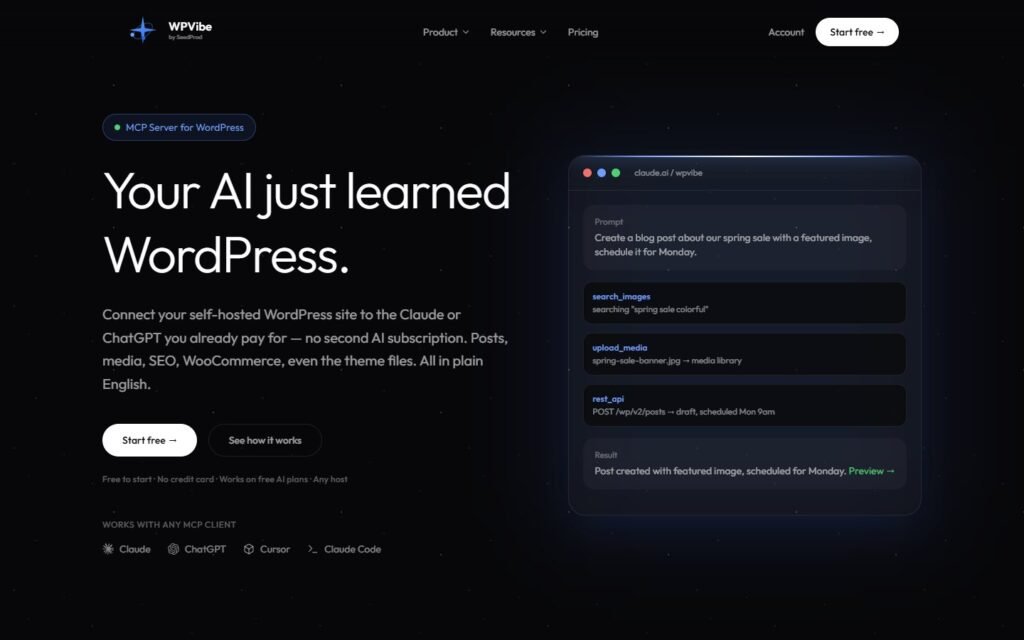
Choose WPVibe if you want to bring your own MCP-compatible AI, connect multiple WordPress sites, run broad administrative operations, or let an AI-assisted developer inspect and safely modify theme files.
Choose Niwa AI if you want a more business-centered operator that can receive instructions through messaging apps, manage WordPress and WooCommerce, publish content, summarize commercial signals, monitor competitors, capture buyer intent, and support conversion workflows.
These products can overlap, but they are not identical substitutes. WPVibe primarily supplies secure WordPress tools to another AI assistant. Niwa is intended to be the assistant and the operating workflow.
WPVibe gives an AI access to WordPress. Niwa AI is designed to help an owner run the business that depends on WordPress.
What WPVibe does well
WPVibe’s clearest advantage is flexibility. The plugin does not require users to adopt one bundled writing model or one proprietary chat window. Instead, it exposes WordPress capabilities through the Model Context Protocol, allowing the site owner to work from a compatible AI client they already use.
According to WPVibe’s official site and WordPress.org listing, its current toolkit includes:
- WordPress REST API operations for posts, pages, media, comments, users, and taxonomies.
- WooCommerce product review and bulk updates for prices, stock, descriptions, and other catalog data.
- More than 40 allowlisted WP-CLI-style commands for plugins, themes, options, users, cache, rewrites, and related administration.
- WordPress Abilities API support for compatible plugins.
- Built-in workflows for Gutenberg, Elementor, and SeedProd.
- Theme-file browsing and editing through an isolated draft-theme workflow.
- Media uploads and Unsplash image search.
- Unlimited connected WordPress sites on every plan.
- Saved skills that teach the connected AI recurring site conventions and procedures.
That makes WPVibe especially relevant for agencies, developers, content teams, and technically confident owners who already have an effective workflow in Claude, ChatGPT, Cursor, or another MCP client.
WPVibe has unusually concrete safety controls
Giving an AI write access to a production website creates obvious risk. WPVibe addresses that with practical guardrails rather than relying only on model instructions.
Its documented controls include WordPress Application Password authentication, role and capability checks, a default-deny command allowlist, read-only database behavior unless a mutation is approved, dry-run previews for destructive operations, trash instead of immediate permanent deletion, append-only approval logs, and draft-theme isolation with PHP syntax validation.
New posts default to draft, and higher-risk actions can require approval inside the AI conversation. That review-first approach is one of WPVibe’s strongest qualities.
What Niwa AI does differently
Niwa starts from a different question. Instead of asking only, “How can an external AI call WordPress tools?”, it asks, “How can the owner delegate website and commercial work without living inside wp-admin?”
The Niwa AI homepage describes an operator that can update stock, change prices, publish or remove products, rewrite headlines, answer customers, respond to emails, track deliveries, and produce SEO blog content from a conversational request.
The phone-centered interface matters. Niwa is designed so the owner can send a request from Telegram or WhatsApp rather than opening a developer client, configuring a prompt, choosing tools, and supervising each WordPress call. The goal is to make delegation feel like messaging a trusted operator.
The broader workflow is explained on How Niwa Works: website actions are connected to ecommerce operations, customer conversations, leads, demos, and useful founder insight.
WPVibe vs Niwa AI comparison table
| Capability | WPVibe | Niwa AI |
|—|—|—|
| Primary role | MCP server and WordPress tool layer | WordPress business operator |
| Main interface | Claude, ChatGPT, Gemini, Cursor, Windsurf, and other MCP clients | Owner conversation, including Telegram and WhatsApp workflows |
| Bring your own AI model | Yes; central to the product | Not the primary product proposition |
| WordPress posts and pages | Yes | Yes |
| Media and taxonomy management | Yes | Yes through publishing workflows |
| WooCommerce product operations | Yes, including bulk catalog edits | Yes, including products, prices, stock, coupons, and operational requests |
| Plugin and theme administration | Strong documented coverage | Supported as part of site-operator workflows |
| Theme-file development | Major strength; sandbox, preview, validation, and rollback controls | Possible through managed site work, but not the primary positioning |
| Multiple connected websites | Unlimited sites are documented | Not currently the main public positioning |
| Telegram/WhatsApp administration | Not documented as a native owner command channel | Core differentiator |
| Content publishing | Yes; draft-first by default | Yes; research, writing, WordPress creation, and publishing workflows |
| Customer-facing shopping help | Not a primary documented feature | Part of the conversion-focused product direction |
| Lead capture | Can operate compatible forms and site data; no native visitor agent is prominently documented | Designed to capture visitor intent and route useful lead context |
| Business reporting | Site intelligence and accessible data; recurring founder reporting is not the main documented workflow | Designed to summarize business signals and recommended next actions |
| Competitor monitoring | Not prominently documented as a built-in workflow | Part of the owner research and monitoring workflow |
| Conversion workflows | Strong backend execution, but not positioned as a storefront conversion agent | Connects customer questions, recommendations, leads, and follow-up to website operations |
| Safety model | Detailed approval gates, dry runs, audit logs, and draft-theme isolation | Managed execution with founder-facing reporting and confirmation for sensitive work |
This comparison reflects publicly documented product information available on July 19, 2026. Both products are evolving quickly.
WordPress and WooCommerce operations
For direct WordPress administration, WPVibe is a serious product. It exposes a broad operational surface: REST routes, plugin abilities, WP-CLI-style commands, rendered-site inspection, file tools, and builder-specific skills. A developer can ask Cursor to inspect a theme, while a content manager can ask ChatGPT to prepare and organize posts.
Its WooCommerce coverage is also practical. Official documentation says a connected AI can review the store and create, update, or bulk-edit products, prices, stock, and descriptions. For catalog maintenance, that can eliminate repetitive trips through product screens.
Niwa covers the owner’s operational version of these jobs: change a product price, correct stock, publish a page, create an SEO article, inspect a problem, or prepare a commercial update. The difference is less about whether a database field can be changed and more about how the request begins and what happens after the change.
An MCP power user may prefer WPVibe’s explicit tools. A busy store owner may prefer sending Niwa a short phone message and receiving a business-readable result.
Content publishing and SEO workflows
WPVibe is well suited to teams that already create content in an external AI assistant. It removes the copy-and-paste stage by allowing that assistant to create the WordPress draft, upload media, assign categories, and work with SEO plugins that expose supported routes or abilities.
Niwa’s content workflow is more delegated. The owner can request a topic, competitor comparison, page update, or SEO article and let the operator handle research, duplicate checks, drafting, WordPress formatting, metadata, internal linking, publishing, and the completion report.
That distinction is visible in this site’s existing SiteGround AI Agent vs Niwa AI comparison: the focus is not just generating text, but connecting WordPress execution with the owner’s wider business priorities.
Business reporting and competitor monitoring
WPVibe can expose valuable site information. It documents plugin and theme inspection, PHP and site-health data, rendered HTML analysis, performance diagnostics, Google Site Kit compatibility, database reads, and access to plugin abilities. A capable external AI can analyze those results.
However, WPVibe itself is primarily the connection and tool surface. Its public materials do not prominently present recurring competitor monitoring or proactive founder reports as packaged business workflows.
Niwa’s direction is broader. The operator can research competitors, watch changes, summarize sales or site signals, explain why they matter, and recommend a next action. That is useful when the owner does not want raw output from five tools; they want a concise answer such as “stock is falling on this product, conversion softened on this page, and this competitor changed its offer.”
Lead capture and conversion workflows
This is the biggest strategic difference.
WPVibe operates the website from the administrative side. It can work with WPForms, WooCommerce, supported plugins, and site content, but it is not primarily marketed as a shopper-facing sales or support agent.
Niwa is designed to connect administration with the visitor experience. A customer’s question about price, fit, shipping, stock, or compatibility can become useful intent data rather than an isolated chat transcript. The workflow can answer the question, recommend an appropriate product, collect contact details when follow-up makes sense, and tell the owner why the lead matters.
The practical model is explained in AI Lead Capture for Ecommerce: help first, identify the buying blocker, and capture contact details when there is a clear reason to continue. The same principle applies to AI recommendations versus traditional search, where conversational guidance complements exact keyword search instead of merely replacing it.
For a WooCommerce store, backend catalog updates and storefront conversion assistance are both valuable. WPVibe is currently stronger as an open, multi-client operational connector. Niwa is the more direct fit when the desired outcome includes conversations, intent, leads, follow-up, and revenue, not only site changes.
Where WPVibe is the better choice
WPVibe deserves the advantage when the user wants:
- A remote MCP server that works with several AI clients.
- Freedom to switch between Claude, ChatGPT, Gemini, Cursor, and other compatible tools.
- Detailed WordPress administration and WP-CLI-style operations.
- Theme development with a sandboxed draft and preview workflow.
- Unlimited connected sites for an agency or portfolio.
- Explicit in-chat approvals, dry runs, and audit records.
- A technical toolkit that can be composed into custom agent workflows.
These are meaningful strengths. Niwa should not be presented as superior for every WordPress user.
Where Niwa AI is the better choice
Niwa is the stronger fit when the owner wants:
- Telegram or WhatsApp to function as the command center.
- One operator that understands the ongoing site and business context.
- WordPress and WooCommerce execution without building an MCP workflow personally.
- Research, content production, publishing, and reporting as one delegated job.
- Customer-facing answers and product guidance.
- Lead capture based on buyer intent rather than a generic form interruption.
- Competitor monitoring and commercially focused summaries.
- Conversion workflows that connect visitor questions to follow-up and action.
The difference is similar to hiring infrastructure versus hiring an operator. WPVibe provides a capable, secure bridge for your chosen AI. Niwa is designed to accept the assignment, use the available tools, and report the business result.
Which WordPress AI agent should you choose?
Choose WPVibe if you enjoy working in an MCP-compatible assistant, want granular control, or need a broad toolkit for content, administration, plugins, themes, and multiple sites. It is particularly compelling for developers and agencies.
Choose Niwa AI if you want to delegate through a familiar messaging interface and care about the commercial loop around the website: products, customers, leads, reporting, competitors, content, and conversion.
Some advanced teams may even view the products as complementary categories. WPVibe demonstrates how powerful an open WordPress tool layer can be. Niwa demonstrates why the next step is not only giving an AI access, but giving a business owner a dependable operator.
Frequently asked questions
Is WPVibe a WordPress AI agent?
WPVibe describes itself as a general-purpose WordPress agent and MCP server. More precisely, it connects an MCP-compatible AI assistant to WordPress tools, data, files, plugins, and administrative operations.
Does WPVibe work with WooCommerce?
Yes. Its official documentation says connected AI clients can review a WooCommerce store and create, update, or bulk-edit products, prices, stock, and descriptions.
Can WPVibe manage WordPress from Telegram or WhatsApp?
Native Telegram or WhatsApp owner administration is not prominently documented in WPVibe’s official feature set. Its supported interfaces center on MCP clients such as Claude, ChatGPT, Gemini, Cursor, Windsurf, and OpenCode.
Is WPVibe better than Niwa AI for developers?
It may be. WPVibe has strong documented tools for WP-CLI-style administration, theme-file inspection, sandboxed theme editing, page builders, REST routes, and multiple sites. Developers and agencies may prefer that open toolkit.
Is Niwa AI better for ecommerce conversion?
Niwa is more directly positioned around the full conversion workflow: customer questions, product recommendations, lead intent, owner notifications, follow-up, and the operational actions behind the store. WPVibe has strong WooCommerce administration, but a native shopper-facing conversion agent is not its primary documented feature.
Do either of these tools remove the need for human review?
No. High-impact website changes, pricing, code, policies, and customer promises should remain reviewable. WPVibe explicitly uses approval gates and draft-first workflows. Niwa’s operating model similarly depends on clear reporting and appropriate approval for sensitive actions.
Final verdict
WPVibe is one of the more capable WordPress MCP implementations currently available. Its client flexibility, administrative depth, multi-site support, theme sandbox, and visible safety controls make it a credible choice for people who want their existing AI assistant to operate WordPress.
Niwa AI takes the category in a more business-centered direction. It combines website operations with messaging-based administration, content publishing, customer assistance, lead capture, reporting, competitor monitoring, and conversion workflows.
Choose WPVibe to give your preferred AI a powerful WordPress toolkit. Choose Niwa AI when you want a WordPress operator that stays focused on the owner, the customer, and the business outcome.
To see the operator workflow in context, explore How Niwa Works or book a Niwa demo.

